
Table of Contents

Introduction
The analytics landscape is undergoing one of the biggest shifts since the rise of the modern data stack. Teams are no longer satisfied with fast pipelines or scalable warehouses alone, they need consistent metrics, strong governance, and self-serve analytics that actually work across the entire organization. This is where dbt Fusion and its Semantic Layer are designed to help.
What Is dbt Fusion? (Brief Recap)
dbt Fusion is dbt Labs’ unified engine that brings together several core capabilities into a single analytics platform:
- A Rust-powered compiler that improves performance and scalability
- A metadata-aware orchestration layer that improves dependency management and surfaces cost-relevant signals
- A Semantic Layer designed to standardize metric definitions across SQL, Python, and BI tools
In simple terms, Fusion expands dbt beyond transformations toward a more complete analytics execution and governance layer.
And the Semantic Layer is the part that makes analytics consistent.
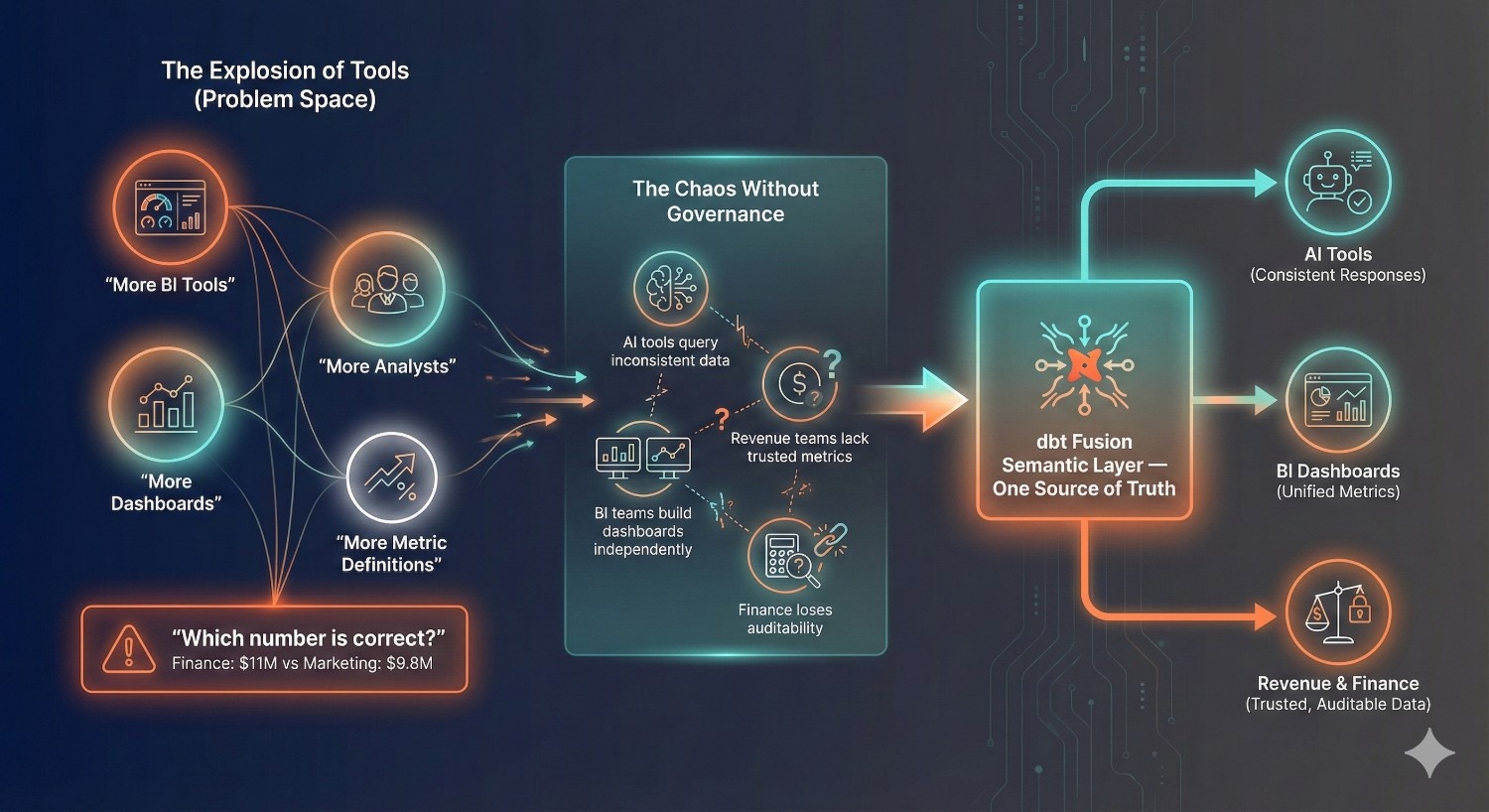
Why the Semantic Layer Matters More in 2025
In 2025, companies are managing:
- More BI tools
- More dashboards
- More analysts
- More definitions of the same metric
This leads to the classic problem every data team knows:
“Which number is correct? Why does finance say revenue is $11M and marketing says it’s $9.8M?”
As organizations mature, metric consistency becomes a top priority.
Stakeholders expect answers — not arguments.
Meanwhile:
- AI tools are querying business data
- BI teams are producing dashboards independently
- Revenue teams need trusted metrics
- Finance requires strict auditability
Without a semantic layer, every tool and every team invents its own calculations.
With dbt Fusion, metrics are defined in one place and reused consistently across supported tools.
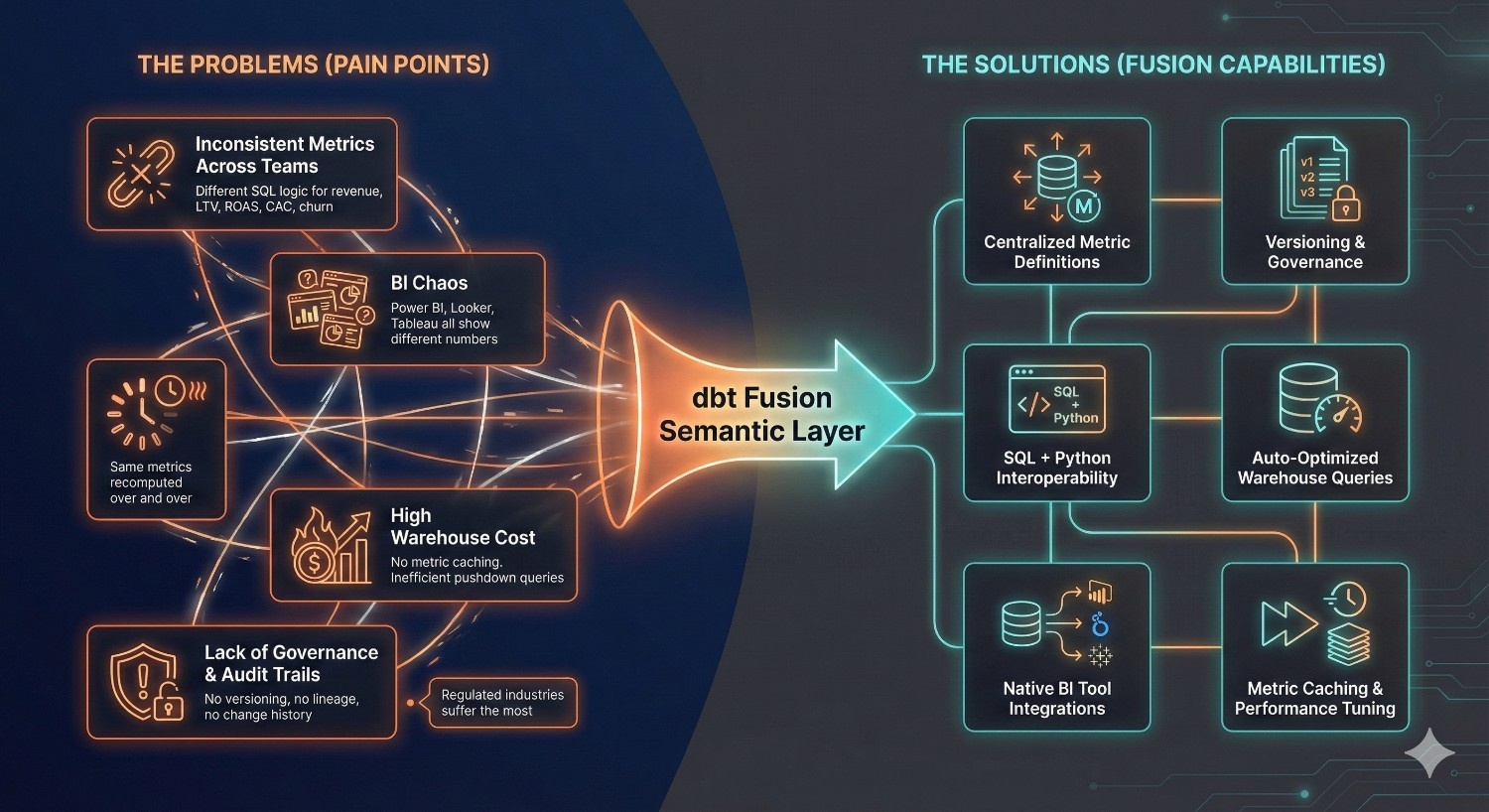
The Problems the Semantic Layer Solves
1. Inconsistent Metrics Across Teams
Different SQL logic for revenue, LTV, ROAS, churn, CAC, etc., depending on who wrote the query.
2. BI Chaos
Dashboards across Power BI, Looker, Tableau, and Sheets show different results — creating distrust.
3. Slow Pipelines & Redundant Queries
Every dashboard recomputes the same metrics, wasting Snowflake/BigQuery compute.
4. High Warehouse Cost
Without shared metric definitions and optimized query generation, organizations often pay for unnecessary processing.
5. Lack of Governance & Audit Trails
No version control for metrics. No lineage visibility. No change history.
Regulated industries suffer the most.
dbt Fusion’s Semantic Layer helps address these challenges through:
- Centralized metric definitions
- Versioning and governance
- SQL/Python interoperability
- Auto-optimized warehouse queries
- Native BI tool integrations
- Performance optimizations such as reduced query duplication and more efficient metric execution
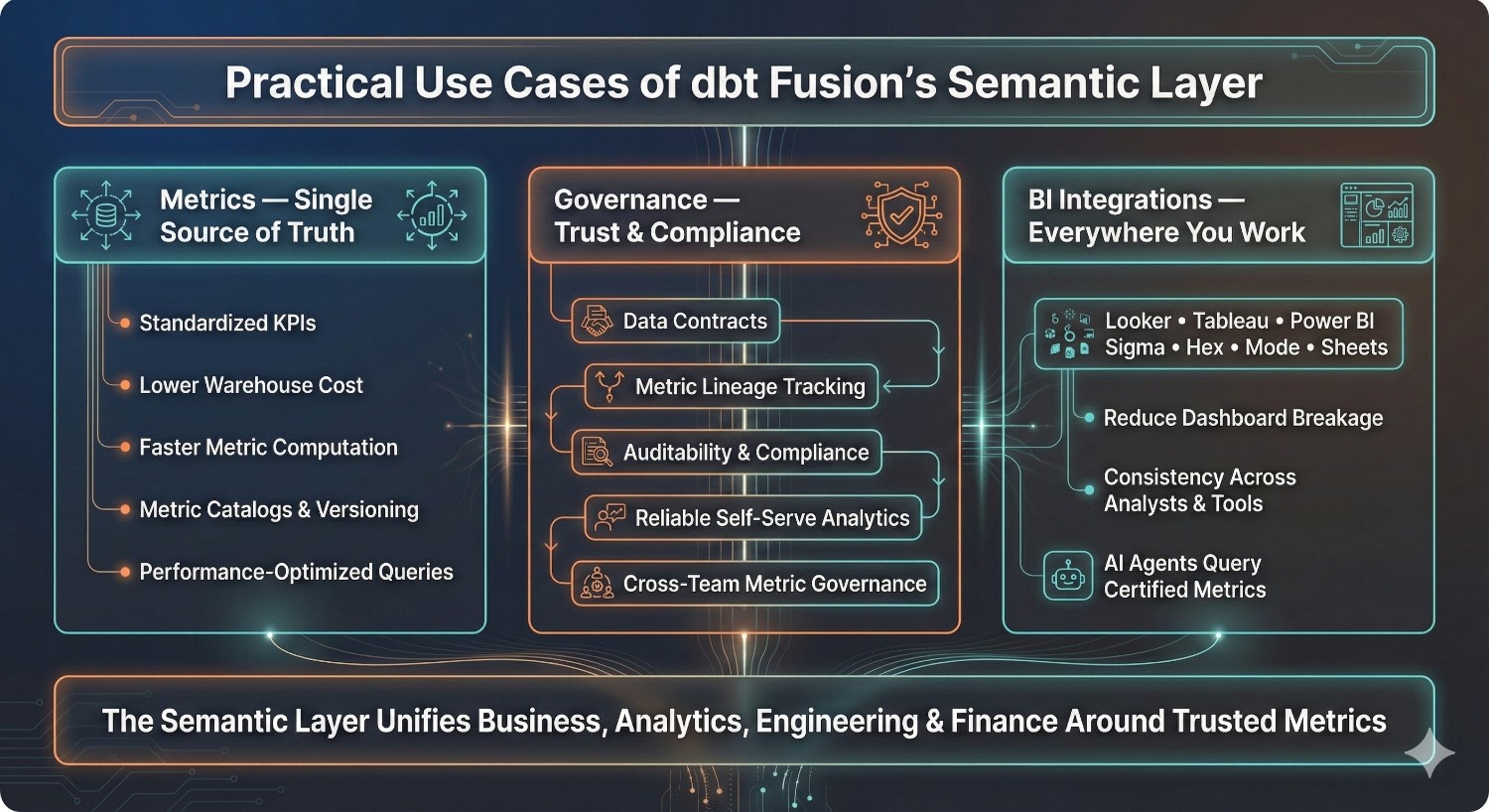
What This Article Covers
This guide explores real-world, practical use cases that show how organizations use dbt Fusion’s Semantic Layer to:
Metrics
- Create a single source of truth
- Standardize KPIs
- Reduce data warehouse cost
- Improve metric computation performance
- Build metric catalogs and versioned definitions
Governance
- Enforce data contracts
- Track metric lineage
- Improve auditability and compliance
- Enable reliable self-serve analytics
- Ensure cross-team metric governance
BI Tool Integrations
- Connect metrics to Looker, Tableau, Power BI, Sigma, Hex, Mode, and Sheets
- Reduce dashboard breakage
- Ensure consistency across analysts and tools
- Enable AI agents to query certified metrics
By the end, you’ll understand how the Fusion Semantic Layer can serve as a critical layer in the modern data stack—helping align business, analytics, engineering, and finance teams around trusted metrics.
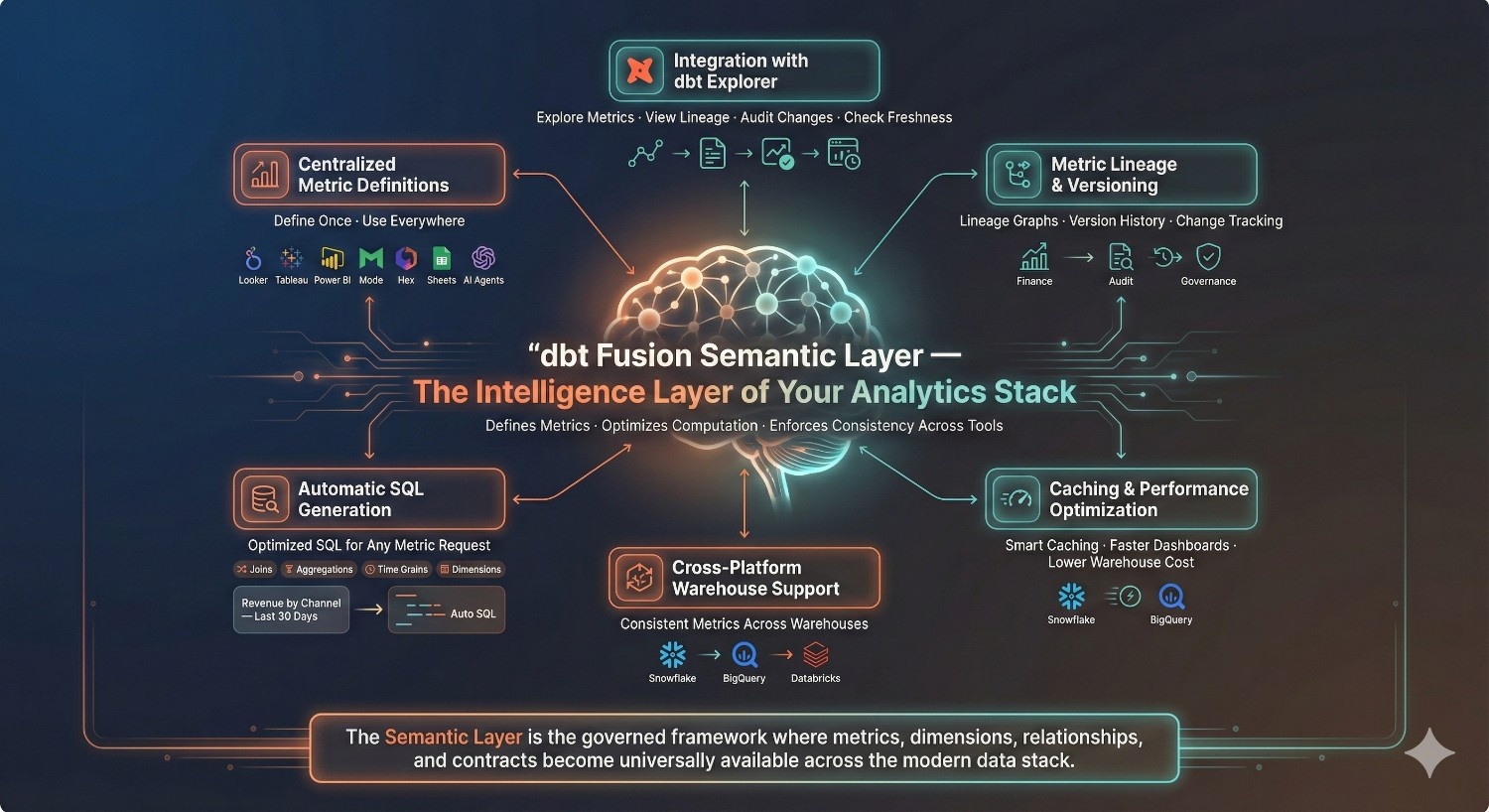
What Is the dbt Fusion Semantic Layer?
The dbt Fusion Semantic Layer is a new layer within dbt designed to standardize and govern how organizations define, compute, and consume metrics across their analytics ecosystem. It is designed to serve as a consistent source of truth for business calculations across SQL, Python, BI tools, and supported programmatic consumers.
Think of it as the “brain” of your analytics stack:
It defines what a metric means, optimizes how it’s computed, and ensures every downstream tool uses the exact same logic.
High-Level Definition
The Semantic Layer is a central, governed framework inside dbt Fusion where teams define:
- Metrics (e.g., Revenue, CAC, LTV)
- Dimensions (e.g., Channel, Region, Plan)
- Relationships between entities
- Contracts that enforce structure and type stability
Once defined, these can be accessed and reused consistently across supported tools and teams.
Key Capabilities of the Fusion Semantic Layer
1. Centralized Metric Definitions
Metrics are written once — in dbt — and reused everywhere.
Instead of rewriting SQL for the same calculation in:
- Looker
- Tableau
- Power BI
- Mode
- Hex
- Excel / Sheets
- Custom dashboards
- AI assistants
…everyone consumes the same certified metric definition.
This significantly reduces metric drift and improves consistency.
2. Metric Lineage & Versioning
Every metric has:
- A full lineage graph showing upstream models
- Version history (v1, v2, v3…)
- Change tracking, so you know who updated what and why
- Ability to maintain older definitions without breaking legacy dashboards
This is crucial for:
- Finance reporting
- Audit requirements
- Enterprise analytics governance
- Large teams with shared dashboards
This helps reduce unexpected downstream impact when metric definitions change.
3. Automatic SQL Generation
Analysts and BI tools no longer need to hand-write complex SQL for metrics.
The Semantic Layer automatically generates optimized SQL based on:
- Metric definition
- Dimensions and filters requested
- Time grains
- Warehouse dialect (Snowflake / BigQuery / Databricks)
- Aggregation logic
- Join paths
Example:
“Revenue by channel for the last 30 days”
→ dbt Fusion generates the appropriate SQL with joins and aggregations derived from the metric definition.
This is a huge unlock for:
- Self-serve analytics
- AI-assisted analytics
- Consistent reporting
- Reducing SQL complexity and human errors
4. Caching & Performance Optimization
dbt Fusion supports performance optimizations that can reduce repeated metric computation, including:
- Heavy metrics are stored and reused
- Repeated dashboard views don’t hit your warehouse multiple times
- Snowflake and BigQuery compute usage can be reduced
- Users get faster dashboards and insights
This allows the semantic layer to contribute to both consistency and performance improvements.
5. Cross-Platform Support
The Semantic Layer is designed to work across major cloud warehouses, including:
- Snowflake
- BigQuery
- Databricks
- (More engines expected to follow)
Whether you’re running multi-cloud or migrating from one platform to another, the Semantic Layer helps abstract SQL differences while maintaining standardized metric logic.
6. Integration with dbt Explorer
dbt Explorer is dbt’s new unified interface for:
- Viewing metric definitions
- Visualizing lineage
- Auditing changes
- Monitoring data freshness
- Understanding downstream dependencies
- Checking which dashboards use which metrics
This gives data teams improved visibility and governance that previously required multiple tools.
Explorer combined with the Semantic Layer provides stronger transparency and control over analytics assets.
How the Fusion Semantic Layer Aligns with the Modern Data Stack
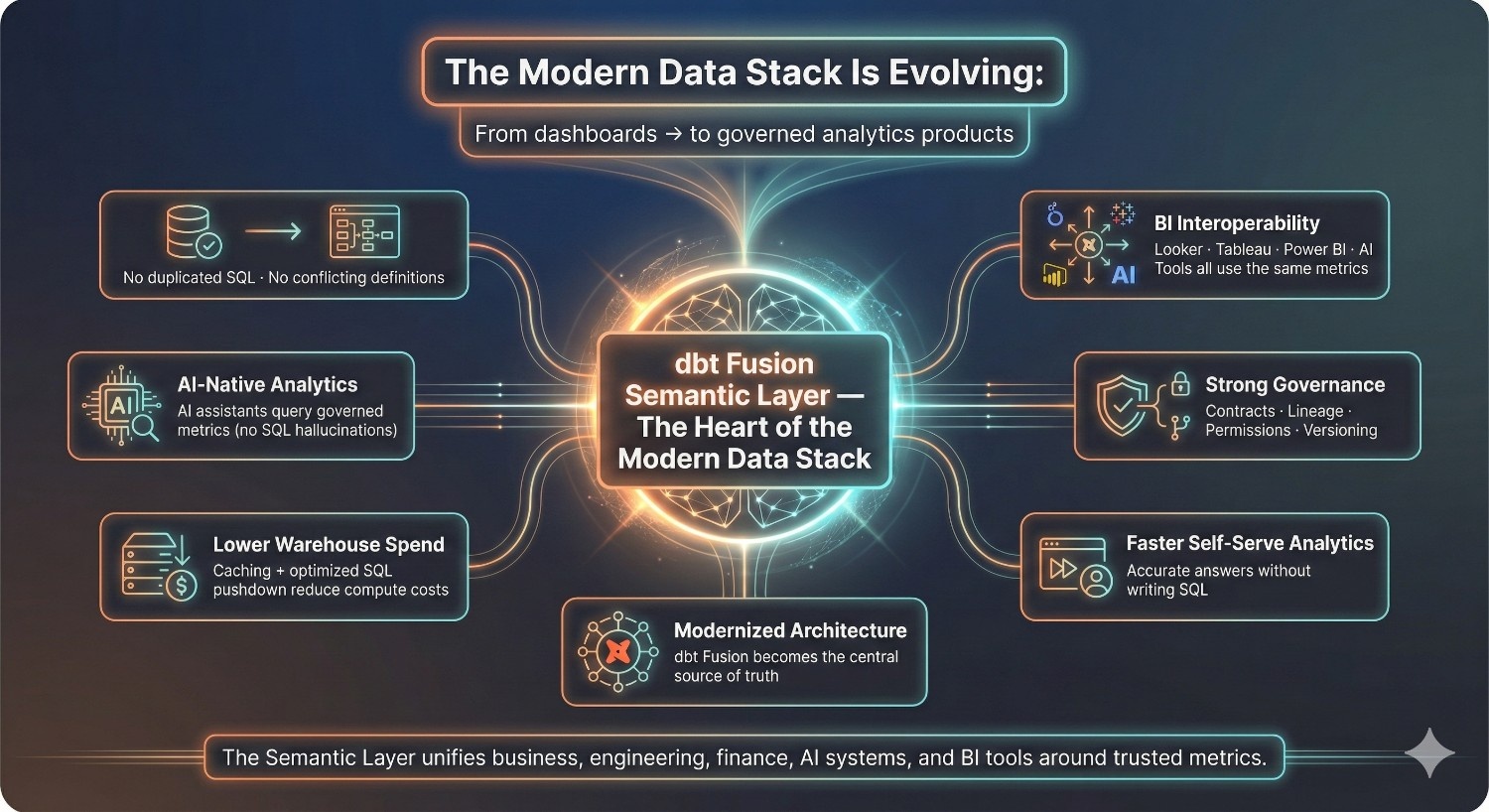
The modern data stack is moving from “build lots of dashboards” to “build consistent, governed analytics products.
Here’s how the Semantic Layer fits into that evolution:
✔ It standardizes business logic across teams
No more duplicated SQL. No conflicting definitions.
✔ It makes BI tools interoperable
Looker, Power BI, Tableau, and AI tools can all query the same metric definitions.
✔ It supports AI-native analytics
AI assistants can use structured, governed metrics instead of generating SQL from scratch (and hallucinating).
✔ It strengthens data governance
Contracts, lineage, permissions, and versioning bring order and auditability.
✔ It reduces warehouse spend
Caching and optimized SQL pushdown minimize compute usage.
✔ It accelerates self-serve analytics
Business teams get accurate answers without writing SQL.
✔ It modernizes analytics architecture
Instead of metrics scattered across dashboards and queries, dbt Fusion can serve as a central source of truth within the modern data ecosystem.
Why the Semantic Layer Is a Game-Changer
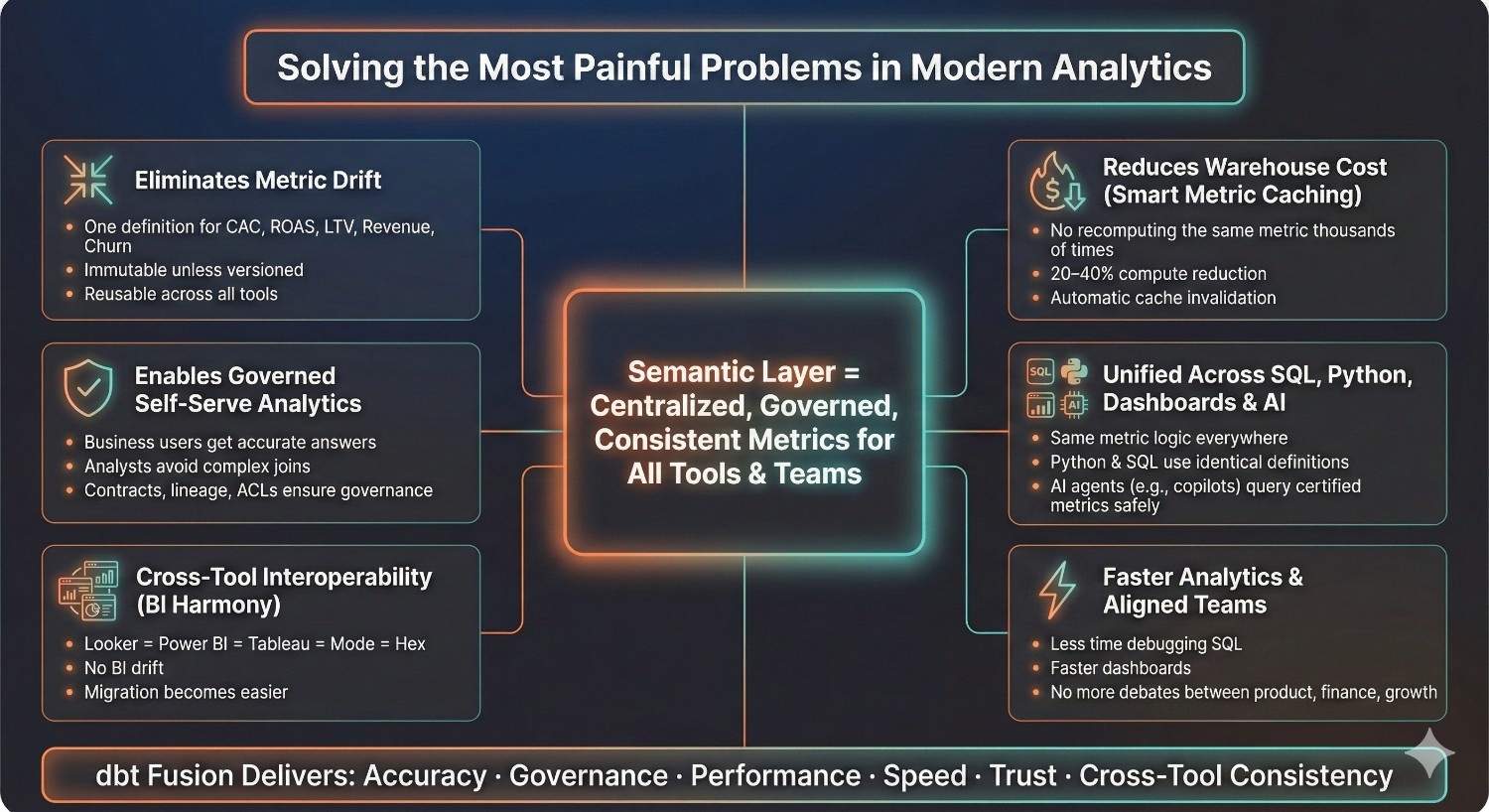
The dbt Fusion Semantic Layer isn’t just another feature — it is designed to address some of the most painful, expensive, and time-consuming challenges in modern analytics. As companies scale, the biggest bottleneck is not the warehouse or pipelines, it’s inconsistent metrics and ungoverned reporting. The semantic layer meaningfully changes how teams build, consume, and trust analytics.
Below are the core reasons it transforms the way modern data teams operate.
1. Eliminates Metric Drift
Metric drift is the silent killer of data trust. It happens when:
- Marketing defines CAC differently from Finance
- Product calculates retention differently from Growth
- BI tools each implement their own SQL logic
- Analysts copy/paste slightly different versions of revenue calculations
Over time, every team ends up speaking a different numerical language — even though they’re supposed to be using the same company data.
dbt Fusion helps eliminate metric drift by centralizing metric logic in one place.
Once defined in the semantic layer, metrics become:
- Immutable unless explicitly versioned
- Reusable across all tools
- Consistent regardless of who queries them or how
This restores trust across the organization and removes the internal friction that slows down analytics.
2. Enables Governed Self-Serve Analytics
Self-serve analytics only works if:
- Business users can get answers without writing SQL
- Those answers are accurate
- Access is governed and monitored
The legacy way (letting BI teams define metrics inside dashboards) creates chaos.
With the dbt Semantic Layer:
- Business teams query trusted metrics, not raw tables
- Analysts don’t have to rewrite complex joins
- Data leaders get governance through lineage, contracts, and versioning
- Access control restricts sensitive metrics
- Everyone speaks the same definitions
This means a marketing analyst can confidently ask:
“What was LTV by channel last quarter?”
And know the result matches what Finance would produce.
Governed self-serve analytics becomes more achievable because the semantic layer reduces ambiguity.
3. Unlocks Interoperability Across BI Tools
In most companies:
- Power BI shows one number
- Looker shows another
- Tableau shows a third
Because each tool has its own logic, calculations, and data modeling patterns.
dbt Fusion addresses this by positioning the semantic layer as a shared source of truth.
Any BI tool that queries metrics does so by referencing the same semantic definitions. That means:
- ROAS in Looker = ROAS in Power BI = ROAS in Tableau
- Dashboards don’t drift apart over time
- Migrating BI tools becomes easier
- Multi-team reporting becomes aligned
As a result, BI tools can operate more consistently because metric logic is centrally defined in dbt.
4. Reduces Warehouse Cost Through Smart Metric Caching
One of the biggest hidden costs in Snowflake and BigQuery is recomputing the same metric thousands of times across dashboards.
Example:
If 40 dashboards compute revenue daily, that’s 40 warehouse scans.
The semantic layer introduces intelligent caching, which:
- Stores results for heavy, frequently-used metrics
- Reuses cached metric outputs across queries
- Prevents redundant warehouse scans
- Automatically invalidates caches when data is refreshed
Organizations often see meaningful compute cost reductions by caching frequently used metrics such as:
- LTV calculations
- Daily retention metrics
- Marketing attribution metrics
- Funnel reporting
- Financial KPIs
This turns the semantic layer into both a performance accelerator and a cost reduction engine.
5. Ensures Consistency Across SQL, Python, Dashboards, and AI Agents
Before dbt Fusion, each layer of analytics used different logic:
- SQL analysts wrote queries one way
- Python data scientists modeled features another way
- BI tools transformed data again
- AI copilots relied on inconsistent or ad-hoc metric logic
The result: fragmentation.
With the Semantic Layer:
- SQL queries automatically reference metric definitions
- Python notebooks use the same metric logic via APIs
- BI tools consume metrics with no redefinition
- AI agents can query certified metrics in a more controlled and reliable way
This alignment is critical for the future of analytics where SQL, Python, and AI operate together.
6. Faster Analytics Because Teams Work Off the Same Logic
When metrics, dimensions, and relationships are defined centrally:
- Analysts spend less time writing and debugging SQL
- BI teams build dashboards faster
- Data scientists spend more time modeling and less time extracting
- Product and finance teams stop debating definitions
- AI copilots respond instantly with accurate answers
The entire analytics lifecycle accelerates because teams stop reinventing the wheel.
Fusion’s semantic layer isn’t just a definition layer — it’s a workflow accelerator.
In short:
The dbt Fusion Semantic Layer brings:
- Accuracy
- Governance
- Performance
- Speed
- Trust
- Cross-tool consistency
to every part of your analytics organization.
Use Case 1: Single Source of Truth for Metrics
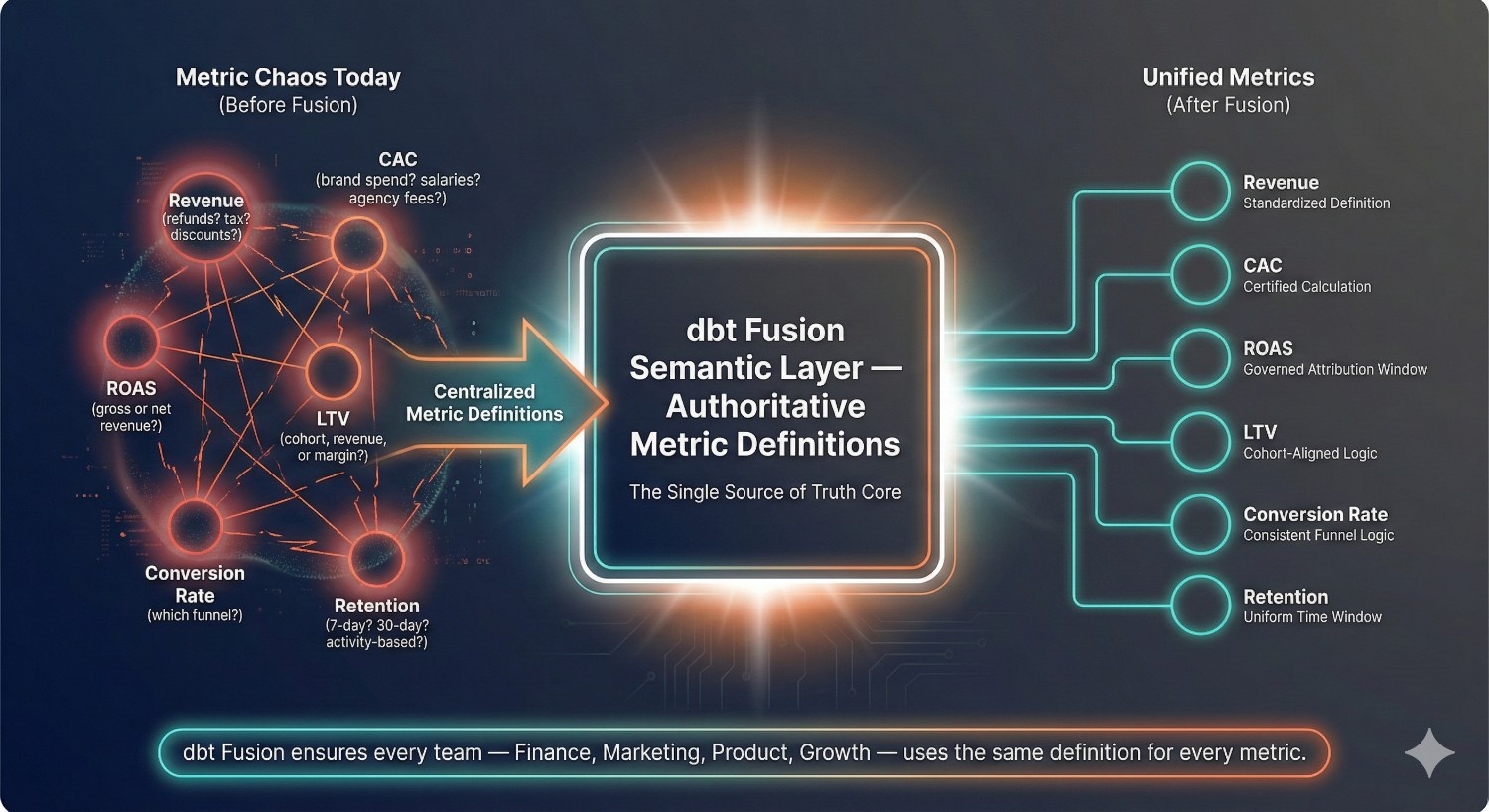
Every modern business depends on a handful of critical metrics — revenue, CAC, ROAS, LTV, conversion rate, churn, retention, activation, and dozens of others that drive strategic decisions. Yet ironically, these metrics are also the biggest sources of confusion, misalignment, and internal debate.
The dbt Fusion Semantic Layer addresses this by enabling a single, governed definition for business metrics, helping align teams across the organization.
Examples of Common Business-Critical Metrics
Here are typical metrics that often vary across teams:
- Revenue – Are refunds included? What about tax or discounts?
- CAC (Customer Acquisition Cost) – Does it include brand spend? Team salaries? Agency fees?
- ROAS (Return on Ad Spend) – Based on gross revenue or net? Over what attribution window?
- LTV (Lifetime Value) – Cohort-based? Revenue-based? Margin-based?
- Conversion Rate – Which funnel step? Unique users or sessions?
- Retention – Rolling 30-day? 7-day? Based on last activity or purchase?
These are often interpreted differently across departments without a centralized system to govern definitions.
How Semantic Metrics Standardize Business Logic
With dbt Fusion, each metric is defined once — in code — inside the semantic layer.
Example metric definition:
metrics:
– name: revenue
type: sum
sql: total_amount
filters:
– field: is_refunded
operator: =
value: false
time_grains: [day, month, quarter, year]
dimensions: [channel, region, product, campaign]
This definition is:
- Version-controlled
- Tested
- Documented
- Part of the dbt DAG
- Available to all BI tools, SQL, and AI agents
Now, any query like:
- “Revenue by month”
- “Revenue by region”
- “Revenue by acquisition channel”
is computed from the same logic.
The transformation is profound:
Before Semantic Layer:
- Analysts write their own SQL
- Metrics differ by team
- Dashboards conflict
- Leadership distrusts numbers
- Analysts waste time reconciling inconsistencies
After Semantic Layer:
- All tools use the same metric definition
- BI dashboards always match
- SQL queries pull from standardized logic
- AI agents give consistent answers
- Data teams never redefine the same metric twice
This allows the semantic layer to function as a shared source of truth across the business.
Why This Eliminates Slack Arguments About “Which Metric Is Correct”
Every data team has experienced this chaos:
Marketing says revenue is $10.2M.
Finance says it’s $9.8M.
Product says it’s $11.1M.
“Which one is correct?”
→ Endless Slack threads
→ Screenshots of dashboards
→ SQL snippets thrown around
→ Emergency alignment meetings
These disagreements happen because:
- Different teams use different joins
- Filters vary
- Time windows differ
- Attribution logic is unclear
- Each dashboard implements its own interpretation
The Semantic Layer fixes this permanently by:
- Storing the definitive metric logic in dbt
- Versioning changes with full audit trails
- Enforcing the same definition in every downstream tool
- Making metric lineage visible in dbt Explorer
- Ensuring all dashboards pull from governed logic
Now, when someone asks:
“Why does revenue look different on this dashboard?”
The answer is:
“It doesn’t. All dashboards use the same metric definition.”
Slack arguments disappear.
Fire drills disappear.
Cross-team alignment becomes the default, not the exception.
In short:
A single source of truth for metrics means:
- No more metric drift
- No more conflicting dashboards
- No more meetings about definition differences
- Faster decision-making and higher trust
The dbt Fusion Semantic Layer doesn’t just define metrics — it aligns the entire organization around the same numbers.
Use Case 2: Governed Metric Evolution (Versioning)
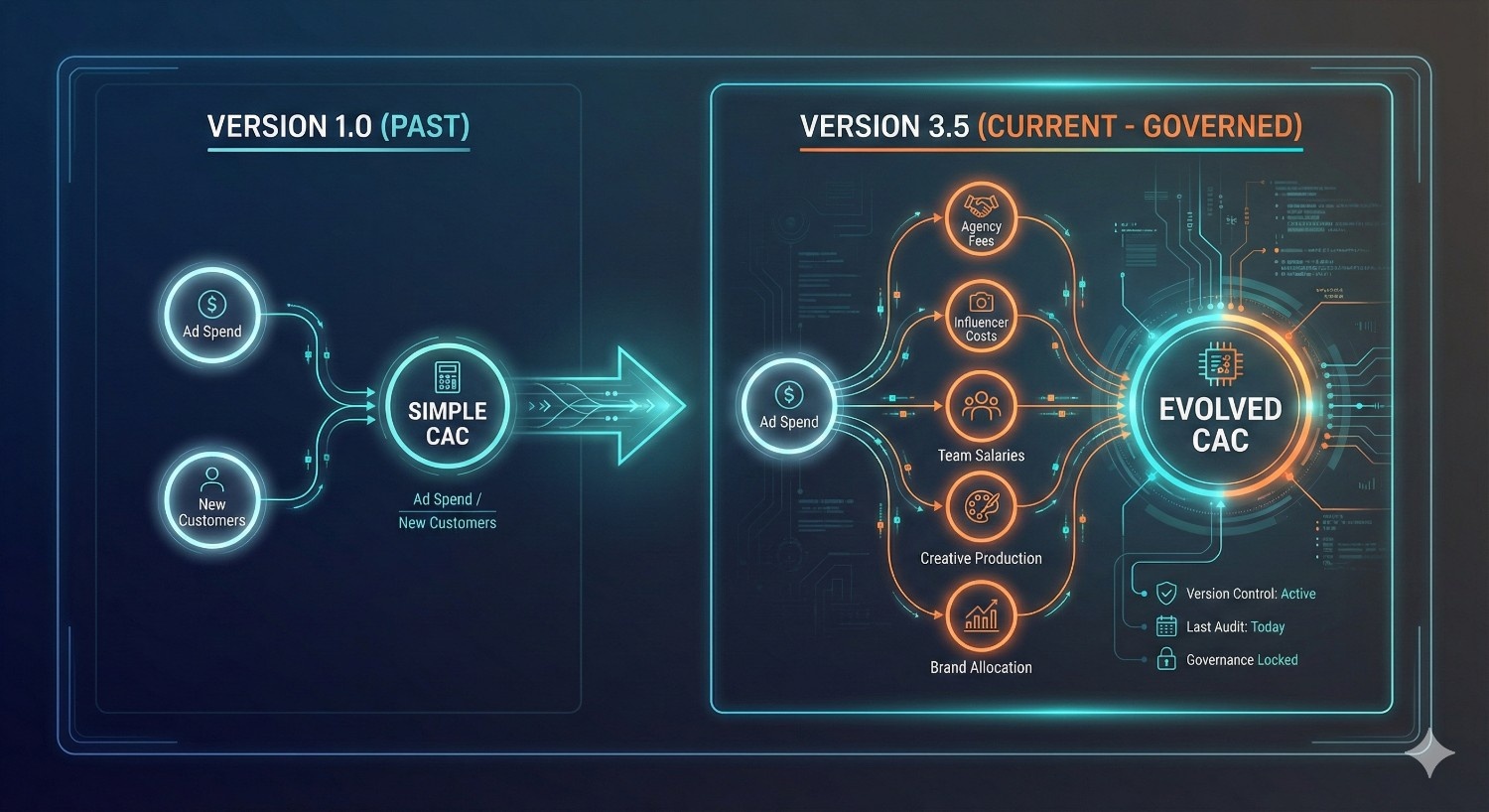
No metric stays the same forever. As a company grows, its business model evolves, and so do the metrics used to measure performance. CAC might start simple (ad spend ÷ new customers) but later expand to include:
- Agency fees
- Influencer costs
- Salaries of the acquisition team
- Brand spend allocations
- Creative production costs
This evolution is natural — but without governance, it becomes a source of conflict.
Scenario: Changing CAC Definition → Marketing and Finance Fighting
A real-world scenario most data teams know too well:
Marketing’s version of CAC:
Only includes paid ad spend.
Finance’s version of CAC:
Includes ad spend + salaries + tools + creative.
Both are technically valid.
Both answer different questions.
Both can appear in dashboards.
Neither team trusts the other.
A dashboard update to CAC suddenly triggers:
- Marketing accusing dashboards of overstating CAC
- Finance accusing Marketing of underreporting CAC
- Analysts scrambling to explain differences
- Executives confused about which number to trust
- Emergency Slack threads:
“Why did CAC spike 32% overnight?”
“Whose definition are we using?”
“Did someone update the SQL?”
This is metric chaos — and it happens because there is no version control for metrics.
How dbt Fusion Fixes This with Governed Metric Evolution
1. Version-Controls Metrics
In dbt Fusion, metrics can have explicit versions, just like APIs.
Example:
metrics:
– name: cac
version: v1
definition: …
– name: cac
version: v2
definition: …
This allows:
- Marketing dashboards to continue using cac_v1
- Finance dashboards to adopt cac_v2
- Data teams to migrate gradually
- No breaking changes
- Full transparency about what changed
Just like software versioning, but for business logic.
2. Audits All Changes Automatically
dbt Fusion provides:
- A complete audit trail
- Git-backed version history
- Visibility into who updated the metric
- What changed
- Why it changed
- Links to PRs, approvals, tests, and lineage
This means:
- No hidden changes
- No surprise metric shifts
- No analyst silently editing dashboard logic
Executives get confidence.
Data teams get control.
BI teams get stability.
3. Ensures Backward Compatibility
Backward compatibility is one of the most powerful features of the semantic layer.
When you introduce a new metric definition:
- Old dashboards continue using the previous version
- API consumers keep their existing logic
- Analysts aren’t forced to rewrite queries
- Teams can migrate at their own pace
- No analyst arrives at work to find every dashboard broken
You can even deprecate metrics gradually:
- cac_v1 marked as deprecated
- Teams notified through dbt Explorer
- Dashboards migrated over weeks or months
- No downtime, no data quality incidents
This is real enterprise-grade governance.
Impact: No More Broken Dashboards, No More Fire Drills
Without governed versioning, a metric definition change can break:
- 12 Looker dashboards
- 8 Power BI reports
- 4 Tableau workbooks
- 3 Excel models
- 5 data science notebooks
- 1 executive report emailed weekly
With dbt Fusion:
- Changing a metric becomes more controlled and predictable
- Breaking changes are prevented
- Versioning ensures all dashboards remain functional
- Data contracts enforce stability
- Cross-team alignment becomes seamless
The result?
1. No more broken dashboards
Dashboards use the version they depend on.
2. No more emergency Slack threads
Metric changes are audited, visible, and approved.
3. No more team conflict
Marketing, finance, product, and operations all know exactly which version they’re using.
4. No more metric ambiguity
Executives get clean, consistent numbers — with full lineage and documentation.
In short:
The dbt Fusion Semantic Layer brings the rigor of software engineering to business metrics, enabling organizations to evolve their KPIs without chaos.
Metric versioning =
- Trust
- Stability
- Alignment
- Predictability
- Zero downtime
This is one of the biggest reasons enterprises adopt dbt Fusion.
Use Case 3: Metric-Level Access Controls
As organizations scale, not every stakeholder should have access to every metric. Sensitive KPIs like profitability, salary-related metrics, medical/health data, or detailed revenue breakdowns must be protected — especially in regulated industries such as healthcare, finance, and insurance.
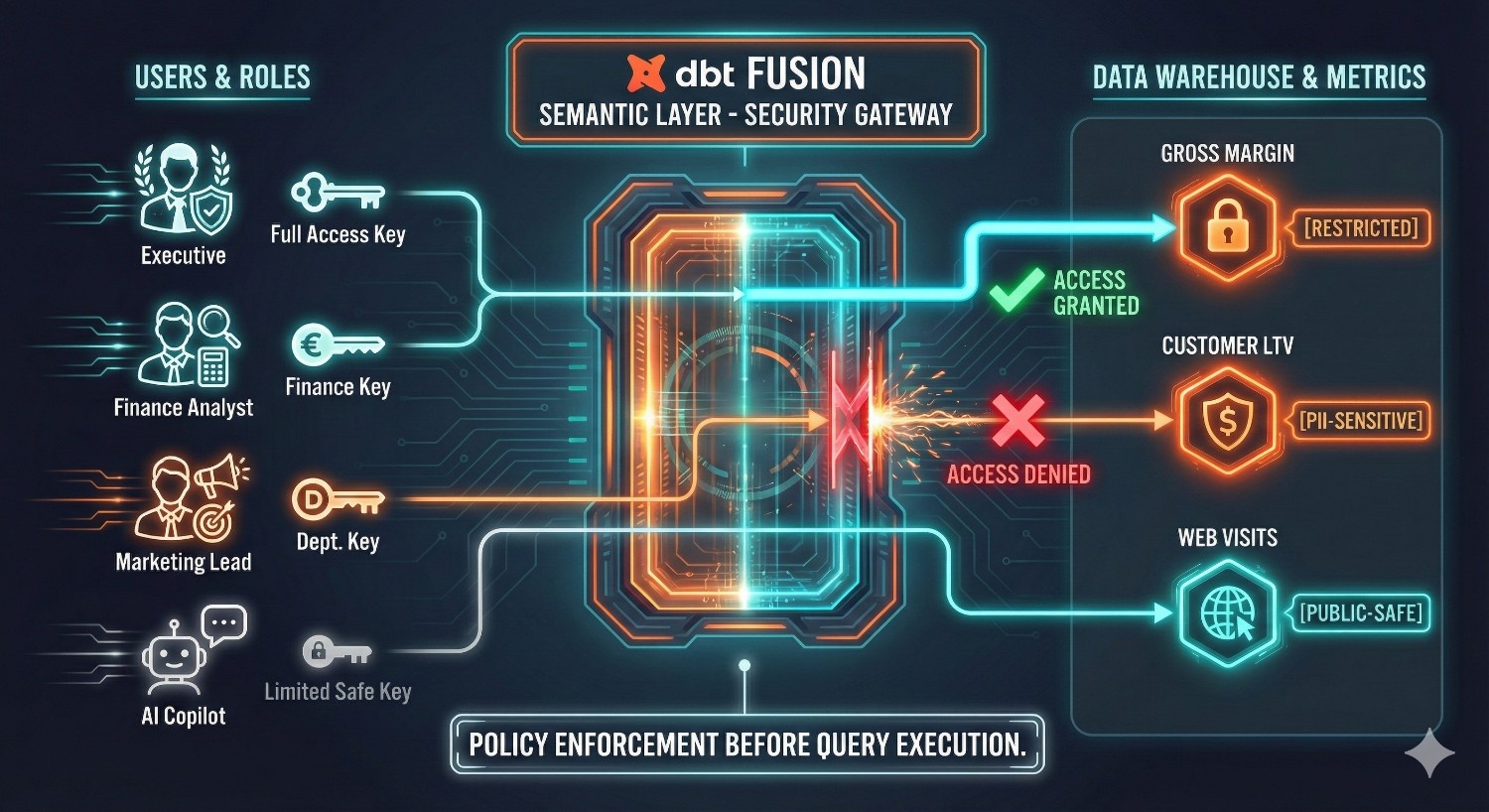
The dbt Fusion Semantic Layer introduces metric-level access controls, allowing data teams to enforce governance directly at the semantic layer before any query is executed. This helps support security, privacy, and compliance while maintaining analytics velocity.
How Governance Policies Apply at the Metric Layer
1. PII-Safe Metrics
Some metrics contain direct or inferred PII such as:
- Customer-level LTV
- Per-user revenue
- Medical visit retention
- Demographic-based conversion rates
- Engagement metrics tied to identifiable users
With the semantic layer, you can define PII-safe or anonymized versions of metrics, such as:
- PII-Safe LTV – aggregated, cohort-level only
- Billing Revenue – excluding identifiable transaction fields
- User Engagement Metrics – without user IDs or emails
dbt Fusion lets you:
- Tag metrics as pii or sensitive
- Hide or restrict metrics for certain roles
- Ensure AI tools and BI dashboards only access allowed definitions
This enforces privacy-by-design at the metric level.
2. Restricted Financial KPIs
Some KPIs are too sensitive to be accessible to everyone:
- Gross Margin
- Net Revenue
- Burn Rate
- Payroll Ratios
- Profitability Metrics
- Forecasted ARR/MRR
- Department P&L metrics
Without proper governance, these metrics might accidentally appear in:
- A junior analyst’s dashboard
- A public report
- A marketing team’s exploration workspace
- AI-generated insights
Fusion allows you to restrict metrics based on:
- User role
- Department
- Domain-specific permissions
- Environment (prod vs dev)
- Tool-level access
For example:
- Executives → can see gross margin, burn rate
- Finance → full access
- Marketing → only revenue, CAC, ROAS, LTV
- Data Analysts → everything except payroll or HR metrics
- External agencies → only aggregated, non-sensitive metrics
This helps reduce the risk of accidental exposure of sensitive financial data.
3. Role-Based Access (Analyst vs Exec)
Role-based access control (RBAC) enables fine-grained permissions such as:
- Analysts → Can query detailed metrics and dimensions
- Executives → Can query financial KPIs but not raw user data
- Product Teams → Can query activation and retention metrics only
- Support Teams → Can query support KPIs but not revenue or LTV
- AI Agents → Can only access certified, safe metrics
Fusion supports role-based access control within dbt Cloud and through supported BI integrations.
Examples:
- In Power BI, only executives can view the gross margin metric.
- In Tableau, certain dashboards show anonymized retention metrics.
- In Looker, the semantic layer restricts non-finance users from querying profitability calculations.
- AI copilots can only request metrics with the ai_safe tag.
This aligns analytics access with organizational hierarchy and compliance requirements.
How Fusion Enforces Rules Before Queries Hit the Warehouse
A key capability is that access controls are applied at the semantic layer, before SQL is generated or sent to the warehouse.
Here’s how enforcement works:
1. Metric Definition Layer
Each metric can include:
- Tags (sensitive, pii, restricted)
- Access groups
- Required roles
- Approved consumers (BI tools, apps, teams)
2. The Semantic Layer Checks Permission Before Querying
When a user or tool requests a metric:
- The semantic layer validates permissions
- If unauthorized → query is blocked
- If authorized → SQL generation begins
This prevents unauthorized queries from ever reaching Snowflake, BigQuery, or Databricks.
3. Warehouse Security Reinforcement
Fusion’s metric-level governance complements:
- Row-level security (RLS)
- Column-level security (CLS)
- Data masking policies
Unlike warehouse-level controls, semantic enforcement is applied earlier in the query lifecycle.
4. Protects Against “Curious Analyst” Queries
Even if an analyst tries to manually query sensitive metrics via:
- dbt API
- BI explorer
- AI copilots
- SQL endpoints
The semantic layer will reject the request in a controlled and secure manner.
Impact
Metric-level access control transforms analytics governance:
✔ Significantly reduced risk of exposing sensitive metrics
Even if dashboards or AI tools attempt unauthorized requests.
✔ Centralized governance
No need to manage permissions across 10+ BI tools.
✔ Consistent, compliant analytics
Especially important for HIPAA, SOC2, PCI, GDPR environments.
✔ Faster onboarding and role-based control
New employees get instant access to the right metrics.
✔ Reduced risk of accidental leaks through self-serve tools
Self-serve exploration becomes safe for the organization.
In short:
The dbt Fusion Semantic Layer ensures that:
- Only the right people access the right metrics
- Sensitive calculations are never leaked
- BI tools, SQL, and AI agents all operate within a governed framework
- Compliance becomes built-in, not bolted-on
It’s governance that scales with your business.
Use Case 4: Faster Metric Computation with Caching
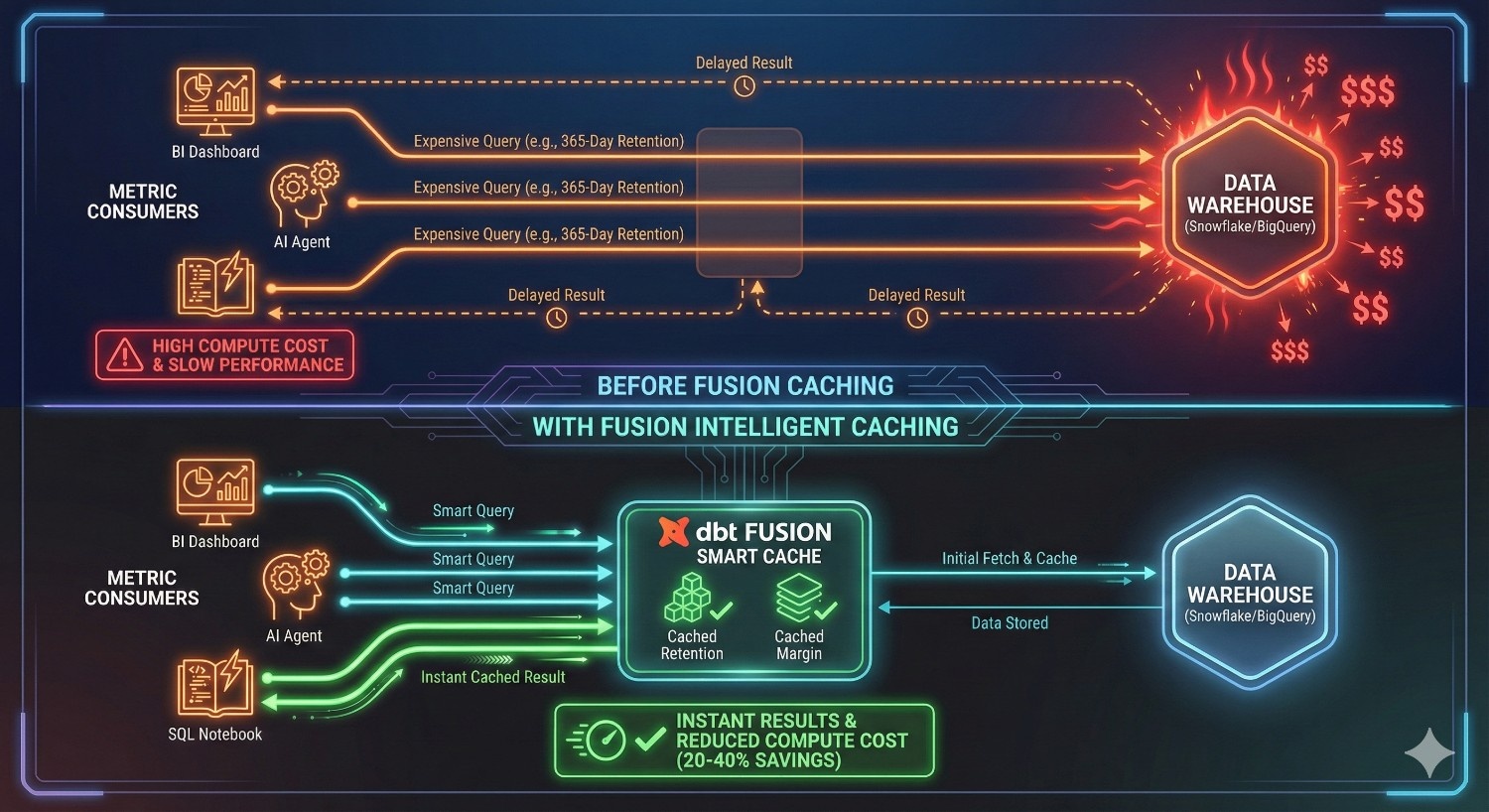
One of the biggest hidden costs in modern analytics isn’t storage or data ingestion—it’s recomputing the same expensive metrics over and over again across dashboards, notebooks, AI tools, and ad-hoc queries. Every time a dashboard refreshes or a team runs a SQL query, the warehouse reprocesses identical metric logic, consuming unnecessary compute.
dbt Fusion solves this with intelligent metric caching, transforming the semantic layer from a definition engine into a performance accelerator.
dbt Fusion Caches Metric Results Intelligently
The Fusion Semantic Layer includes a caching mechanism that:
- Stores metric outputs for frequently requested metrics
- Reuses cached results across BI tools, SQL queries, and API calls
- Automatically invalidates and refreshes caches when data updates
- Avoids repeating expensive warehouse scans
- Ensures that every consumer receives identical metric values
Caching is applied at the metric level, not the query level, meaning:
- Different dashboards can share the same underlying cached metric
- Different tools (Power BI, Looker, Excel, AI agents) reuse results
- Even Python notebooks can tap into cached outputs
This turns dbt into a lightweight metric server—reducing compute while increasing consistency and performance.
Reduces BigQuery or Snowflake Compute Usage
Snowflake and BigQuery costs are largely tied to:
- Scanning large tables
- Repeating long-running aggregations
- Running the same joins over and over
- Heavy user concurrency
dbt Fusion can materially reduce warehouse consumption by:
1. Materializing Cached Metrics
Heavy metrics are computed once, then reused.
2. Cutting Redundant Queries
Dashboards no longer send near-identical SQL to the warehouse.
3. Optimizing Pushdown SQL
The Rust engine generates efficient, warehouse-optimized SQL.
4. Controlling Expensive Time Windows
A metric like “LTV for the last 365 days” might be slow—caching turns it near-instant.
5. Reducing BI Tool Query Noise
Tools like Power BI notoriously fire many background queries; caching mitigates this.
6. Eliminating Ad-Hoc “Metric Rebuilds”
Analysts no longer recompute metrics manually in SQL notebooks.
Many organizations report meaningful compute cost savings after implementing metric caching across critical dashboards.
Ideal for Heavy Metrics That Are Expensive to Compute
Some metrics are computationally expensive because they require scanning large datasets, performing many transformations, and joining complex relationships.
Here are the most common ones that benefit from dbt Fusion caching.
1. 365-Day Retention
Year-long retention calculations require:
- Large user-event tables
- Complex cohort alignment
- Rolling window aggregations
These queries often become multi-minute jobs.
With Fusion:
- Retention is computed once
- Stored as a cached metric
- Queried instantly across BI tools or AI agents
Significant performance improvements and reduced compute overhead.
2. Multi-Touch Attribution
Attribution models—linear, time-decay, position-based, algorithmic—are extremely expensive because they require:
- Rebuilding user journeys
- Joining touchpoints across channels
- Recalculating conversion windows
Fusion caching makes attribution:
- Fast
- Reusable
- Consistent across Marketing and Finance
No more running attribution nightly and manually exporting to dashboards.
3. Margin Calculations
Gross margin and contribution margin require:
- Joining orders
- COGS data
- Returns/refunds
- Shipping and fulfillment costs
- Discount adjustments
These joins are heavy and slow, especially on BigQuery.
Cached margins:
- Load instantly in dashboards
- Stay consistent across financial reports
- Remove repeated computation loads
Finance teams benefit the most.
Tie-In to Warehouse Cost Reduction
Caching is one of the most effective ways to reduce Snowflake and BigQuery bills, because:
- Repeated queries no longer scan fact tables
- Dashboards refresh without incurring compute costs
- High-traffic BI environments (Power BI/Tableau) stop generating redundant warehouse loads
- AI agents querying metrics do not trigger expensive computations
Fusion’s caching layer ensures:
- Expensive metrics run once instead of hundreds of times
- Business-critical dashboards load instantly
- Heavy transformations are amortized across the organization
This can lead to lower compute costs and improved performance while maintaining accuracy and data freshness.
In summary:
dbt Fusion’s intelligent metric caching:
- Makes analytics faster
- Protects your warehouse budget
- Prevents redundant metric computation
- Enables heavy metrics like attribution and retention to run smoothly
- Supports high-scale BI and AI workloads
- Ensures consistency across every consumer
Caching allows the semantic layer to contribute to both performance improvements and cost efficiency.
Use Case 5: Semantic Layer as a Governance Control Plane
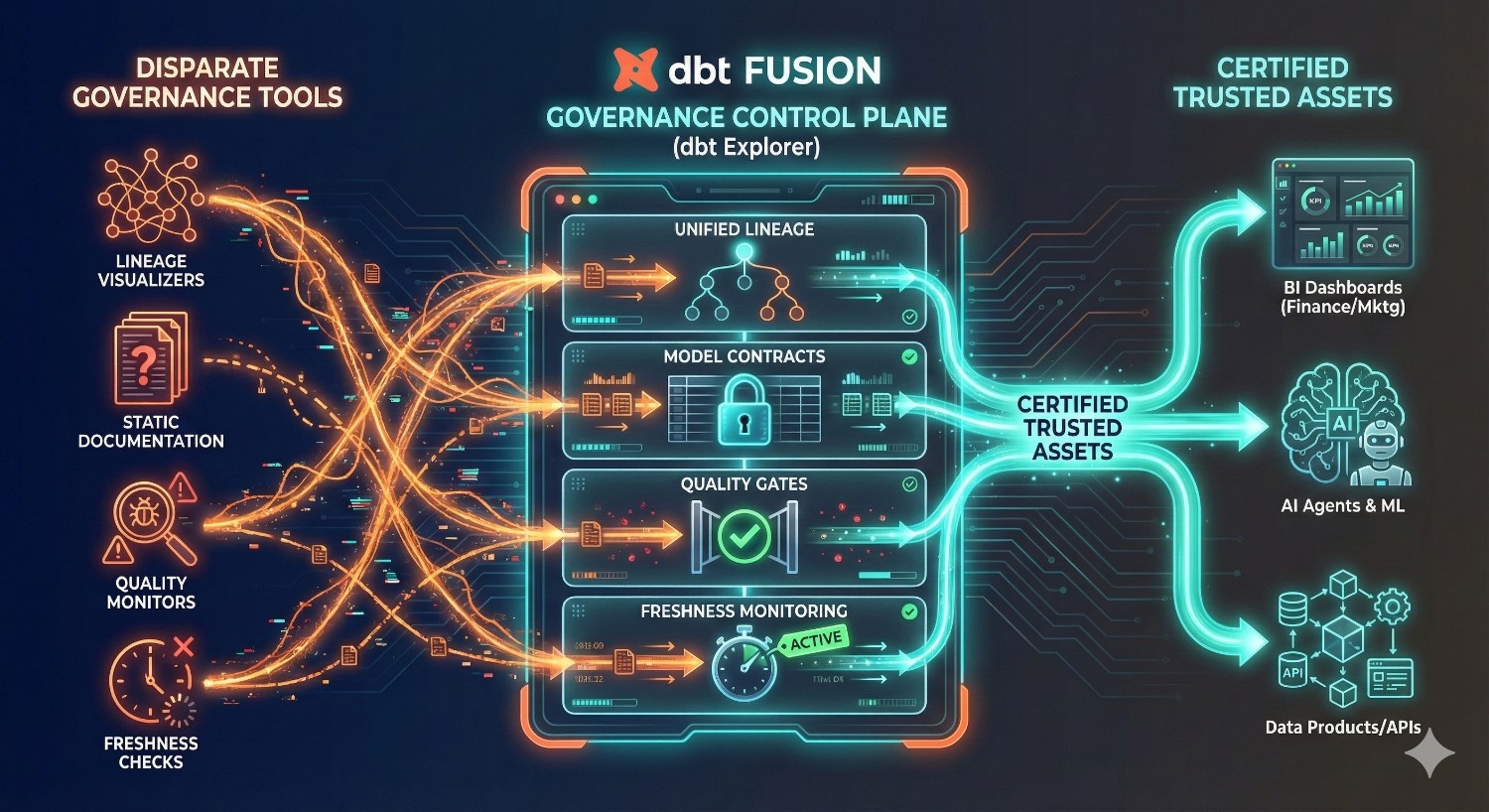
As analytics ecosystems grow, governance becomes the critical backbone that ensures trust, reliability, and consistency across data products. But governance often requires multiple tools: lineage visualizers, documentation systems, quality monitors, schema checkers, and BI governance layers — creating fragmentation and operational overhead.
The dbt Fusion Semantic Layer, combined with dbt Explorer, changes this. It positions dbt as a centralized governance control plane, giving teams a unified interface for managing metrics, models, tests, and data assets — and helping teams rely on certified, trusted sources.
dbt Explorer Makes Governance Visible and Actionable
dbt Explorer is the “visual brain” of dbt Fusion. It brings together semantic definitions, lineage, documentation, contracts, and quality signals into a unified, interactive UI.
Here’s how it acts as a governance control plane.
1. Metric Lineage: Full Transparency of Upstream & Downstream Logic
Metric lineage answers critical governance questions:
- Where does this metric come from?
- Which models feed into it?
- Which transformations, filters, and relationships apply?
- Which dashboards and applications use this metric?
dbt Explorer provides a graph-based visualization of:
- Upstream staging models
- Transformations and aggregations
- Metric definitions
- Downstream BI dependencies
- API endpoints consuming the metric
This prevents:
- Breaking important KPIs
- Blindly changing metric logic
- Downstream dashboard failures
- Misaligned interpretations across teams
Metric lineage becomes auditable, transparent, and easy to understand — even for non-technical stakeholders.
2. Model Contracts: Enforcing Stability and Structure
Model contracts in dbt Fusion enforce schema stability by defining:
- Column names
- Data types
- Nullability requirements
- Constraints
- Field-level expectations
The semantic layer uses these contracts to guarantee that:
- Metric definitions reference stable models
- BI tools never break because a field changed type
- Invalid schema changes are blocked during CI/CD
- Backward compatibility is preserved
- Analysts always know what a model contains
Contracts turn your data models into safe, governed interfaces — just like APIs.
3. Data Quality Tests Integrated with Semantic Logic
Quality tests in dbt — such as:
- Unique tests
- Not null tests
- Accepted values tests
- Relationship tests
- Custom business logic tests
— are all surfaced in dbt Explorer and integrated into the semantic layer.
This means:
- Metrics rely only on validated models
- Failed tests can automatically block metric computation
- Downstream dashboards show alerts when underlying data is invalid
- AI copilots avoid using metrics linked to bad data
Instead of BI tools accidentally visualizing bad data, the semantic layer helps reduce incorrect metric usage at the source.
Governance is applied earlier in the analytics lifecycle, rather than only downstream.
4. Freshness Monitoring: Ensuring Metrics Are Based on Timely Data
Freshness is a core governance signal — stale data causes wrong decisions.
dbt Explorer displays:
- Freshness checks for each model
- Last successful load time
- SLA warnings
- Status of incremental models
- Whether metric queries are using outdated data
This allows teams to answer questions like:
- “Did yesterday’s sales load complete?”
- “Is the LTV metric using up-to-date transaction data?”
- “Are the pipelines behind on schedule?”
The semantic layer ensures that:
- If upstream data is stale, the metric is flagged
- Downstream dashboards show warnings
- BI tools and AI agents avoid using stale metrics
No more discovering after an executive meeting that the underlying dataset was 48 hours old.
Governance Outcome: Everyone Uses Certified Data Assets
By combining lineage, contracts, tests, and freshness into the semantic layer, dbt Fusion enforces a governed analytics lifecycle.
Certified data assets become:
- Documented
- Versioned
- Tested
- Fresh
- Governed
- Lineage-tracked
- Access-controlled
And most importantly…
All teams — Marketing, Finance, Product, Ops, BI, Data Science — consume metrics from the same certified source.
This governance model prevents:
- Wild-west dashboards
- Rogue calculations
- Data silos
- Conflicting KPIs
- Compliance risks
- Surprise breakages
A single governance control plane = Lower operational risk + higher data trust + faster analytics.
In short:
The dbt Fusion Semantic Layer, powered by dbt Explorer, can serve as a central source of truth and control for analytics governance:
- Showing full metric lineage
- Enforcing structural contracts
- Integrating data quality checks
- Monitoring freshness
- Certifying reliable assets for downstream use
Governance is no longer scattered across tools — it’s unified, visible, and enforceable.

Use Case 6: Enforcing Data Contracts Automatically
As data teams scale, one of the most common (and costly) sources of analytics breakage is uncontrolled schema changes. A single modification — renaming a column, changing a data type, removing a field — can silently break dozens of dashboards, models, metrics, and API-powered reports downstream.
dbt Fusion solves this problem with data contracts: strict, enforced definitions for models, metrics, and dimensions that prevent accidental changes from breaking your analytics ecosystem.
In other words:
Data contracts help make the analytics layer more predictable and stable, similar to software APIs.
Contracts Embedded Into Every Layer of Analytics
1. Model Contracts
Model-level contracts define:
- Expected columns
- Data types
- Nullability rules
- Constraints
- Primary and foreign key relationships
Example contract:
models:
– name: customers
contract:
enforced: true
columns:
– name: customer_id
data_type: string
constraints:
– not_null
– unique
– name: signup_date
data_type: date
– name: channel
data_type: string
This prevents:
- Accidental column drops
- Type mismatches
- Renaming fields without notice
- Introducing nulls in required columns
If a change violates the contract → dbt blocks the build with a clear error.
2. Metric Contracts
Metrics also have contracts that define:
- Required inputs
- Calculation types
- Dimensions allowed
- Semantic relationships
For example, a CAC metric might require:
- total_marketing_spend
- new_customers
- Valid numerical types
- Non-null inputs
If someone alters the underlying model or metric definition incorrectly → Fusion rejects the change.
3. Dimension Contracts
Dimensions control how metrics can be sliced — such as by channel, region, product, or cohort.
Dimension contracts enforce:
- Valid dimension fields
- Consistent data types
- Non-null dataset references
- Allowed grain levels (day, month, quarter)
This helps prevent dashboard builders from slicing metrics using incorrect or incompatible dimensions.
Data Contracts Prevent Breakage When Things Change
Let’s look at common failure points that contracts eliminate.
1. Upstream Schema Changes
Without contracts:
- A column is renamed → downstream models silently break
- A column is removed → dashboards fail
- Data type changes → BI tools throw conversion errors
- A new null appears → tests fail after deploy
- Analysts have to scramble to debug why models broke
With dbt Fusion:
- Schema changes must comply with contracts
- Violations block the pipeline at build time
- Errors show exactly what changed and why it’s invalid
- Downstream assets remain stable
- Developers must make explicit, reviewed changes to definitions
Contracts transform schema changes from surprises into controlled, intentional updates.
2. BI Dashboards Depending on a Field
In most organizations:
- BI dashboards rely on fields without formal documentation
- A field is renamed or removed
- Dashboards quietly break
- Stakeholders discover the issue in a meeting
- Data teams rush to fix it
dbt Fusion helps reduce this chaos through:
- Contract-enforced schemas
- Lineage linking each field to dashboards
- Build-time checks preventing destructive changes
- Deprecation workflows instead of immediate removal
This means:
- Dashboards are more likely to remain functional
- BI teams aren’t blindsided
- Data engineers get early warnings when definitions change
- Business continuity is maintained
Dashboards become stable products, not fragile assets.
3. Teams Accidentally Modify Definitions
The bigger the organization, the more common this scenario:
- A junior analyst modifies a model and removes a field
- A data scientist changes column types to fit a notebook use case
- An engineer renames fields for readability
- A contractor edits a transformation without understanding dependencies
Without contracts, these changes silently propagate and break everything downstream.
With dbt Fusion:
- The contract flags invalid changes
- CI/CD blocks unsafe merges
- The PR clearly shows what violates the contract
- Maintainers approve or reject changes before deploy
Teams are far less likely to accidentally modify shared interfaces.
Impact: Safe, Predictable, Enterprise-Grade Analytics
Data contracts transform analytics workflows:
✔ Fewer broken dashboards
Problems are caught upstream before production.
✔ Reduced risk of silent schema drift
Changes are intentional, versioned, and reviewed.
✔ No more “shadow definition” updates
Metrics and dimensions stay consistent and reliable.
✔ No more cross-team blame
Contracts define clear rules — not opinions.
✔ BI tools, AI tools, and SQL queries remain stable
Downstream tools never encounter unexpected changes.
✔ Analytics becomes as governed as software engineering
APIs have contracts — now data models do too.
In short:
The dbt Fusion Semantic Layer enforces structure, prevents breakage, and enables safe evolution of your analytics system. It turns your data models into reliable, backward-compatible interfaces that the entire business can depend on.
Use Case 7: Auditability for Finance & Compliance
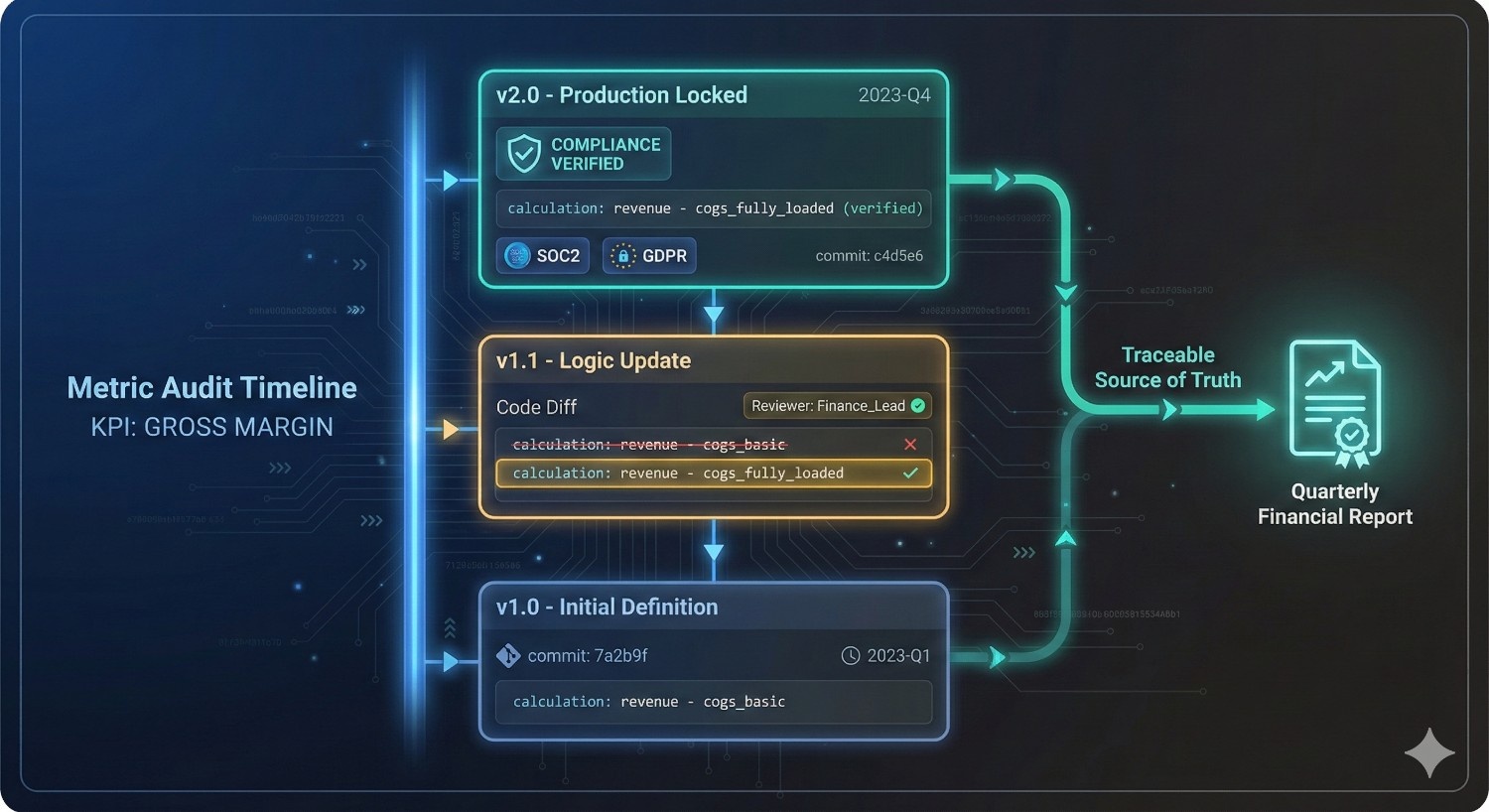
Financial teams, compliance departments, and regulated industries all demand one thing above everything else: auditability. They need to know exactly how numbers were produced, who modified them, when they changed, and whether downstream reporting can be trusted.
Historically, BI tools and SQL-based reporting made this nearly impossible. A metric definition might exist in:
- A BI dashboard formula
- An analyst’s SQL query
- A spreadsheet offline
- A Python model in a notebook
- A partially documented Confluence page
dbt Fusion’s Semantic Layer fixes this by making auditability built-in, not bolted on. It produces a transparent, version-controlled, fully documented system where finance and compliance teams can finally trust the numbers they report.
1. Built-In Audit Trails
In traditional analytics stacks, understanding how a number was produced often requires:
- Reading BI dashboard logic
- Reverse-engineering SQL joins
- Digging into spreadsheets
- Asking multiple analysts for context
- Guessing when definitions changed
With dbt Fusion:
Every metric, model, dimension, filter, and relationship is captured in Git-backed version control.
This means:
- Every change is logged
- Every commit shows what changed and why
- Every reviewer signs off before changes go live
- Every version is documented
- Every incident is traceable
Audit trails become native to the analytics workflow — just like source code.
2. Metrics Change History
Metric evolution is inevitable, especially in finance:
- Gross margin formula changes
- CAC definitions expand
- Revenue recognition logic evolves
- Churn definitions shift for new business models
- LTV computations move from revenue-based → margin-based
Without transparency, these changes create reporting inconsistencies and compliance risks.
dbt Fusion Semantic Layer stores every version of every metric:
- Current version
- Historical versions
- Deprecation notices
- Change logs
- Lineage-based impact analysis
Finance teams can instantly answer:
- “When did our CAC definition last change?”
- “Which dashboards used the old gross margin metric?”
- “Was this metric definition approved before quarter-end reporting?”
- “Which version was used for last year’s annual report?”
This is enterprise-grade metric governance.
3. Perfect for SOC2, HIPAA, GDPR, and Enterprise Reporting
Compliance frameworks require:
- Consistent processes
- Documented logic
- Controlled changes
- Secure access
- PII protection
- Reproducibility
- Traceability
dbt Fusion checks all these boxes.
SOC2 Compliance
- Changes are controlled through PRs and approvals
- Versioning ensures policies cannot be bypassed
- Sensitive metrics can be access-restricted
HIPAA Compliance
- PII-safe metrics enforced
- Restricted access to sensitive data
- All queries routed through governed semantic APIs
GDPR
- Clear lineage for personal data
- Ability to flag and mask sensitive dimensions
- Audit-friendly definitions
Financial Reporting Standards
- Repeatable, consistent logic across quarters
- Clear evidence of when metrics were updated
- Fully traceable inputs and transformations
dbt Fusion provides the transparency auditors expect and supports regulatory requirements.
4. Ensures Financial Reporting Accuracy
Accurate financial reporting depends on:
- Consistent metric definitions
- Transparent calculation logic
- Reproducible outcomes
- Stable inputs
- Clear lineage from raw data to financial statements
The semantic layer ensures that:
- Revenue, gross margin, ARR, MRR, churn, and EBITDA metrics always use the same definitions
- Changes cannot be deployed without review
- Finance dashboards are insulated from backend schema changes
- Downstream BI tools do not rewrite or reinterpret metrics
- CFOs receive numbers that align perfectly with what was used last quarter
This eliminates last-minute surprises during:
- Board meetings
- Quarterly earnings
- Audits
- Budget cycles
- Investor updates
- M&A due diligence
Finance becomes confident not just in the numbers, but in the process that produces the numbers.
In short:
dbt Fusion’s Semantic Layer brings a level of auditability and compliance previously impossible in traditional analytics stacks:
- Complete metric change history
- Automatic audit trails
- Governed version control
- Enterprise-grade compliance alignment
- Accurate, reproducible financial metrics
It turns your analytics ecosystem into an auditor-ready, regulator-approved, finance-friendly reporting platform.
Use Case 8: Cross-Team Collaboration
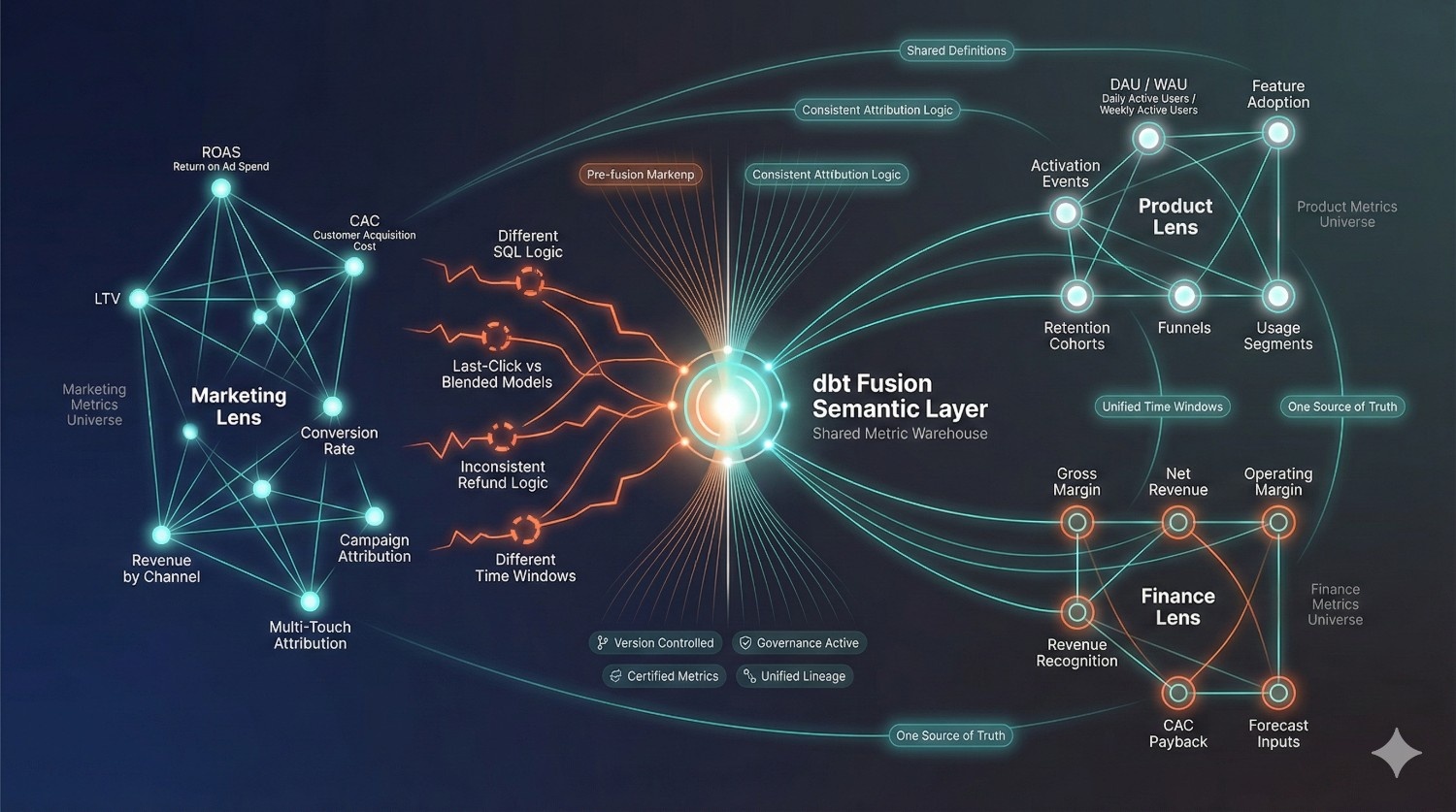
Every team inside a modern organization relies on metrics — but each team looks at the business through a different lens. Marketing cares about acquisition efficiency, Product cares about engagement and retention, Finance cares about margins and profitability. Without a centralized semantic layer, each team defines metrics independently, leading to fragmentation, misalignment, and internal conflict.
dbt Fusion’s Semantic Layer addresses this by enabling a shared metric layer, where every team consumes consistent, governed, and versioned metrics — tailored to their needs but rooted in the same definitions.
This transforms how departments collaborate and eliminates the data silos that historically weakened decision-making.
Marketing Needs ROAS (Return on Ad Spend)
Marketing teams measure:
- ROAS
- CAC
- LTV
- Lead-to-customer conversion
- Campaign attribution
- Revenue by channel
- Multi-touch attribution results
Without shared definitions, Marketing and Finance often disagree because:
- Marketing uses last-click attribution
- Finance uses blended CAC across channels
- Different time windows are applied
- Refund logic is inconsistent
With dbt Fusion:
- ROAS is defined once
- CAC is standardized with version control
- Attribution logic is embedded into the semantic layer
- Dimension slicing (channel, campaign, region) is consistent
- Marketing dashboards always match revenue reported by Finance
Marketing gets the agility of fast insights — without compromising accuracy or governance.
Product Needs Feature Adoption Metrics
Product teams rely on:
- Daily active users (DAU)
- Weekly active users (WAU)
- Feature adoption rates
- Activation events
- Retention cohorts
- Funnel completion metrics
- Usage trends across segments
These often break when:
- Event names change
- New product flows launch
- Dimensions evolve
- User schemas shift
dbt Fusion prevents breakage by:
- Enforcing contracts on user and event data
- Keeping cohort logic consistent
- Versioning retention and activation metrics
- Allowing Product to slice metrics safely by device, feature, geography
With a shared semantic layer, Product, Marketing, and Engineering finally see the same adoption and same retention numbers, reducing internal debates that can slow down roadmap decisions.
Finance Needs Gross Margin and Profitability KPIs
Finance teams depend on:
- Gross margin
- Net revenue
- Operating margin
- Deferred revenue
- CAC payback periods
- Customer lifetime value
- Forecasting inputs
- Revenue recognition logic
The challenge?
Finance requires stability, accuracy, and auditability — no last-minute surprises.
dbt Fusion helps by:
- Locking metric definitions with contracts
- Versioning revenue recognition logic
- Creating secure, role-based access to sensitive metrics
- Ensuring BI reports pull from certified sources
- Providing lineage from raw transactions → transformations → financial dashboards
Finance dashboards become reliable and repeatable, quarter after quarter.
All Teams Share the Same Metric Warehouse
Before the semantic layer, each department lived in its own analytics universe:
- Marketing dashboards contradicted Finance
- Product’s activation metrics didn’t match Marketing’s funnels
- SQL queries drifted across notebooks, BI tools, and datasets
- Teams argued more about numbers than decisions
With dbt Fusion, all teams rely on:
- One semantic definition of metrics
- One lineage graph
- One governance framework
- One caching layer
- One version history
- One certified metrics library
This means:
Marketing ↔ Product
- Activation events map cleanly to acquisition funnels
- Feature adoption connects with LTV and retention
- Campaign performance influences product roadmap priorities
Marketing ↔ Finance
- CAC, ROAS, and LTV always align
- Revenue attribution matches financial reporting
- Budget decisions are based on trustworthy numbers
Finance ↔ Product
- Product engagement maps to monetization metrics
- Feature adoption connects to revenue forecasting
- Financial models align with real user behavior
Analytics ↔ Everyone
- A single team defines, governs, and certifies metrics
- Everyone else consumes them confidently
This alignment dramatically accelerates decision-making across the organization.
In short:
dbt Fusion Semantic Layer becomes the collaboration engine for modern data-driven teams by providing:
- Shared definitions
- Controlled versions
- Cross-team consistency
- Secure access control
- Stable, certified metrics
- Transparent lineage
When Marketing, Product, Finance, and Leadership all operate from the same metric warehouse, the entire business becomes more aligned, more efficient, and more strategic.
Use Case 9: Native Integration with BI Tools
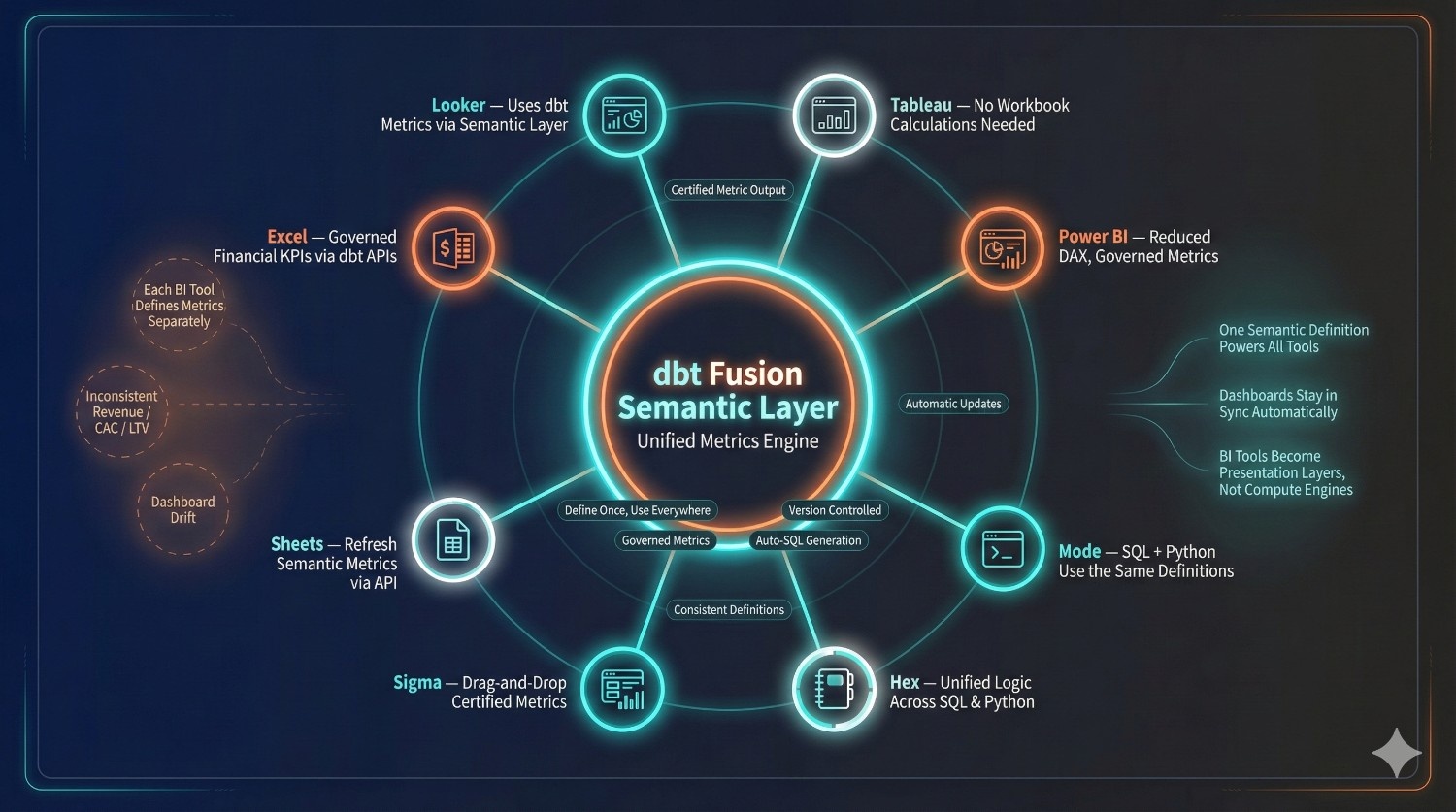
One of the most powerful benefits of the dbt Fusion Semantic Layer is that it doesn’t just standardize metrics inside dbt — it natively integrates them into every major BI tool. This eliminates the decades-old pattern of each BI tool defining its own metric logic, leading to misalignment and inconsistency across dashboards.
With dbt Fusion, metrics are defined once and consumed everywhere, with each BI tool connecting directly to the semantic layer rather than rebuilding logic locally.
This shifts BI tools away from metric calculation and toward presentation and exploration making analytics fast, consistent, and governed.
How the Semantic Layer Integrates with Major BI Tools
Below is a breakdown of how dbt Fusion plugs into each common BI environment and exposes metrics natively.
1. Looker + dbt Fusion
Looker has historically relied on LookML for defining metrics — a powerful but siloed system.
With dbt Fusion:
- Looker connects directly to the semantic layer
- LookML can reference dbt metrics as governed, reusable entities
- dbt’s semantic definitions override mismatched LookML logic
- Metric lineage and definitions become transparent inside Looker
- Dashboards consistently reflect dbt-governed metrics
This reduces duplication and ensures Looker dashboards display certified KPIs.
2. Tableau + dbt Fusion
Tableau dashboards often break because calculations are built inside the workbook.
With dbt Fusion:
- Tableau connects to semantic metrics via dbt SQL endpoints
- Analysts pull metrics like “revenue,” “retention,” or “CAC” using simple selectors
- No need to rewrite LOD expressions or aggregations
- The same tableau workbook works identically across teams
- If metric definitions evolve, Tableau can receive updated logic through the semantic layer
This creates governed Tableau dashboards without hidden logic buried inside worksheets.
3. Power BI + dbt Fusion
Power BI has historically required complex DAX formulas to define metrics.
With dbt Fusion:
- Power BI can query semantic metrics directly
- DAX complexity is reduced dramatically
- Metrics such as revenue, MRR, or CAC are pulled from dbt, not re-created in Power BI
- Row-level security integrates cleanly with dbt’s access rules
- Power BI dashboards stop drifting from Looker/Tableau dashboards
This is especially valuable for enterprise finance teams that rely heavily on Power BI.
4. Mode + dbt Fusion
Mode’s SQL + visual + notebook workflows align perfectly with dbt Fusion.
- Analysts can query metrics without writing complex SQL
- Python notebooks reference the same metric logic as SQL
- Dashboards adopt governed, consistent calculations
- Metric caching reduces warehouse cost for heavy Mode reports
Mode becomes a true analytics IDE powered by uniform metric definitions.
5. Hex + dbt Fusion
dbt Fusion Semantic Layer becomes the collaboration engine for modern data-driven teams by providing:
- Shared definitions
- Controlled versions
- Cross-team consistency
- Secure access control
- Stable, certified metrics
- Transparent lineage
When Marketing, Product, Finance, and Leadership all operate from the same metric warehouse, the entire business becomes more aligned, more efficient, and more strategic.
6. Sigma + dbt Fusion
Sigma is designed for spreadsheet-style exploration over cloud warehouses. With Fusion:
- Sigma users can drag and drop certified metrics
- Dimensions from dbt (e.g., channel, region, cohort) appear automatically
- No need for custom calculations inside Sigma
- Non-technical users get governed self-serve analytics
Sigma becomes a safe, governed, spreadsheet-like BI tool backed by certified metrics.
7. Google Sheets + dbt Fusion
Many operational teams still depend heavily on Sheets for:
- Campaign analysis
- Budgeting
- Weekly reporting
- CS & sales workflows
Fusion integrates through:
- dbt metric APIs
- Scheduled data exports
- Sheets plugins / connectors
Teams can refresh semantic metrics directly into Sheets, ensuring:
- Marketing doesn’t redefine ROAS
- Finance doesn’t manually compute gross margin
- Growth teams don’t rebuild LTV formulas
Sheets becomes a lightweight BI tool powered by governed metrics.
8. Excel + dbt Fusion
Excel remains a core reporting tool for finance and ops.
With dbt Fusion:
- Excel retrieves metrics from dbt APIs or ODBC connections
- Pivot tables can slice semantic metrics by standardized dimensions
- No manual formulas for ARR, MRR, CAC, or margin
- Finance reporting stays consistent with BI dashboards
This creates an Excel environment that is finally reliable and compliant.
How can Data Prism help?
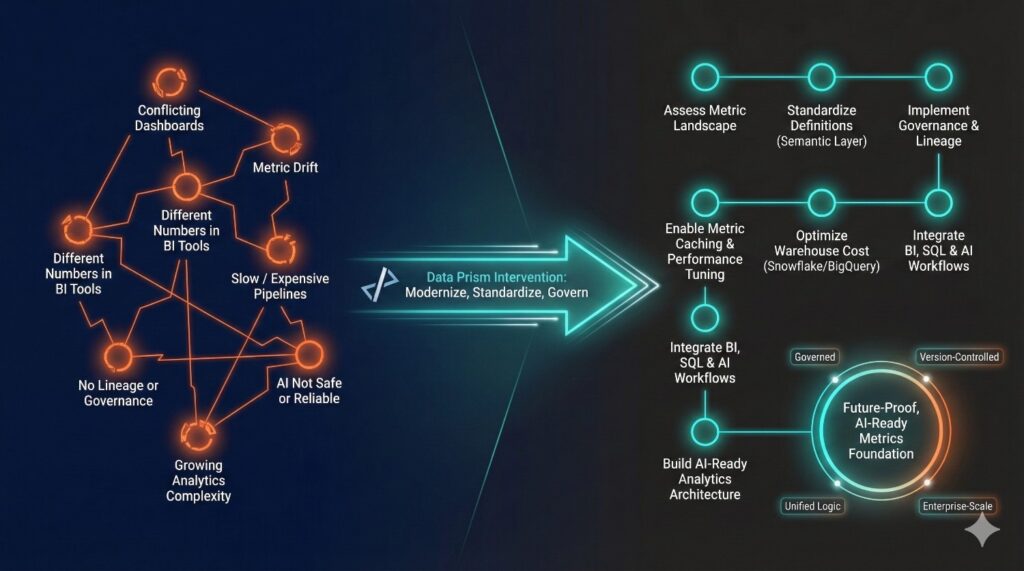
If your organization is experiencing:
- Conflicting dashboards
- Metric drift across teams
- BI tools producing different numbers
- Slow or expensive pipelines
- Lack of lineage or governance
- Difficulty enabling AI safely
- Rapidly growing analytics complexity
…it’s time to evaluate your metric ecosystem.
DataPrism can help.
We partner with engineering, analytics, and finance teams to:
- Assess your current metric landscape
- Standardize definitions using the Fusion Semantic Layer
- Implement governance, caching, and optimized warehouse patterns
- Integrate Fusion with your BI, SQL, and AI workflows
- Reduce your Snowflake/BigQuery spend
- Build a future-proof, AI-ready analytics foundation
Whether you’re upgrading from dbt Core or designing a new analytics architecture, DataPrism can guide you end-to-end.
Ready to standardize your metrics, cut analytics chaos, and enable AI-powered insights?
Let’s build your dbt Fusion Semantic Layer the right way.
Conclusion
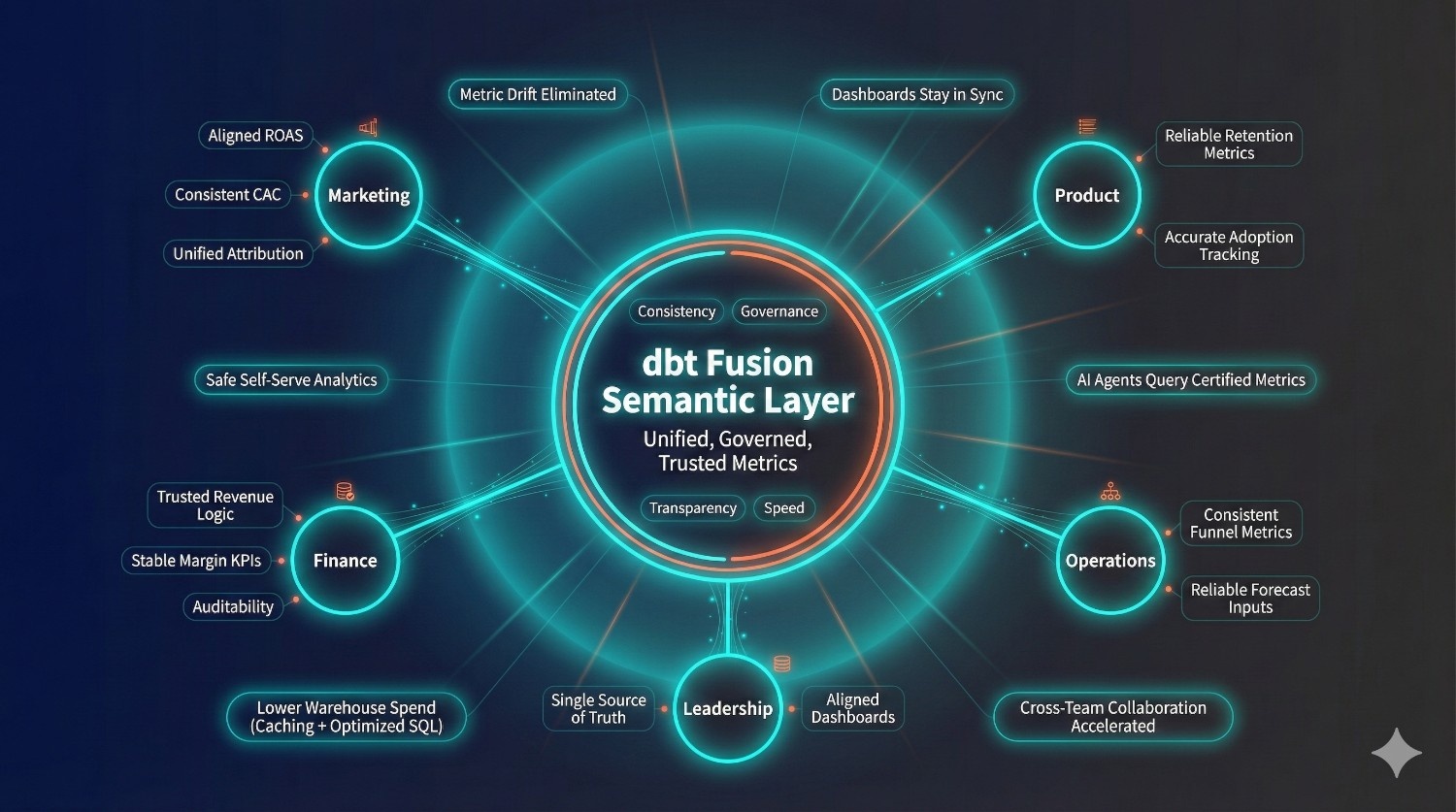
The dbt Fusion Semantic Layer represents a significant evolution in the modern data stack. It delivers all the things organizations have struggled to achieve for years: consistency, governance, transparency, and speed — without slowing down analytics teams or complicating operations.
By centralizing metric definitions, enforcing contracts, providing lineage, and integrating seamlessly with BI tools and AI systems, the semantic layer becomes the backbone of enterprise analytics. It ensures that Marketing, Product, Finance, Operations, and Leadership all operate from a single, trusted source of truth.
With Fusion:
- Metric drift disappears
- Dashboards align automatically
- Self-serve analytics becomes safe
- AI agents can query certified metrics without hallucinations
- Data quality issues surface early
- Warehouse spend drops through caching and optimized SQL
- Teams collaborate far more effectively
In short, the dbt Fusion Semantic Layer gives organizations what they’ve always needed: a governed, intelligent, and unified analytics layer.
Frequently Asked Questions
The new dbt Fusion Semantic Layer represents a substantial redesign rather than a minor incremental update.
Compared to the older semantic layer:
The semantic layer handles:
- Metrics: Moves from simple metric definitions to fully governed, versioned, and cached metrics.
- Performance: Replaces limited performance with a high-performance Rust engine and optimized SQL pushdown.
- Governance: Introduces strong governance through contracts, lineage, and access control instead of minimal oversight.
- BI Integrations: Expands from limited BI support to deep, native integrations with major BI and analytics tools.
- AI Support: Evolves from no AI support to being AI-ready with API-based metric querying.
- Usability: Shifts from a hard-to-operational system to a centralized, visualized, and governed experience.
In short:
The old semantic layer defined metrics.
The Fusion semantic layer operationalizes them across your entire stack.
In many cases, yes.
The semantic layer handles:
- Metric definitions
- Dimensions
- Relationships
- Aggregations
- Filtering logic
- Time-grain rules
This means BI tools no longer need to:
- Recalculate metrics
- Rebuild business logic
- Maintain custom LOD expressions
- Duplicate definitions across dashboards
LookML, Tableau calculations, and Power BI DAX become simpler and lighter — often only needed for visualization logic, not metric logic.
Metrics are best defined in dbt, while dashboards focus on visualization rather than redefining business logic.
Yes — this is one of the key benefits of dbt Fusion.
AI agents (like Kai Pro, ChatGPT, Copilot, Hex AI, or custom LLMs) can safely query metrics via:
- dbt’s Metrics API
- SQL endpoints
- Semantic query interfaces
Because the semantic layer:
- Prevents hallucinated SQL
- Ensures the AI uses the same metric definitions as BI tools
- Restricts access to sensitive metrics using RBAC
- Returns governed, consistent results
This makes dbt Fusion the foundation for safe, enterprise-grade AI analytics.
Yes — in many cases.
dbt Fusion reduces warehouse spend through:
1. Smart Metric Caching
Expensive metrics (e.g., LTV, ROAS, retention, attribution) are cached and reused.
2. Optimized SQL Generation
The Rust engine pushes down efficient SQL, minimizing scanned data.
3. Deduplication of Metric Logic
Instead of 50 dashboards recomputing revenue, the metric is computed once.
4. Contract-enforced models
Prevents inefficient schema changes and expensive joins.
Many teams report meaningful reductions in warehouse costs after implementing Fusion with proper governance and caching strategies.
Migration typically happens in four steps:
Step 1 — Audit Existing Metrics
Identify how metrics are defined across:
- BI dashboards
- SQL files
- Spreadsheets
- Python notebooks
- Data marts
Step 2 — Standardize Definitions in dbt
Create clear metric definitions using contracts, dimensions, and versioning.
Step 3 — Redirect Dashboards to Use Semantic Metrics
Tools like Tableau, Power BI, Looker, Mode, and Hex can query semantic metrics directly.
Step 4 — Deprecate Old Logic Safely
Use dbt Explorer to identify dashboards still using legacy logic and migrate them gradually.
DataPrism helps companies run this end-to-end migration with zero downtime.
Yes.
The dbt Fusion Semantic Layer is part of the new dbt Cloud architecture.
It relies on:
- The Rust engine
- Semantic APIs
- Built-in caching
- Explorer lineage
- BI integrations
dbt Core does not include the Fusion semantic capabilities.
If you want governed, AI-ready metrics with BI and API integration, dbt Cloud is required.
Yes — dbt Fusion supports both SQL and Python.
Query via SQL
You can send metric queries through dbt’s SQL interface or warehouse endpoints.
Query via Python
Python notebooks (e.g., Hex, Jupyter, Databricks) can call:
dbt.metrics.query(metric_name=”revenue”, time_grain=”month”, dimensions=[“channel”])
Both methods use the same governed definitions — ensuring consistency between:
- Data science models
- BI dashboards
- Ad hoc SQL
- AI assistants
- Financial reporting
No more re-implementing business logic across tools.