
Table of Contents
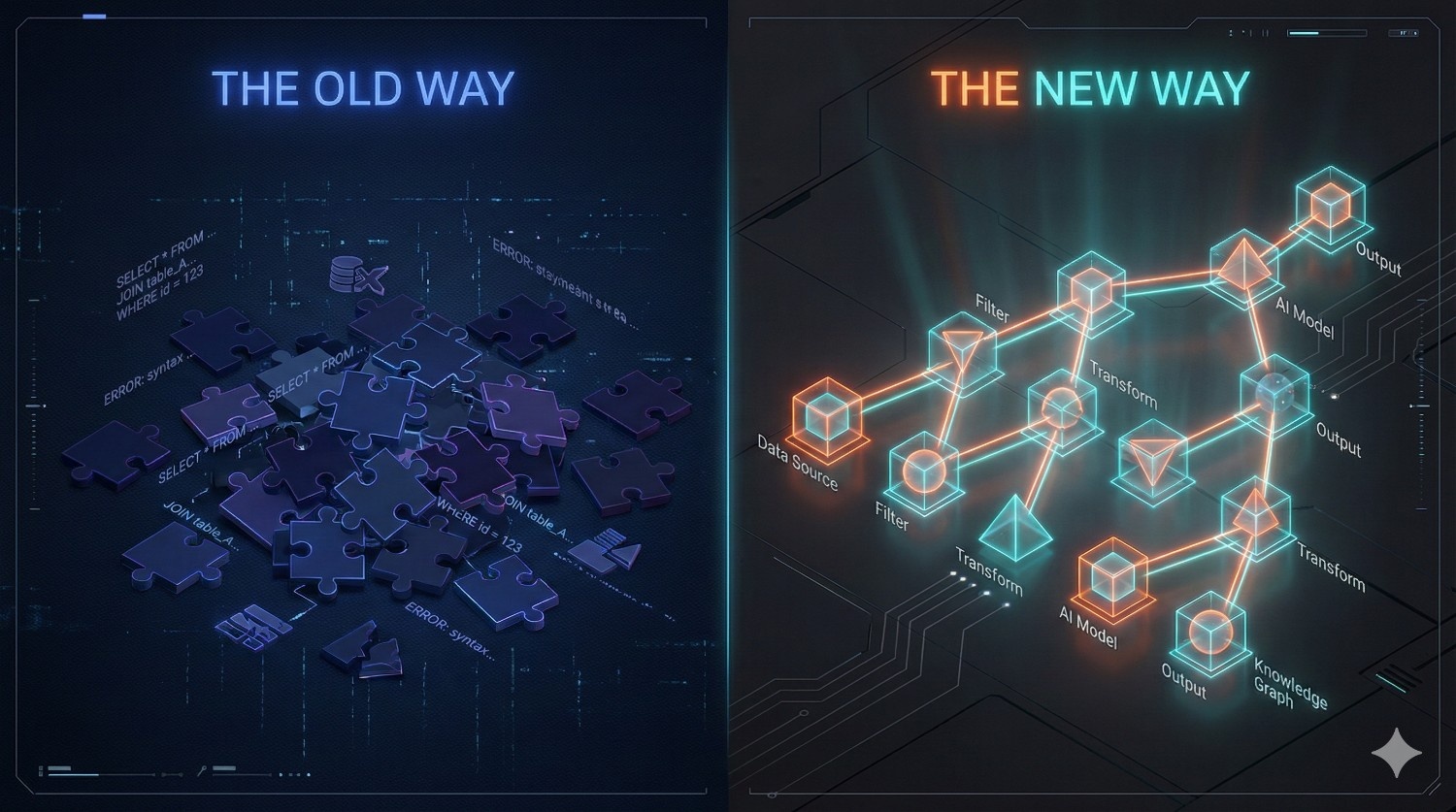
The "Find & Replace" Era is Over
For the better part of a decade, analytics engineers have lived in a world of templated SQL. We didn’t call it string manipulation—we called it “templating”—but the underlying reality of how dbt Core’s python + Jinja engine worked was largely text-based..
It was, effectively, a very fancy find-and-replace engine.
When you ran dbt compile, the engine focused on rendering templates and resolving dependencies,
not on deeply understanding SQL itself. It did not build a true semantic model of your queries.
It didn’t inherently understand that customer_id was a column, that users was a table, or that a specific CTE was never actually referenced in the final select statement. Instead, dbt rendered Jinja expressions, expanded macros, and produced valid SQL text and handed the resulting blob of text to your data warehouse.
It was the warehouse—Snowflake, BigQuery, or Redshift—that acted as the spellchecker.
The Hidden Fragility
This approach was revolutionary in 2016, but in 2025, it reveals a subtle fragility in modern analytics pipelines. It meant that a syntax error, a type mismatch, or an invalid column reference could travel all the way through orchestration pipeline. In many workflows, teams wait through orchestration and warehouse startup, only to have the run fail at the very last second because the warehouse rejected the SQL.
As a result code construction and code validation were effectively separated by network latency and compute costs.
Enter dbt Fusion: Parsing Intent, Not Just Text
The shift to the new Rust-based execution engine isn’t just about raw speed (While compilation is significantly faster). The real revolution is how dbt Fusion understands code.
It doesn’t just process text; it parses intent. By building a complete structural understanding of your code locally—before it ever leaves your laptop—Fusion ends the era of “compile and pray.” It understands the relationships between your data elements, not just the text patterns in your files.
From Strings to Structures (The AST)
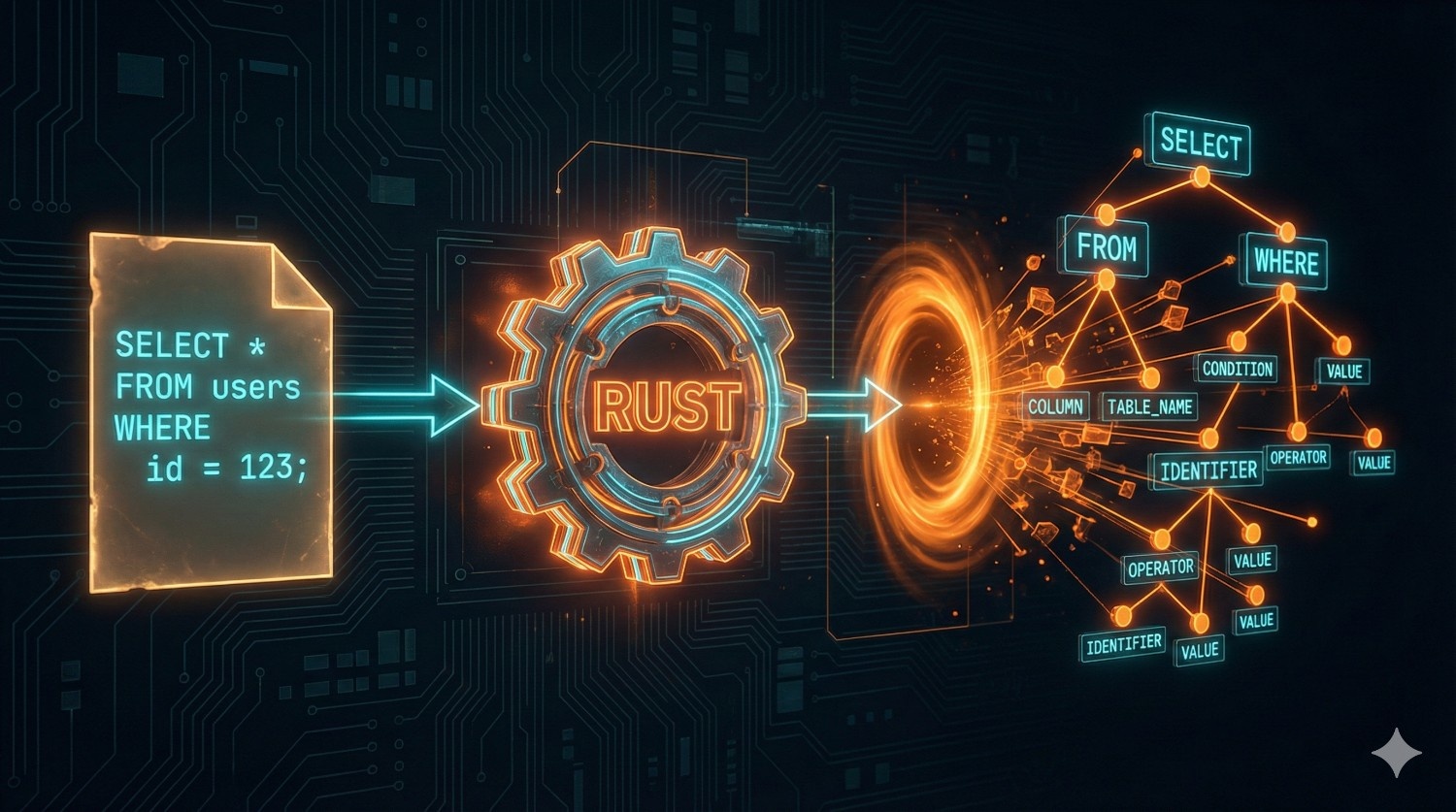
To understand why Fusion is different, we have to look at the engine block. The core innovation isn’t just that it’s written in Rust; it’s that it introduces an Abstract Syntax Tree (AST) to the transformation layer.
In simple terms, an AST is a tree representation of the abstract syntactic structure of source code. While that sounds academic, the practical implication for analytics engineering is massive. It marks the difference between a tool that “reads” your code and a tool that “comprehends” it.
For example, this SQL:
select user_id, email
from users
where is_active = true
Is not seen as text. It is seen as something like:
SelectStatements:
├── Columns: user_id, email
├── From: users
└── Where:
└── is_active = true
The Contrast: Text vs. Topology
In the legacy dbt Core environment, your model files were treated as flat text files mixed with Jinja. While dbt Core understood dependencies and configurations, it did not build a deep semantic representation of SQL itself.
The Old Way (dbt Core): When the legacy engine encountered a line like select * from {{ ref(‘users’) }}, it saw a string of characters. It did not analyze the SQL statement’s internal structure; that responsibility was deferred to the warehouse adapter.
The New Way (dbt Fusion): Fusion doesn’t just read the file; it parses it into a structured data object. It breaks the SQL down into its atomic components—statements, expressions, identifiers, and literals.
When Fusion looks at that same line of code, it doesn’t see a string. It sees a strictly typed data structure, similar to this:
- // Simplified representation of how Fusion “sees” your code
- Statement: Select {
- projections: [AllFields (*)],
- from: TableReference {
- target: “users”,
- relation_type: “model”,
- lineage_dependency: true
- },
- where_clause: None
- }
Why This Structure Changes Everything
Because Fusion holds this map (the AST) in memory, it possesses “Contextual Awareness.”
- It knows customer_id is a Column: can validate if that column actually exists in the upstream model before compiling.
- It knows users is a Reference: creates the lineage graph instantly by analyzing the tree, rather than using regex to scrape for ref() patterns
- It understands Scope: It knows that a variable defined in a CTE (Common Table Expression) is only valid within that specific query block, preventing scoping errors that usually only show up at runtime.
By moving from strings to structures, dbt Fusion turns your SQL from a passive script into an active, validated object.
Catching Errors Before the Warehouse
If there is one universal experience in analytics engineering, it is the “Wait and See” loop.
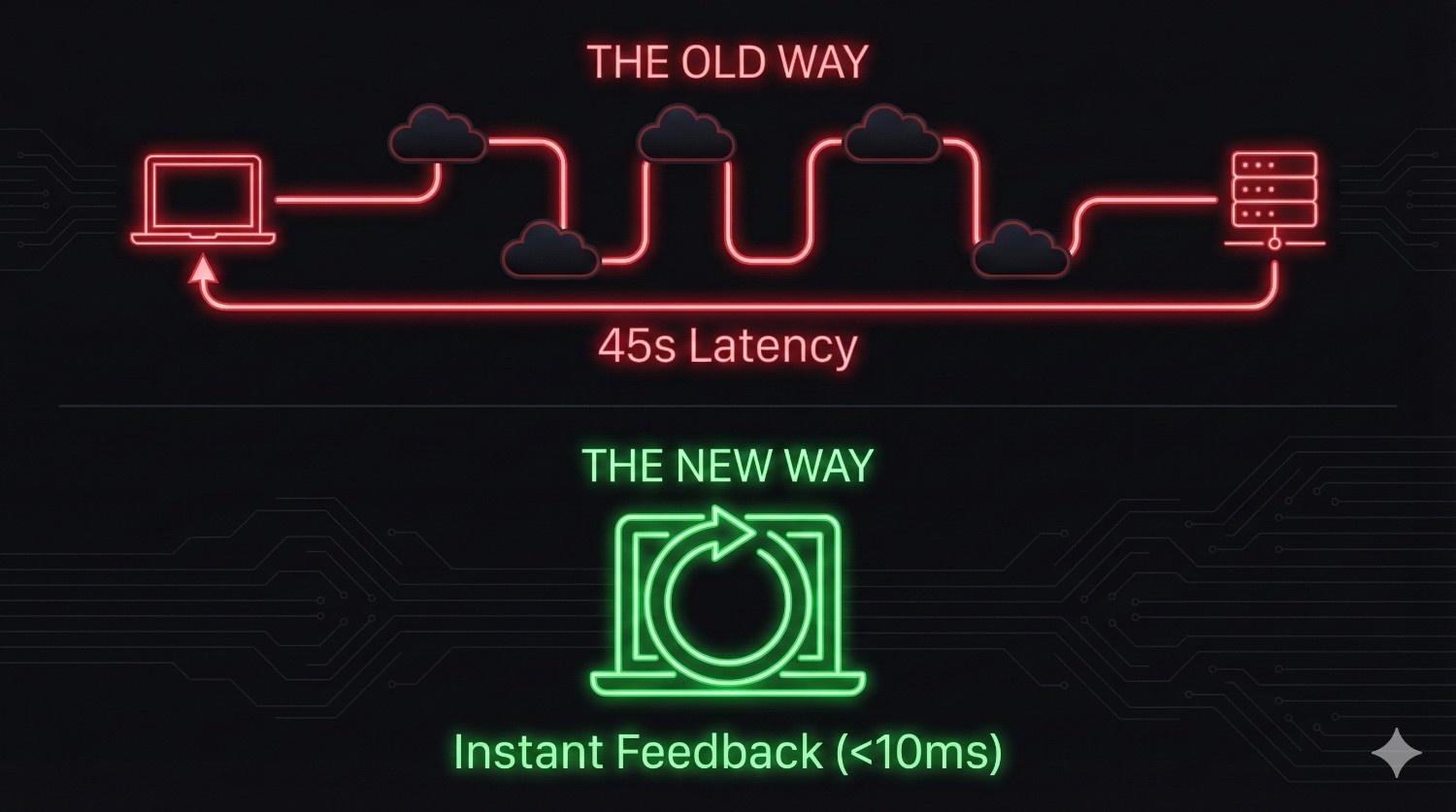
The ” Wait and See” Pain In the legacy workflow, the feedback loop was punished by network latency. You would write a complex model, hit dbt run, and then… wait. You’d wait for the Jinja to render. You’d wait for the HTTP request to travel to Snowflake or BigQuery. You’d wait for the warehouse to queue the query.
Some seconds later, the console would finally spit back red text: SQL compilation error: Column ’email’ does not exist.
This feedback delay—repeated dozens of times a day—doesn’t just cost time. It breaks developer flow.
The Fusion Fix: Static Analysis
Because dbt Fusion holds that AST (the map of your project) in memory, it performs Static Analysis. This is a concept borrowed from software engineering (think TypeScript or Rust compilers) and applied to data.
When you define a reference in Fusion, the engine checks the “contract” of the upstream model. It knows exactly what columns that model outputs and their data types. If you try to select a column that isn’t there, Fusion flags it locally and instantly.
Real-World Example
Imagine you are refactoring a users model and you decide to drop the PII column email.
- In dbt Core: You wouldn’t know you broke downstream models until you ran a full build of the downstream dependencies, or worse, until production broke.
- In dbt Fusion: The moment you remove email from the upstream file, Fusion’s static analyzer lights up every downstream model that references email with a red error line.
It stops you before you even hit Enter. The validation happens on your machine, in milliseconds, costing exactly $0.00 in compute credits.
Why Rust Matters
For years, the data community has loved Python for its accessibility and ecosystem. It was the perfect language to launch dbt and build a community. But as data maturity has accelerated, the scale of our projects has outpaced the capabilities of an interpreted language.
Raw Speed: Built for the Heavy Lifting Rust isn’t just a “faster Python”—it is a fundamentally different class of tool. It is a systems programming language designed for performance-critical applications (like browser engines and operating systems). While Python optimizes for developer ease, Rust optimizes for machine efficiency.
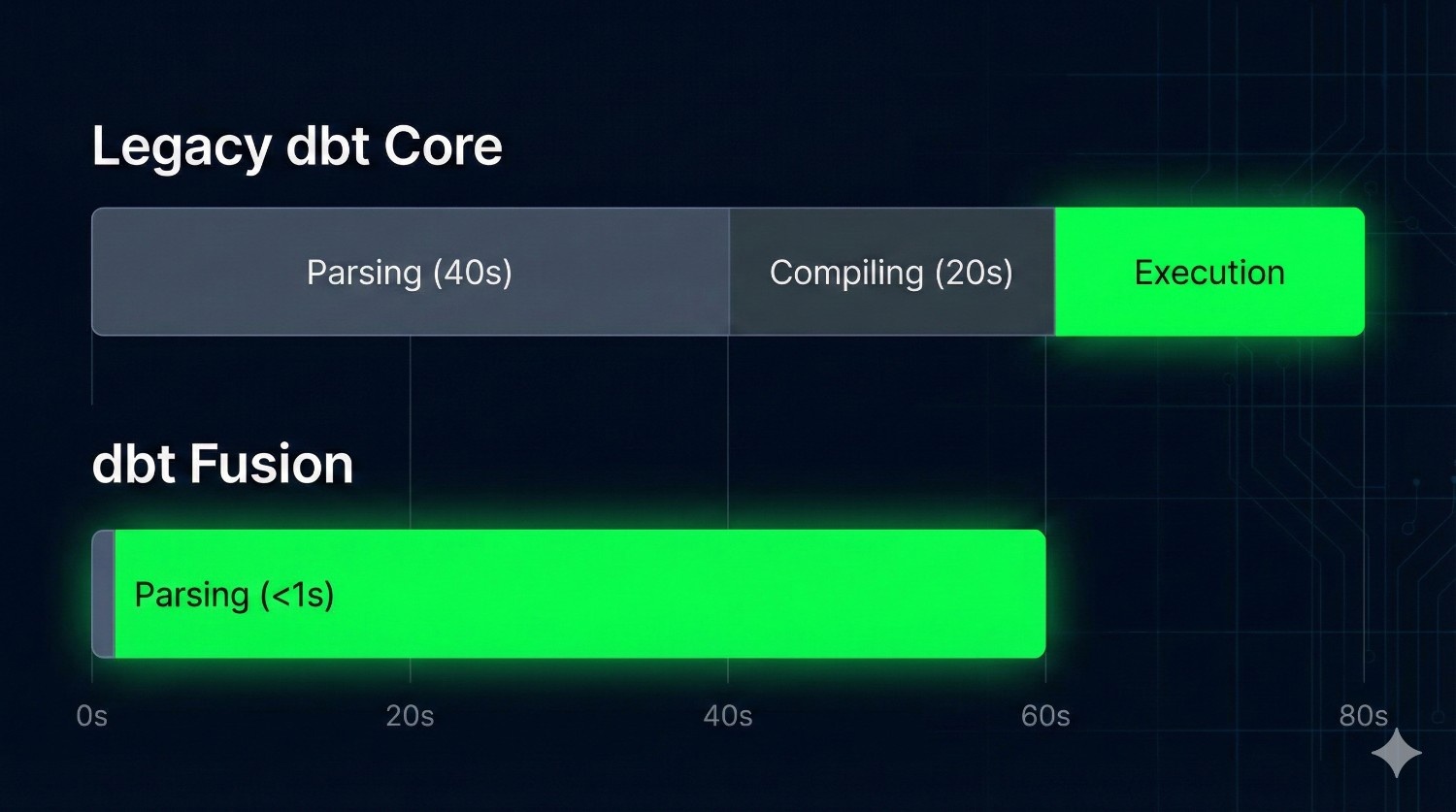
The Bottleneck: The “Spinning Wheel” The challenge was never warehouse execution—Snowflake and BigQuery handle that well. The bottleneck emerged before execution even began.. As organizations scaled to thousands of models, dbt Core had to had to:
- Read thousands of files from disk.
- Render the Jinja context for each one.
- Construct a massive DAG (Directed Acyclic Graph) in memory.
On large enterprise projects, this “pre-flight check” could take minutes. creating a noticeable delay before any SQL was run.
The Numbers: Milliseconds, Not Minutes dbt Fusion obliterates this bottleneck. Because Rust handles file I/O and memory management with near-zero overhead, it can parse that same 5,000-model project in milliseconds.
When parsing is fast, developers run checks more often, iterate more freely, and catch issues earlier. The friction of “waiting to validate your work” largely disappears, making analytics engineering feel closer to modern software development.
Your IDE Finally Wakes Up
We’ve talked about what happens when code runs, but what about when code is being written? For years, analytics engineers suffered from “Context Switching Fatigue.” You wrote code in your editor, but you had to check your compiled SQL in a target/ folder, and you had to check your warehouse console to verify column names.
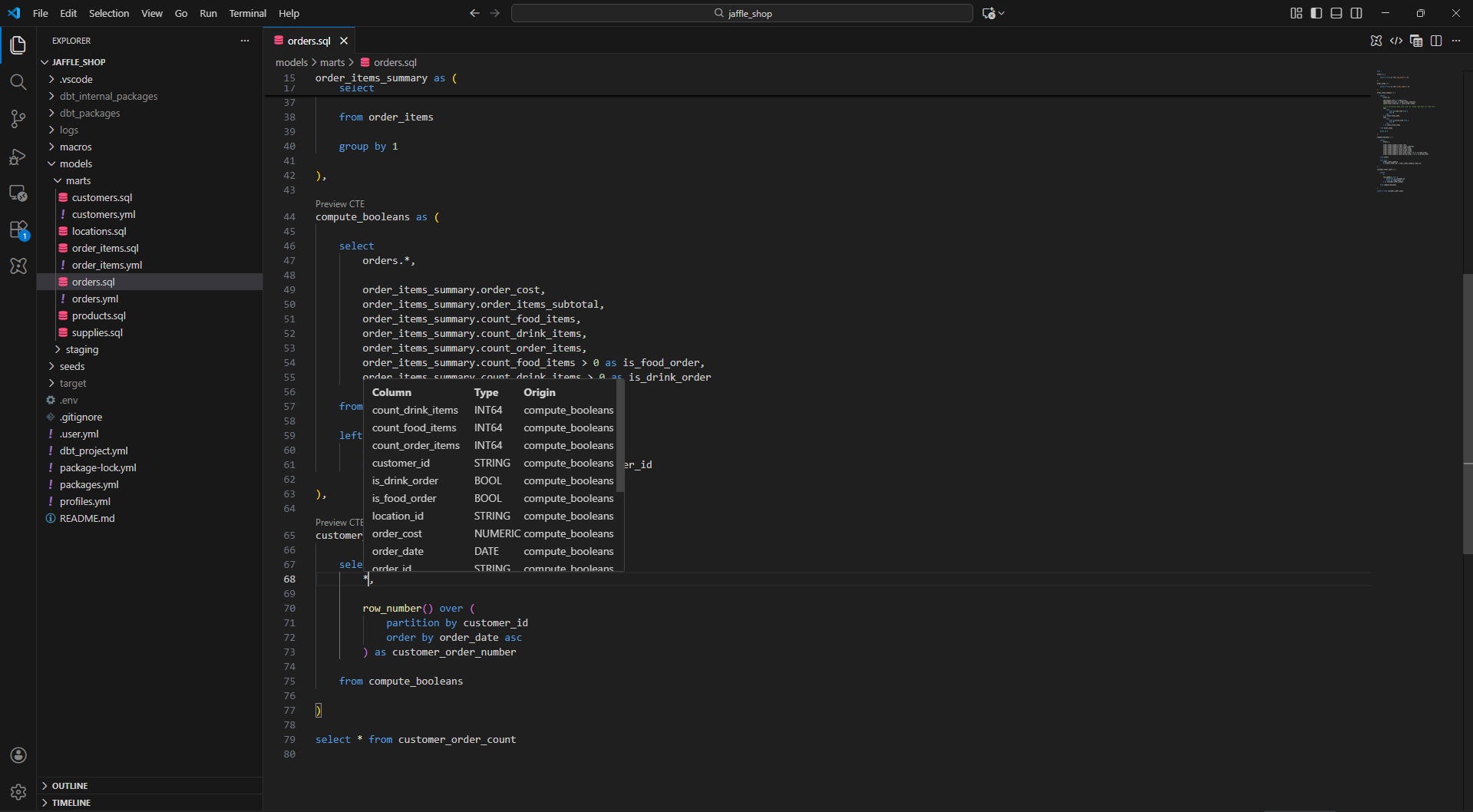
The technical backend (Rust/AST) we discussed earlier pays its biggest dividend here. Because the engine understands the code structure in real-time, it powers a fully functional Language Server Protocol (LSP).
The Brain Behind the Cursor
In the past, VS Code extensions for dbt were essentially text highlighters. They could color-code your SQL keywords, but they didn’t understand your project.
With Fusion, the Rust binary acts as a “Language Server.” It runs in the background, maintaining that Abstract Syntax Tree we discussed. This means your editor is no longer just displaying text; it is connected to a brain that understands the entire lineage of your project.
Features That Actually Work
This architectural shift enables the “Intelligence” features that software engineers have enjoyed for years:
- Go to Definition: No more hunting through the file tree to find an upstream model. You can Command+Click on ref(‘stg_payments’) and jump instantly to that file.
- Autocomplete that Trusts: When you type select user_, the editor doesn’t just guess words from the current document. It queries the AST, sees the upstream model’s schema, and confidently suggests user_id, username, and user_created_at.
- Real-Time “Squiggles”: The most valuable feature is the one you hope to see least. Red error squiggles appear under invalid references as you type, not after you run a command.
By closing the gap between “typing” and “validating,” Fusion keeps you in the flow state.
Conclusion
For years, analytics engineering relied on templating and deferred validation, with correctness enforced only at execution time.
dbt Fusion represents a shift toward structural understanding and earlier validation.
This isn’t just about faster runs. It’s about confidence—knowing that many issues can be identified before queries ever reach the warehouse, while still relying on the warehouse for final execution and semantics.
Try It on Your Current Project
The best part about Fusion is that it isn’t a “rip and replace” migration. Because it reads standard SQL, you can test the parsing speed on your existing project today.
- Step 1: Install the new “dbt Fusion” VS Code Extension.
- Step 2: Open your current dbt project.
- Step 3: Watch the parsing bar disappear before you can even blink.
The future of data transformation isn’t just faster—it’s smarter. And it’s already here.
Frequently Asked Questions (FAQ)
Before you make the switch, here are answers to the most common questions teams have about adopting the dbt Fusion engine.
Generally, no. Fusion is designed to work with standard SQL and most existing Jinja patterns. However, because Fusion is stricter than the legacy Python engine, it might catch latent bugs or ambiguous code that the old engine ignored. Think of it less as “breaking” your project and more as “finally revealing” issues that were already there
Asolutely not. You still write SQL and Jinja exactly as you always have. Rust is just the engine under the hood making it run faster and smarter. Your developer workflow remains focused on analytics code.
Python is fantastic for many things, but it hits performance ceilings with massive-scale string parsing and memory management. Rust is a systems-level language designed for raw speed, memory safety, and concurrency. Rust offers predictable performance, efficient memory usage, and strong concurrency guarantees, enabling faster feedback loops and earlier validation for large projects.required for the next generation of analytics, a fundamental architectural shift away from an interpreted language was necessary.
While dbt Labs hasn’t officially deprecated the Python engine, dbt Fusion is clearly the strategic path forward. All major new features, performance improvements, and IDE enhancements will be built on top of the Fusion engine. It is highly recommended to start planning your migration to future-proof your stack.