
Table of Contents

Introduction
Modern organizations operate in an always-on analytics environment. Data platforms no longer sit in the background generating periodic reports—they actively drive daily decisions across revenue, operations, and customer experience.
Executive dashboards influence forecasts and budgets.
Customer-facing analytics power live products.
Data pipelines feed applications, APIs, and machine learning models around the clock.
In this reality, even brief analytics downtime during a Snowflake migration can disrupt the business in visible and costly ways.
The Real Business Cost of Downtime
Downtime is not just a technical issue—it is a trust issue.
When dashboards break or metrics fluctuate unexpectedly:
- Stakeholders lose confidence in data accuracy
- Decision-making slows or becomes reactive
- Teams shift from strategic work to firefighting
- Customer-facing experiences may degrade
For revenue-critical or operational analytics, minutes of disruption can translate into delayed decisions, missed opportunities, or reputational damage. As data becomes embedded in core workflows, tolerance for downtime effectively disappears.
Why Snowflake Migrations Fail Without Structure
Snowflake’s architecture makes data movement appear deceptively simple. As a result, migrations are often approached as a copy-and-switch exercise rather than a controlled engineering program.
Common failure patterns include:
- Big-bang cutovers with no safe rollback
- Incomplete dependency mapping across BI, ML, and applications
- Rushed or unvalidated historical backfills
- Schema drift during long-running migrations
- Uncontrolled warehouse usage and cost spikes
These issues rarely stem from lack of skill. They stem from lack of a migration framework. Without structured Data Migration Consulting, teams operate reactively, discovering risks only after they impact production.
Who This Guide Is For
This guide is designed for leaders who own both technical outcomes and business continuity, including:
- CTOs responsible for platform reliability
- Heads of Data overseeing large Snowflake estates
- Analytics leaders managing critical dashboards and metrics
- Platform owners accountable for cost, governance, and uptime
For these roles, the question is no longer whether to modernize Snowflake—it is how to do so without interrupting the business.
The blueprint that follows is based on real-world Data Migration Consulting engagements, focused on zero-downtime execution, cost-aware design, and measurable risk reduction—so Snowflake environments can evolve while the business keeps moving.
Why Snowflake Migrations Fail — And Where Downtime Really Comes From
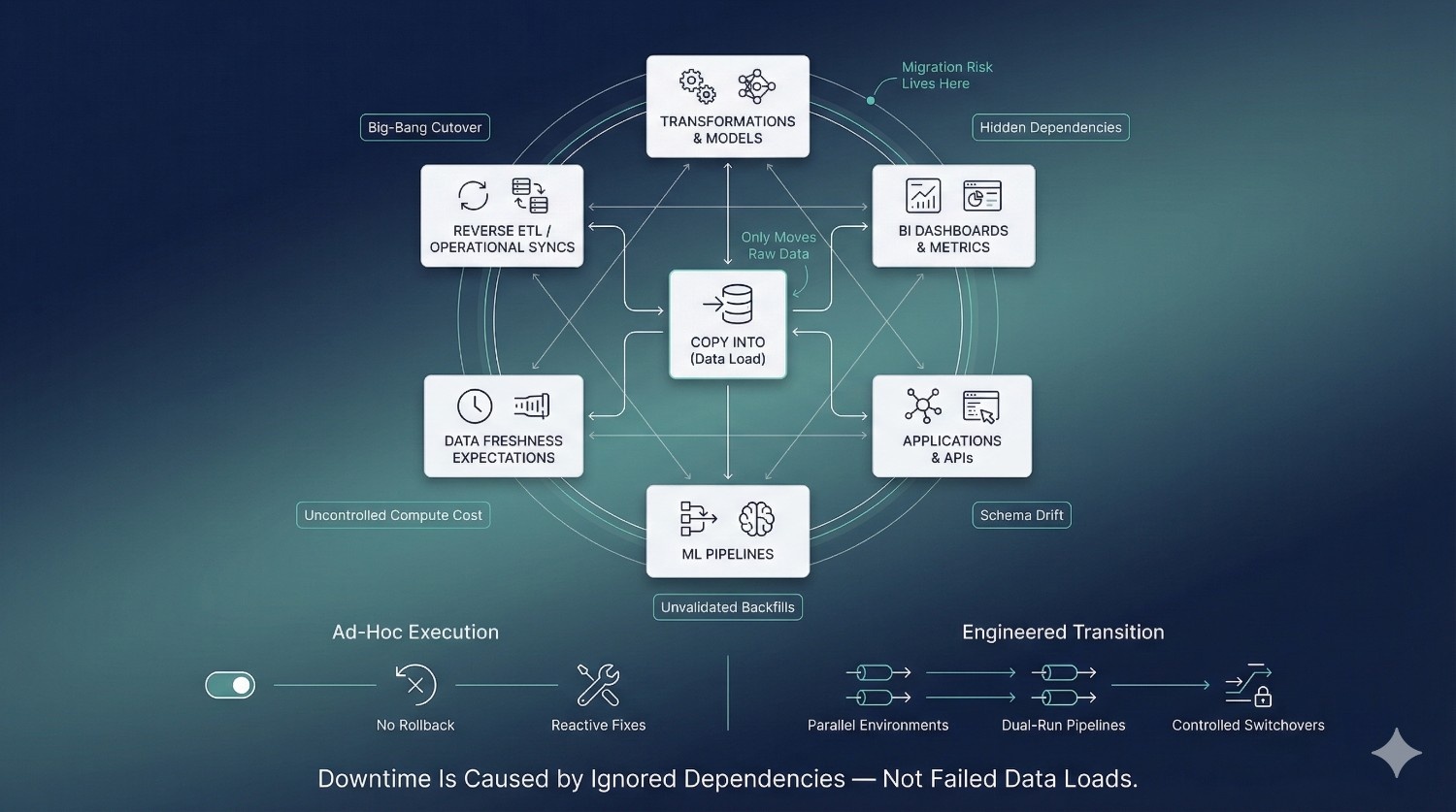
Most Snowflake migrations fail for a simple reason: they are treated as data movement exercises instead of risk-managed engineering programs. Snowflake makes loading data easy, but migration complexity rarely lives in the COPY INTO command itself. It lives in everything connected to the data.
The “COPY INTO” Fallacy
A common misconception is that Snowflake migration success is defined by whether data loads complete successfully. Teams assume that once tables are copied, the hard work is done.
In reality, COPY INTO only solves one narrow problem: moving raw data. It does nothing to account for:
- Downstream transformations and models
- BI dashboards and metric definitions
- Application dependencies and APIs
- Data freshness expectations
When migrations are designed around loading data instead of preserving behavior, downtime becomes inevitable.
Big-Bang Cutovers vs. Engineered Transitions
Many teams attempt a big-bang cutover—migrating everything at once and switching production in a single moment. This approach concentrates risk into one irreversible event.
When something breaks:
- There is no clean rollback
- Teams scramble to diagnose issues under pressure
- Stakeholders lose confidence immediately
Engineered transitions take the opposite approach. They spread risk over time using parallel environments, dual-run pipelines, and controlled consumer switchovers. This shift in mindset—away from “go-live day” and toward continuous validation—is a core principle of successful Data Migration Consulting.
Hidden Dependency Chains
Downtime often originates far from the tables being migrated.
A single Snowflake fact table may power:
- Dozens of BI dashboards
- Machine learning training pipelines
- Reverse ETL syncs into operational systems
- Application features and customer-facing analytics
These dependencies are rarely fully documented. When migrations ignore them, dashboards break, features fail silently, and data inconsistencies surface only after business users notice something is wrong. Dependency blindness is one of the most common—and expensive—migration failures.
Schema Drift and Backfill Failures
Snowflake migrations rarely occur in static environments. Source systems continue to evolve while migration is in progress.
Common issues include:
- Columns added or renamed mid-migration
- Data types changing without notice
- Historical backfills missing late-arriving data
- Incremental logic diverging from production pipelines
Without continuous validation, these issues slip through unnoticed and only surface post-cutover. Fixing them after the fact is significantly more disruptive than preventing them through structured migration controls.
Cost Explosions During Migration
Compute cost is another hidden failure mode. Migration workloads often run alongside production without isolation or monitoring.
This leads to:
- Competing warehouse usage
- Unplanned concurrency spikes
- Overnight credit consumption doubling or tripling
When cost controls are added reactively, it is usually after budgets have already been exceeded. Cost-aware execution must be designed in from the start—not patched in later.
The Business Consequences of Failed Migrations
When Snowflake migrations fail, the impact is immediate and visible:
- Broken dashboards and inconsistent metrics
- Emergency rollbacks and data reloads
- Loss of trust from executives and business teams
- Delayed roadmaps and extended stabilization periods
These outcomes are rarely caused by Snowflake itself. They are the result of underestimating migration risk.
Why Ad-Hoc Execution Fails Without Data Migration Consulting
Most internal teams are optimized for delivery, not one-time, high-risk transitions. Without proven playbooks, migrations become reactive, slow, and fragile.
Effective Data Migration Consulting introduces:
- Structured discovery and dependency mapping
- Parallel environments and rollback paths
- Continuous validation and cost controls
- A risk-first mindset focused on business continuity
The difference between downtime and continuity is rarely tooling. It is planning, sequencing, and discipline—applied consistently throughout the migration lifecycle.
What “Zero-Downtime” Actually Means in Snowflake
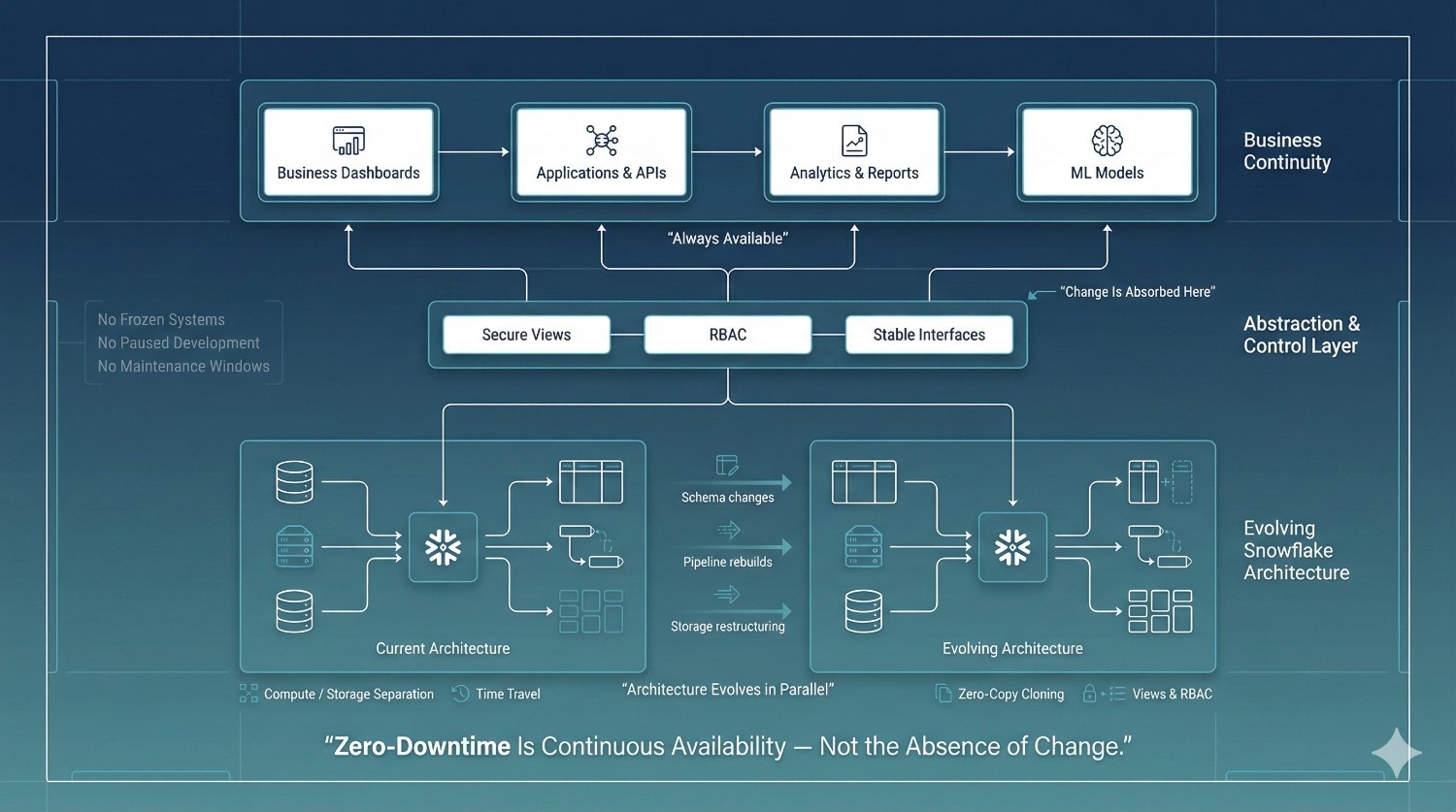
Zero-Downtime Does Not Mean “No Change”
A common misconception is that zero-downtime requires halting development or pausing upstream systems. In reality, Snowflake migrations almost always happen in live, changing environments.
During a zero-downtime migration:
- Data models evolve
- Pipelines are rebuilt or optimized
- Storage structures change
- New governance controls are introduced
The difference is that these changes are absorbed behind stable interfaces, not exposed directly to business users.
Continuous Availability vs. Frozen Systems
Zero-downtime is about continuous availability, not immobility.
Production systems continue to:
- Accept writes
- Serve reads
- Power dashboards and applications
There are no maintenance windows, no late-night cutovers, and no scheduled outages communicated to the business. From the outside, nothing appears to change—even though the underlying architecture is being replaced in parallel.
What Business Users Should Not Experience
When zero-downtime is executed correctly, business users should not see:
- Broken or delayed dashboards
- Changing metric definitions
- Data freshness gaps
- Conflicting numbers across reports
- Emergency messages explaining “migration issues”
For stakeholders, the migration should be invisible. The absence of disruption is the success metric.
Snowflake Capabilities That Enable Zero-Downtime
Snowflake provides several primitives that make zero-downtime migration achievable—but only when used intentionally.
Compute and storage separation
Snowflake allows migration workloads to run on isolated warehouses without impacting production queries. This enables parallel execution and precise cost control.
Time Travel
Time Travel provides a safety net for data recovery and validation. It allows teams to quickly investigate discrepancies and recover from mistakes without full reloads.
Zero-copy cloning
Cloning enables instant duplication of databases and schemas without additional storage cost. This makes it possible to create realistic parallel environments for testing, validation, and migration rehearsal.
Secure views and role-based access control (RBAC)
Views and RBAC allow stable abstraction layers between consumers and physical data. Underlying tables can change while access patterns remain consistent.
Why Tools Alone Are Insufficient
While Snowflake enables zero-downtime, it does not enforce it. These features can just as easily be misused to create fragile or overly complex migrations.
Without structure:
- Clones drift from production
- Views become inconsistent
- Validation is skipped
- Cost visibility is lost
Zero-downtime failures rarely stem from missing features—they stem from missing discipline.
Zero-Downtime as a Design Discipline
True zero-downtime is not a Snowflake feature; it is an architectural choice.
Effective Data Migration Consulting treats zero-downtime as a design principle applied across:
- Environment isolation
- Synchronization strategies
- Validation frameworks
- Consumer abstraction
- Rollback safety
When migrations are designed this way from the start, Snowflake becomes an enabler of continuity rather than a source of false confidence.
The Zero-Downtime Snowflake Migration Blueprint (Overview)
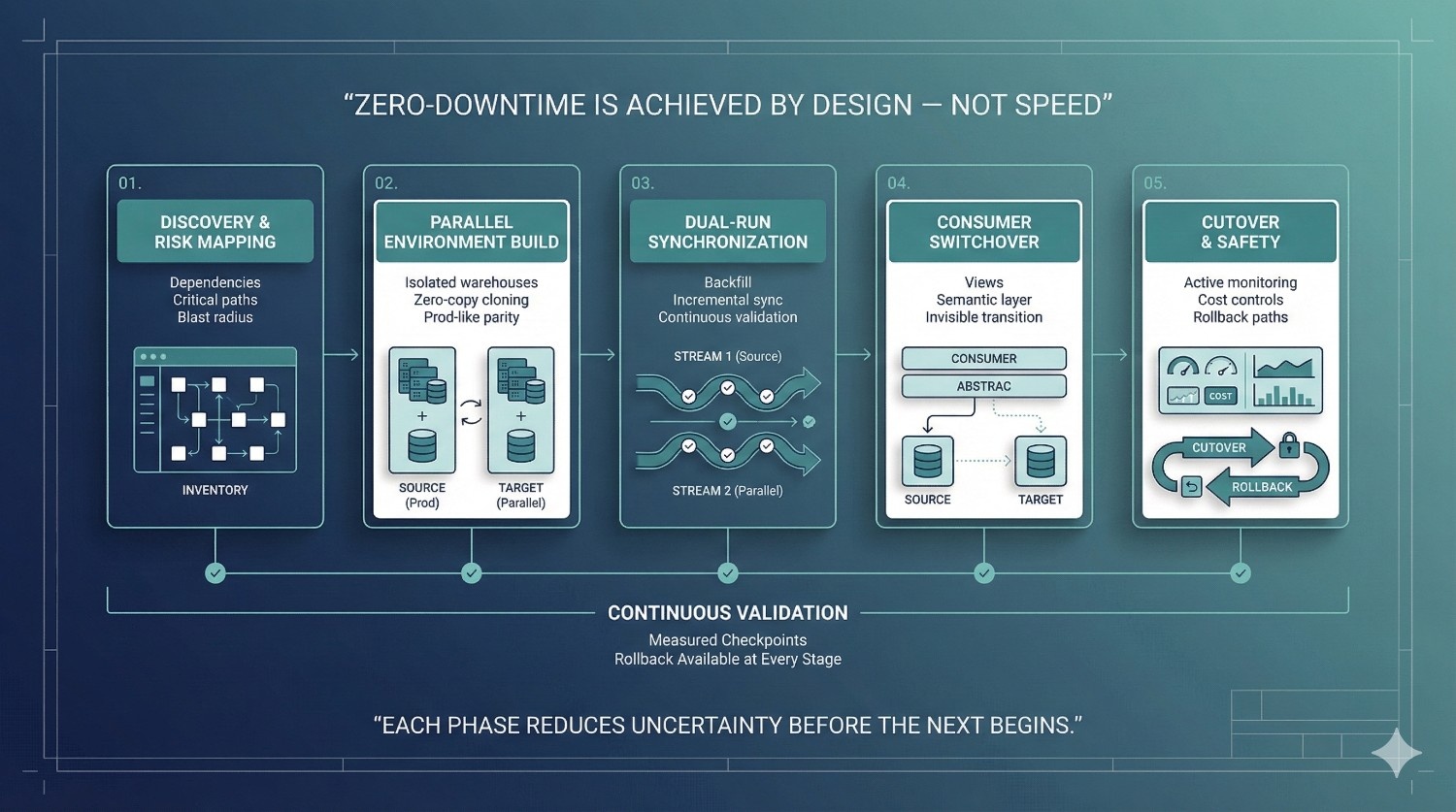
Zero-downtime Snowflake migrations do not succeed by accident. They succeed because risk is deliberately reduced, isolated, and validated at every stage. This requires moving away from one-off execution and toward a phased migration framework designed to protect business continuity.
Why Phased Execution Matters
Migration risk compounds when too many changes are introduced at once. Copying data, rebuilding pipelines, switching consumers, and optimizing cost in a single step creates a fragile system with no margin for error.
A phased approach breaks migration into controlled stages where:
- Each phase has a clear objective
- Risk is introduced incrementally, not all at once
- Validation happens continuously, not at the end
- Rollback paths remain available throughout
This structure transforms migration from a high-stakes event into a predictable engineering process.
How Data Migration Consulting Structures Risk
Effective Data Migration Consulting is fundamentally about risk management. Rather than assuming correctness, consulting-led migrations are designed to prove correctness before production impact.
Consultants structure risk by:
- Identifying critical datasets and consumers early
- Isolating migration workloads from production
- Running legacy and new systems in parallel
- Validating data, performance, and cost continuously
- Designing rollback strategies before cutover
This risk-first mindset ensures that failures are detected early—when they are cheap to fix and invisible to the business.
Overview of the Five Migration Phases
The zero-downtime Snowflake migration blueprint is organized into five deliberate phases:
- Discovery & Risk Mapping
Full visibility into Snowflake objects, dependencies, and business-critical paths. - Parallel Environment Build
Creation of isolated, production-like environments using cloning and dedicated warehouses. - Dual-Run Data Synchronization
Historical backfills combined with continuous incremental updates to keep environments in lockstep. - Consumer Switchover
Safe, invisible transitions using views and semantic abstractions instead of direct table changes. - Cutover, Monitoring & Rollback Safety
Controlled traffic shifts with active monitoring, cost controls, and tested rollback paths.
Each phase reduces uncertainty before moving to the next.
How This Blueprint Differs from DIY Migrations
DIY Snowflake migrations often focus on speed: move the data, switch the dashboards, and fix issues later. This approach relies heavily on heroics and institutional knowledge.
The consulting-led blueprint prioritizes:
- Design over urgency
- Validation over assumption
- Reversibility over finality
- Continuity over convenience
By applying structured Data Migration Consulting practices, organizations replace risk with predictability—and deliver migrations that the business barely notices.
Phase 1: Discovery & Risk Mapping
Every successful zero-downtime Snowflake migration starts with discovery. This phase is not administrative overhead—it is the foundation that determines whether the migration will be controlled or chaotic. Most migration failures can be traced back to gaps in discovery, where hidden dependencies and risks surface only after production is impacted.
Comprehensive Snowflake Object Inventory
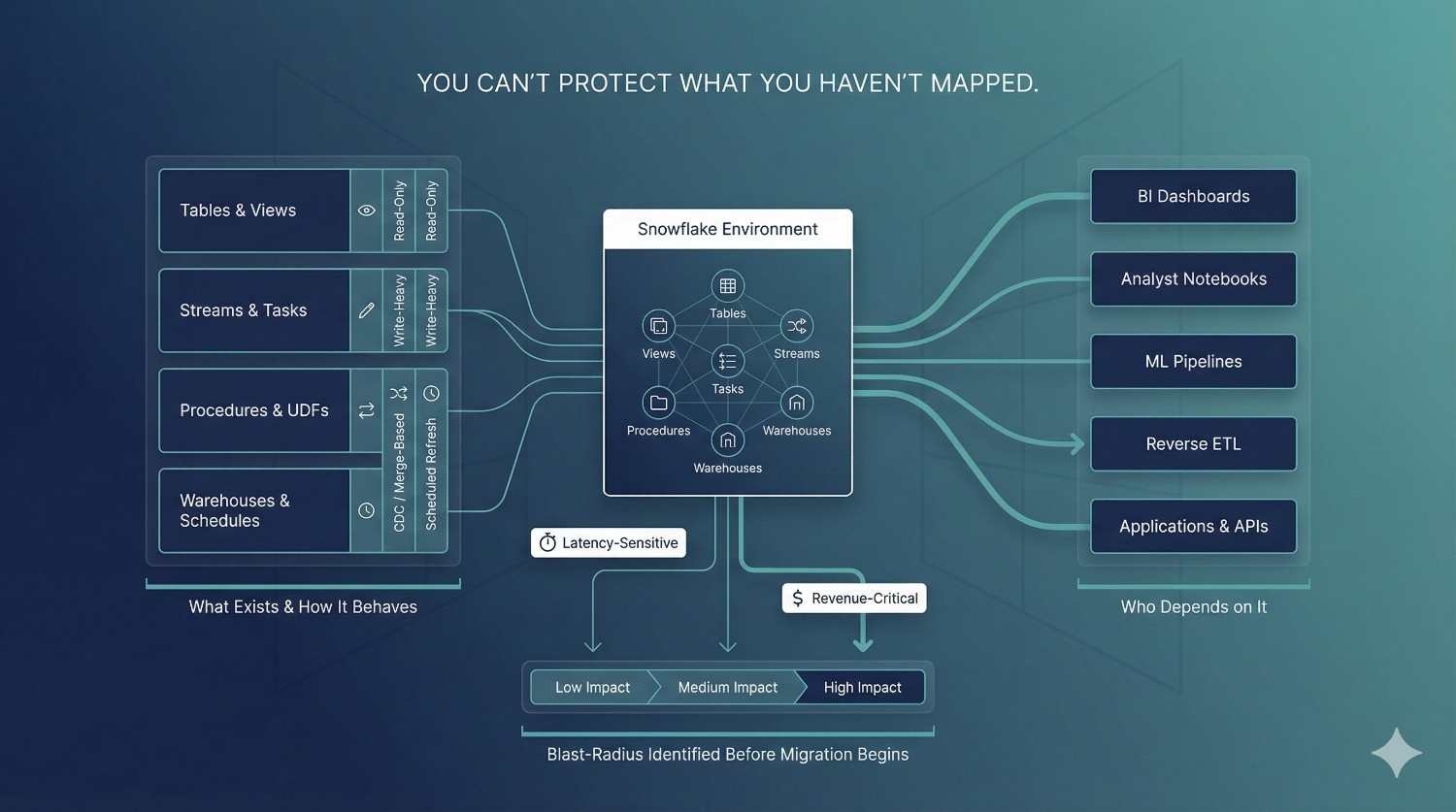
Discovery begins with a full inventory of the Snowflake environment. This goes far beyond identifying a list of tables.
A complete inventory includes:
- Tables and views (including nested and downstream dependencies)
- Streams and Tasks driving incremental pipelines
- Stored procedures and user-defined functions
- Warehouses and resource monitors
- Scheduled jobs and orchestration triggers
Without this visibility, teams migrate partial systems and unknowingly leave critical components behind.
Consumer Mapping Across the Data Ecosystem
Data rarely exists in isolation. Each Snowflake object serves multiple consumers, many of which sit outside the warehouse itself.
Effective discovery maps:
- BI tools such as Looker, Tableau, Power BI, and Sigma
- Notebooks and ad-hoc analyst workflows
- Machine learning training and inference pipelines
- Reverse ETL jobs syncing data into operational systems
- Application APIs and customer-facing features
This mapping ensures migrations protect not just data, but the workflows and experiences that depend on it.
Read and Write Behavior Classification
Not all datasets behave the same way. Treating them uniformly introduces unnecessary risk.
During discovery, objects are classified by behavior:
- Read-only or append-only datasets
- Write-heavy transactional tables
- Tables updated via merges or CDC
- Derived models refreshed on schedules
Understanding how data changes determines how it must be synchronized during migration—and where dual-run strategies are mandatory.
Identifying Latency-Sensitive and Revenue-Critical Workloads
Some workloads tolerate minor delays. Others do not.
Latency-sensitive or revenue-critical assets often include:
- Executive and operational dashboards
- Customer-facing analytics
- Real-time decisioning models
- Data products embedded in applications
These workloads are flagged as high risk and prioritized for additional safeguards, validation, and rollback protections throughout the migration.
Blast-Radius Analysis
A single failure can propagate widely.
Blast-radius analysis evaluates:
- Which downstream assets break if an upstream table is wrong
- How many dashboards, reports, or applications are affected
- Whether failures are visible to customers or executives
This analysis allows teams to sequence migrations safely and avoid triggering widespread disruption from a single misstep.
Why Discovery Is Where Most Migrations Fail
Discovery is often rushed or skipped entirely under schedule pressure. Teams rely on partial documentation or tribal knowledge, assuming issues will be resolved during cutover.
In practice, undiscovered dependencies are the leading cause of:
- Broken dashboards
- Silent data corruption
- Emergency rollbacks
- Extended stabilization periods
By the time these issues surface, they are expensive and highly visible.
Consulting Value: Turning Unknowns into Controlled Risks
This is where structured Data Migration Consulting creates immediate value. Experienced consultants approach discovery as a risk-reduction exercise, not a checklist.
The outcome of Phase 1 is:
- Clear visibility into what exists and who depends on it
- Explicit identification of high-risk migration paths
- A prioritized execution plan grounded in business impact
By converting unknowns into known, manageable risks, discovery sets the stage for a zero-downtime Snowflake migration that proceeds with confidence rather than hope.
Phase 2: Parallel Environment Build
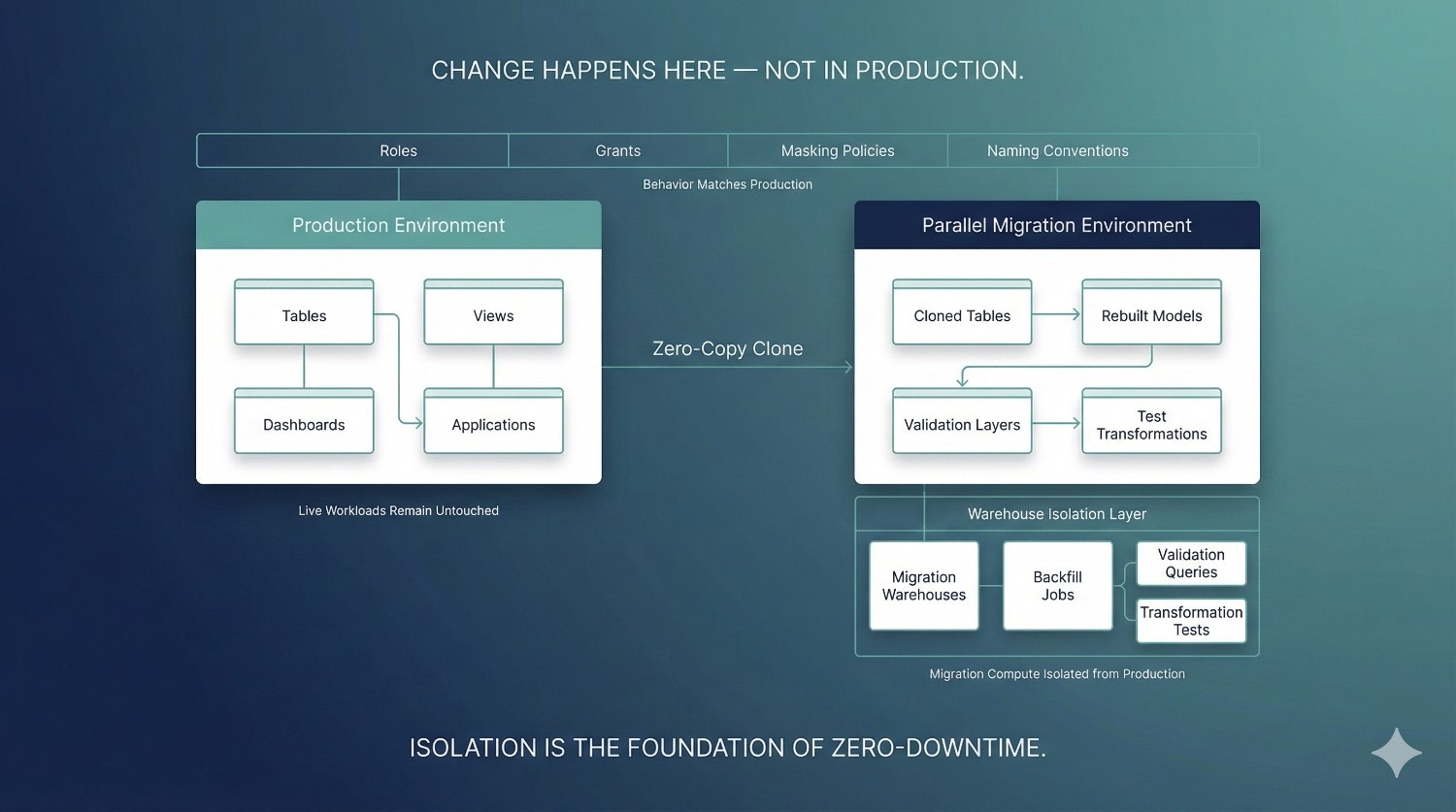
Zero-downtime Snowflake migrations are impossible without strong isolation. Phase 2 establishes that isolation by creating parallel environments that behave like production—but remain completely safe to change, test, and validate. This phase turns Snowflake’s flexibility into a controlled advantage rather than an operational risk.
Why Production Schemas Must Never Be Migration Targets
Migrating directly into production schemas exposes live workloads to partial loads, schema mismatches, and failed transformations. Even a small mistake can immediately impact dashboards, applications, and downstream systems.
Production schemas should remain stable and untouched during migration. All transformation, backfill, and validation work must occur outside the live execution path. This separation ensures that experimentation and iteration never leak into business operations.
Parallel Databases vs. Parallel Schemas
Parallel environments can be implemented using either separate databases or isolated schemas, depending on organizational standards and governance requirements.
Parallel databases provide the strongest isolation. They are ideal for large-scale migrations, multi-domain Snowflake estates, or situations where security boundaries must be strictly enforced.
Parallel schemas can be effective for smaller migrations or tightly governed environments where database-level separation is not feasible.
In both cases, the key principle is consistency: the parallel environment must mirror production structure closely enough that behavior remains predictable at cutover.
Zero-Copy Cloning Strategy
Snowflake’s zero-copy cloning capability is a cornerstone of parallel environment design.
Cloning allows teams to:
- Instantly duplicate large datasets without additional storage cost
- Preserve schema structure and metadata
- Create realistic testing environments in minutes
Clones serve as a baseline for migration work, enabling transformations and validation to occur on production-like data without risking production itself.
Warehouse Isolation and Cost Containment
Migration workloads should never compete with production queries.
Dedicated virtual warehouses are provisioned exclusively for:
- Historical backfills
- Incremental synchronization
- Validation and reconciliation
- Transformation testing
This isolation prevents performance degradation and makes migration spend fully observable.
Auto-suspend and auto-resume settings ensure warehouses consume credits only when actively running, preventing idle cost bleed during long migration phases.
Environment Parity: Roles, Grants, and Masking Policies
A parallel environment is only useful if it behaves like production.
To achieve this, teams replicate:
- Role hierarchies and grants
- Row-level and column-level security
- Data masking policies
- Naming conventions and access patterns
Any mismatch here creates hidden risk during consumer switchover. Environment parity ensures that access behavior remains consistent when views or semantic layers are repointed to the new environment.
Naming Conventions and Future Maintainability
Parallel environments are not temporary throwaways. Poor naming choices lead to confusion, technical debt, and post-migration cleanup work.
Clear, intentional naming:
- Distinguishes legacy and target environments
- Supports future migrations or re-architecture
- Improves long-term operability and governance
This discipline reduces friction not just during migration, but across the Snowflake lifecycle that follows.
Consulting Insight: Isolation Is the Foundation of Zero-Downtime
Experienced Data Migration Consulting teams treat isolation as non-negotiable. Without it, every migration step carries production risk.
By enforcing parallel environments, dedicated warehouses, and strict access parity, teams gain freedom to iterate, validate, and recover—without business disruption. Isolation is what transforms Snowflake’s architectural power into a reliable zero-downtime migration strategy.
Phase 3: Dual-Run Data Sync Strategy
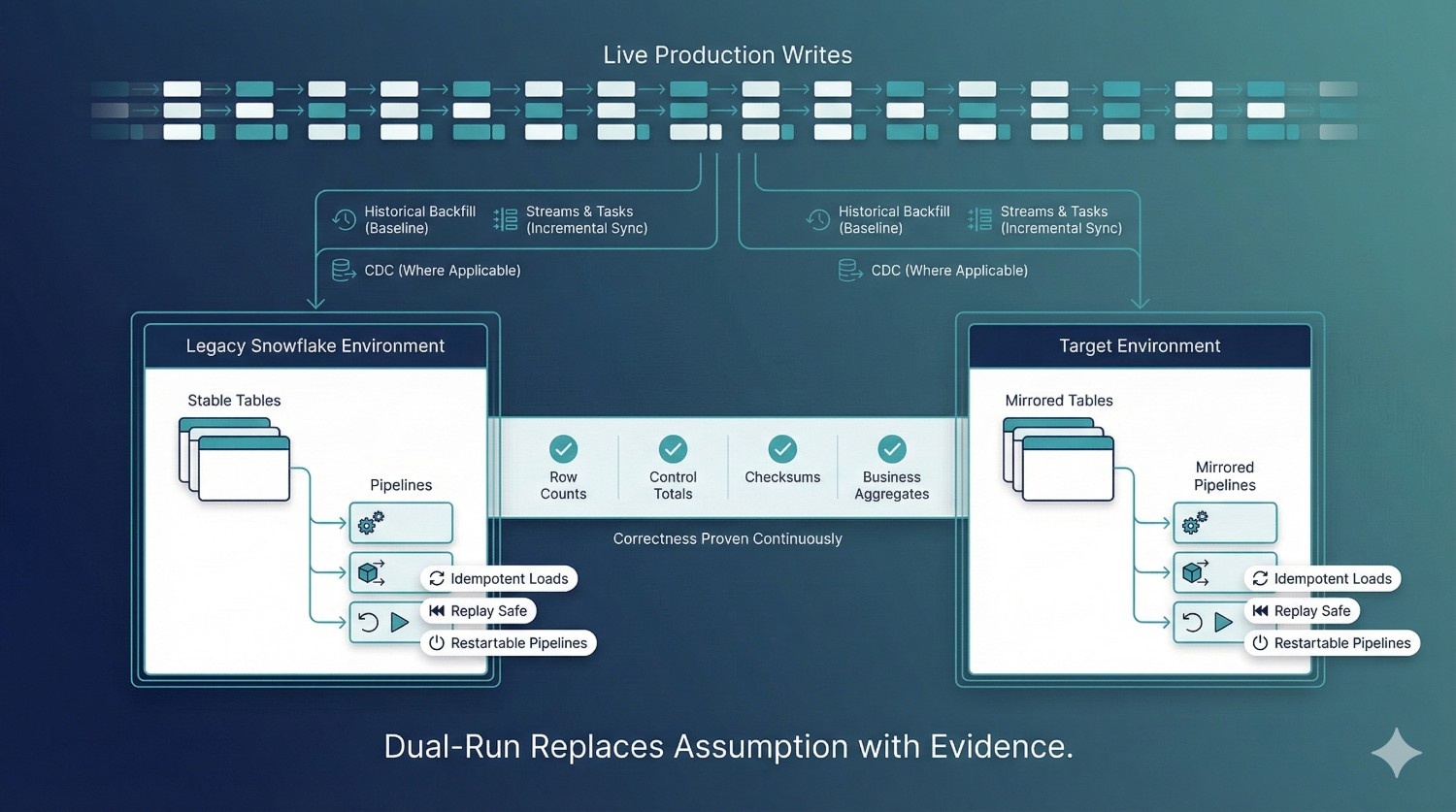
This phase is where zero-downtime migration becomes real. Rather than stopping production writes or relying on a single cutover moment, a dual-run data synchronization strategy keeps both the legacy and target Snowflake environments continuously aligned. In enterprise environments, this is the only approach that reliably protects data integrity while the business remains live.
Historical Backfill Strategy
Dual-run begins with a complete historical backfill into the parallel environment. This establishes a full baseline of existing data before incremental changes are applied.
Effective backfills are:
- Executed in controlled batches to avoid warehouse saturation
- Designed to handle late-arriving and slowly changing data
- Logged and restartable to recover cleanly from interruptions
Backfills are treated as engineering workflows, not one-time loads. Progress, performance, and cost are monitored throughout execution.
Incremental Sync with Streams and Tasks
Once the historical baseline is in place, incremental synchronization keeps both environments up to date.
Snowflake Streams capture inserts, updates, and deletes as they occur, while Tasks apply these changes on a defined schedule. This enables near-real-time synchronization without pausing production workloads.
Key design principles include:
- Clear separation between backfill and incremental logic
- Predictable task scheduling to control latency and cost
- Explicit error handling and retry behavior
When implemented correctly, Streams and Tasks allow migration pipelines to run quietly in the background while production continues uninterrupted.
CDC-Based Dual Ingestion Where Applicable
For upstream systems that already support change data capture, dual ingestion may occur before Snowflake entirely.
In these cases:
- CDC feeds both legacy and target environments in parallel
- Migration complexity shifts upstream, reducing Snowflake-side logic
- Cutover risk is further reduced by proving parity at ingestion time
This approach is especially effective for high-volume transactional systems where latency and accuracy are critical.
Idempotency and Replay Safety
Every migration pipeline must be safe to re-run.
Idempotent design ensures that:
- Replayed batches do not create duplicates
- Partial failures can be retried without corruption
- Pipelines can be paused, resumed, or reprocessed safely
Replay safety is essential during long migration windows, where retries and corrections are inevitable. Without it, even small failures can force full reloads and extended downtime.
Continuous Validation During Dual-Run
Dual-run without validation is false confidence. Continuous validation runs alongside synchronization to prove correctness over time—not just at the end.
Common validation techniques include:
- Row counts to confirm completeness
- Control totals for key numerical fields
- Checksums to detect silent data divergence
- Business aggregates that reflect how data is actually consumed
Validation discrepancies are investigated immediately, while rollback and correction are still low-risk.
Why Dual-Run Is Non-Negotiable in Enterprise Data Migration Consulting
Enterprise Snowflake environments are too interconnected to rely on single-event cutovers. Without dual-run, correctness is assumed rather than proven.
Experienced Data Migration Consulting treats dual-run as mandatory because it:
- Eliminates guesswork at cutover
- Surfaces data issues early and invisibly
- Preserves write continuity and data integrity
- Allows migrations to proceed without business disruption
In practice, dual-run is the difference between hoping a migration works and knowing it does.
Phase 4: Consumer Switchover Without Breaking Anything
In most Snowflake migrations, data movement is not what causes outages—consumer switching is. Dashboards, applications, machine learning jobs, and downstream systems are often tightly coupled to specific tables, schemas, or database names. When these connections are changed directly, even small mismatches can cascade into visible failures.
This phase focuses on switching consumers safely, without forcing coordination across dozens of teams or breaking production workloads.
Why Consumers—not Data—Cause Outages
Tables can be migrated in parallel without impact. Consumers cannot.
Outages typically occur when:
- BI tools are repointed directly to new tables
- Applications expect unchanged schemas or column behavior
- Metric definitions drift during migration
- Freshness or latency expectations are violated
The more consumers involved, the higher the coordination cost—and the greater the risk of error during cutover.
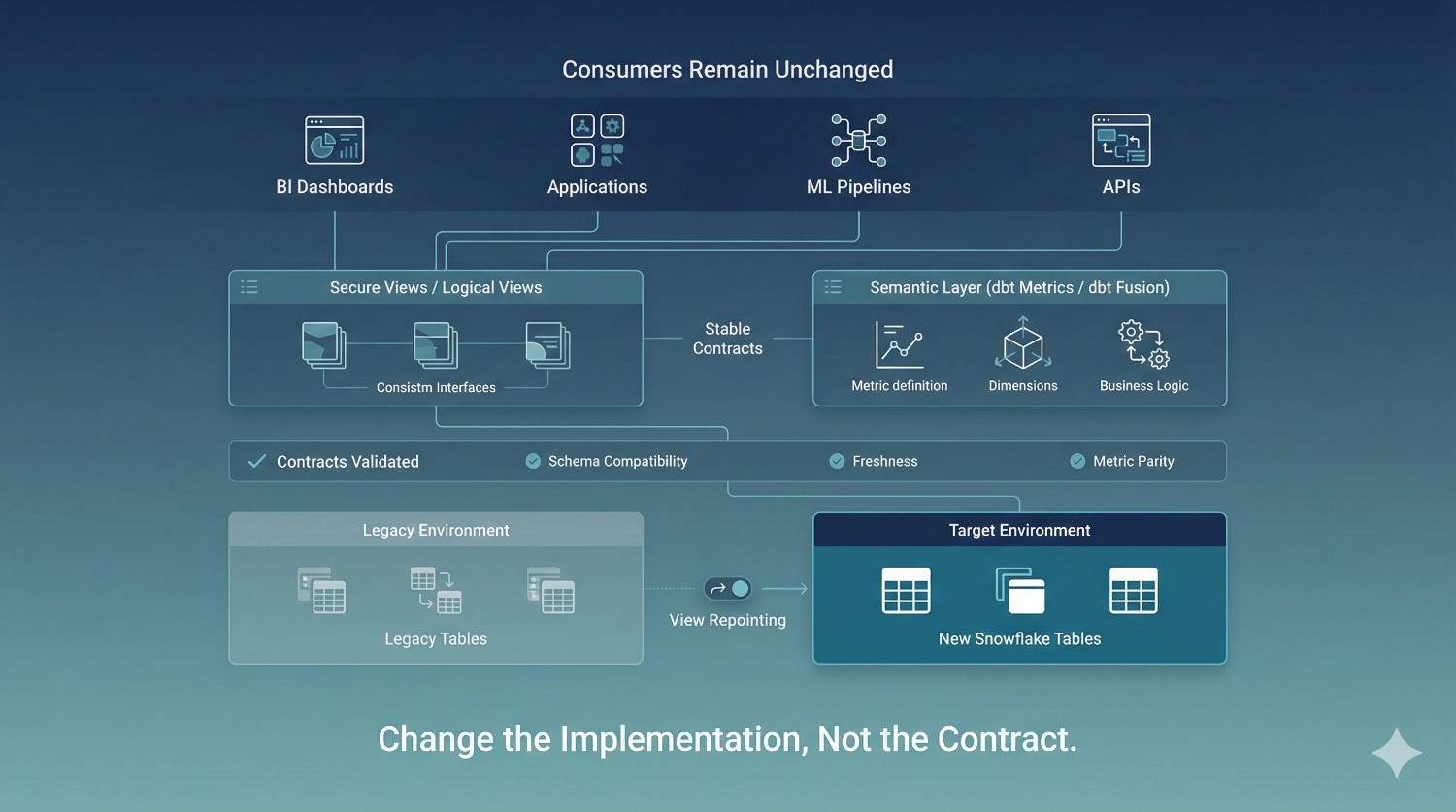
Views as Stable Contracts
Views act as stable interfaces between consumers and physical data. Instead of connecting dashboards or applications directly to tables, views encapsulate logic and shield consumers from change.
During migration:
- Legacy tables continue to power views initially
- Parallel tables are validated behind the scenes
- Views are repointed to the new environment once parity is proven
From the consumer’s perspective, nothing changes. The contract remains intact even as the underlying implementation shifts.
Semantic Layers as Migration Abstractions
For metrics-driven organizations, semantic layers provide an even stronger abstraction.
Using tools such as dbt metrics or the dbt Fusion semantic layer:
- Business definitions remain centralized and consistent
- Metric logic is decoupled from physical tables
- Dashboards switch data sources without modification
Semantic layers prevent metric drift during migration and eliminate the need to manually update hundreds of reports.
Contract-Based Validation Before Switchover
Before any consumer traffic is redirected, contracts are explicitly validated.
Validation checks typically include:
- Schema compatibility and column-level consistency
- Data freshness and update latency
- Metric outputs and aggregate values
Only when contracts are satisfied does switchover occur. This ensures consumers see the same—or better—results after migration.
Zero-Touch BI and Application Continuity
When abstraction is used correctly, consumer teams do not need to take action.
Dashboards continue to load.
Applications continue to query data.
ML pipelines continue to run.
The migration completes without coordinated releases, mass communication, or emergency fixes. For business stakeholders, the transition is invisible.
Consulting Lesson: Abstraction Beats Coordination
Attempting to coordinate dozens of consumer teams during cutover is fragile and slow. Experienced Data Migration Consulting replaces coordination with abstraction.
By enforcing views and semantic layers as stable contracts, migrations become safer, faster, and far less disruptive. Abstraction is what allows Snowflake environments to evolve without breaking the systems—and people—that depend on them.
Phase 5: Cutover, Monitoring & Rollback Safety
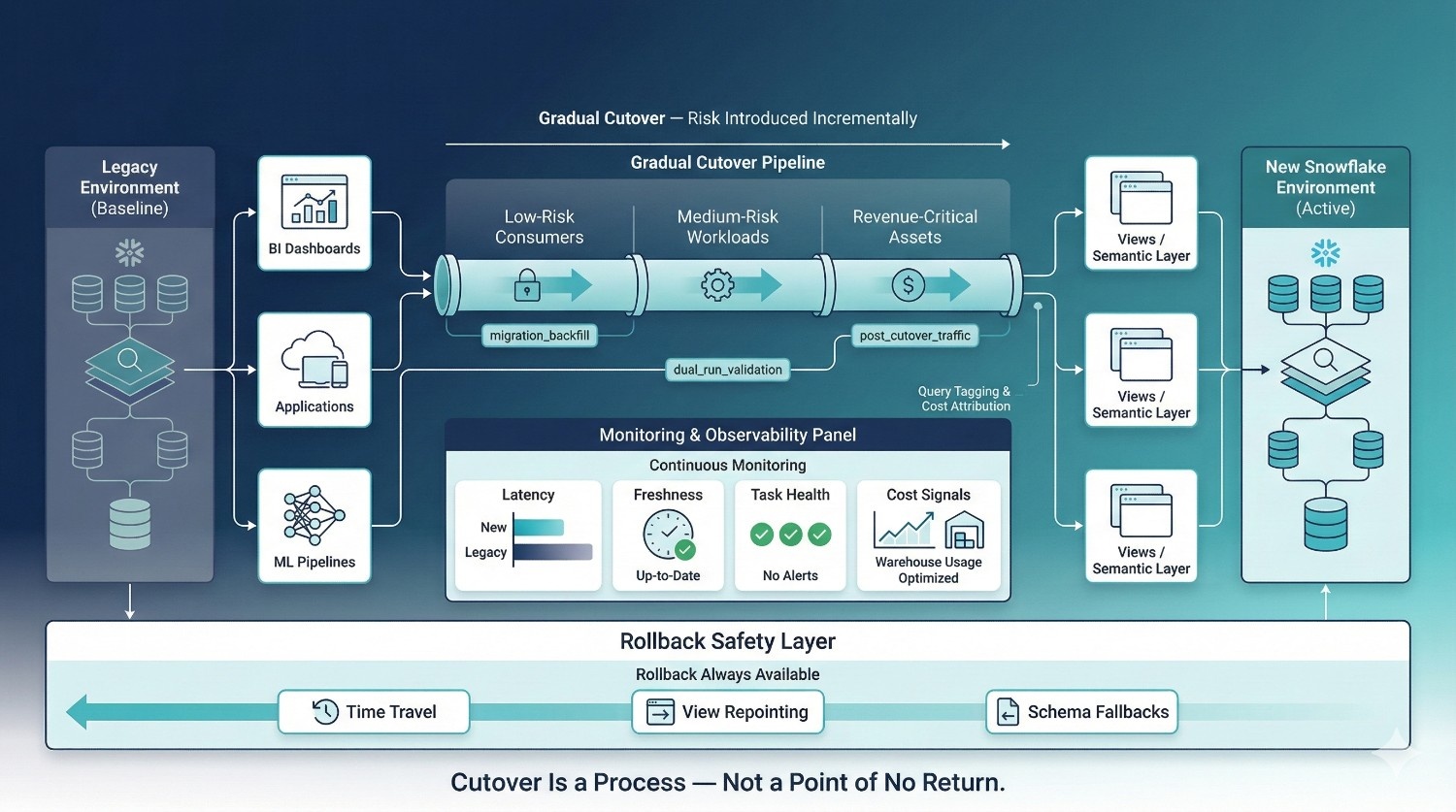
The final phase of a zero-downtime Snowflake migration is not a dramatic “go-live” moment. It is a controlled transition designed to minimize risk, surface issues early, and preserve the ability to reverse course if needed. Successful migrations treat cutover as a reversible process, not a one-way decision.
Gradual vs. Hard Cutovers
Hard cutovers—where all consumers are switched at once—concentrate risk into a single point in time. This approach is only appropriate for low-risk, low-impact workloads.
In enterprise environments, gradual cutovers are preferred:
- Consumers are migrated in stages
- High-risk workloads move last
- Issues are detected before full exposure
This staged approach reduces blast radius and allows teams to build confidence incrementally.
Performance and Freshness Monitoring
Once traffic begins flowing to the new environment, continuous monitoring becomes essential.
Key signals include:
- Query latency compared to legacy performance
- Data freshness and pipeline lag
- Task execution reliability and error rates
Monitoring ensures that the new environment not only matches but improves upon the legacy system—without degrading user experience.
Query Tagging for Migration Visibility
Query tagging provides visibility into exactly how migration workloads behave.
By tagging:
- Migration backfills
- Validation queries
- Dual-run pipelines
- Consumer traffic post-cutover
Teams can trace performance, attribute cost, and quickly isolate anomalies. This observability is critical for diagnosing issues before they escalate.
Cost Anomaly Detection
Zero-downtime does not mean uncontrolled spend.
Active cost monitoring focuses on:
- Unexpected warehouse scaling
- Increased query concurrency
- Long-running or inefficient migration queries
Early detection allows teams to throttle workloads, adjust schedules, or pause non-critical processes before budgets are exceeded.
Rollback Mechanisms Built Into the Design
Rollback is not a failure—it is a safety feature.
Effective rollback options include:
- Snowflake Time Travel for rapid data recovery
- View repointing to redirect consumers back to the legacy environment instantly
- Schema-level fallbacks that preserve compatibility during correction
Because rollback paths are designed and tested in advance, teams can act decisively without panic.
Why Reversible Migrations Outperform One-Way Doors
One-way cutovers rely on hope. Reversible migrations rely on engineering discipline.
Experienced Data Migration Consulting treats reversibility as a core design principle because it:
- Reduces stress during cutover
- Encourages early detection and correction
- Protects business continuity
- Builds trust with stakeholders
When rollback is always possible, migrations become safer, calmer, and significantly more successful.
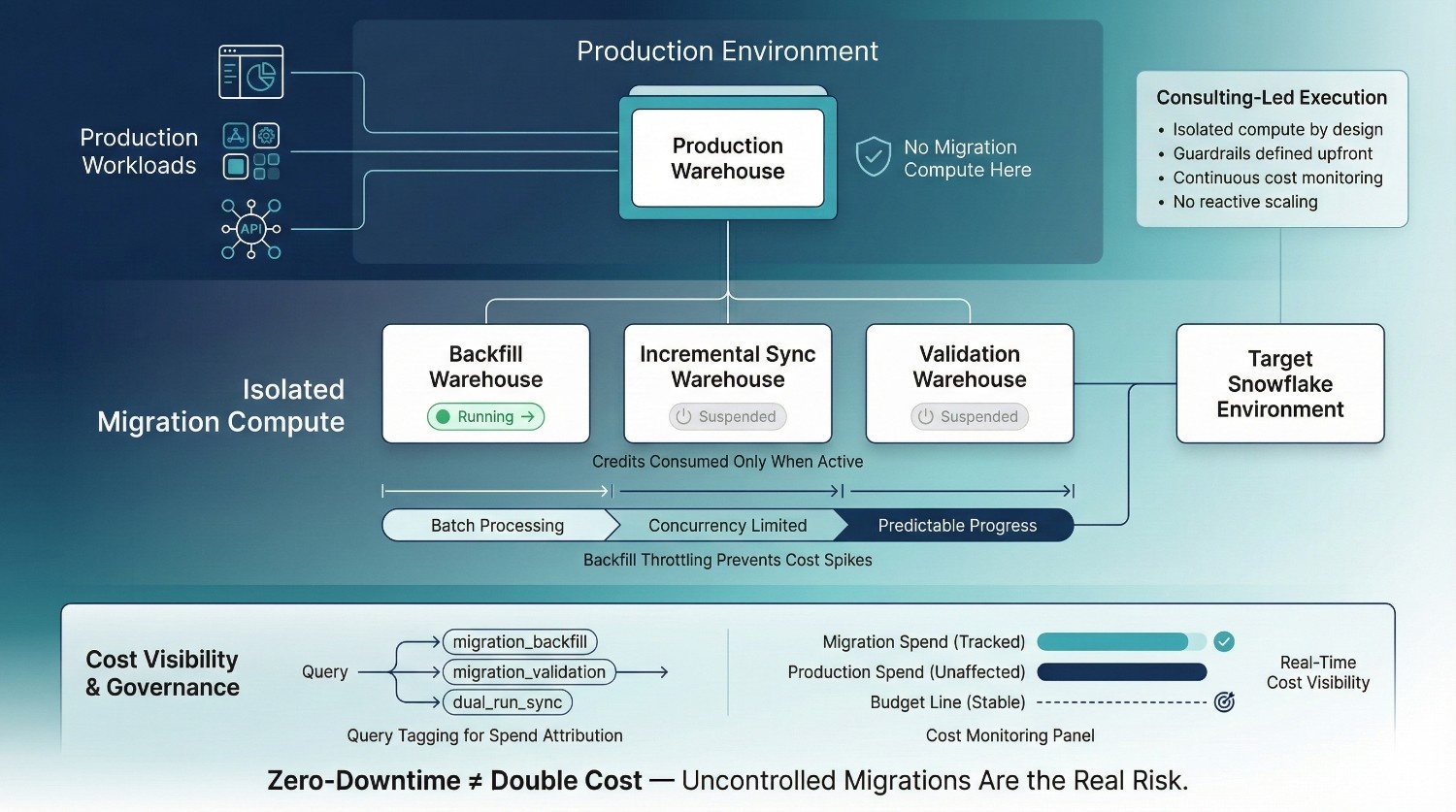
Cost Control During Zero-Downtime Snowflake Migrations
Cost is one of the most common objections to zero-downtime Snowflake migrations—and one of the most misunderstood. Many organizations assume that running legacy and target environments in parallel automatically doubles compute spend. In practice, uncontrolled migrations create cost explosions; well-designed zero-downtime migrations do not.
The Myth of “Zero-Downtime = Double Cost”
Zero-downtime does not mean running everything twice at full capacity.
Cost overruns typically occur when:
- Migration workloads share warehouses with production
- Backfills run at maximum concurrency without limits
- Validation queries are untracked and unmanaged
These failures are the result of poor execution, not the zero-downtime model itself.
Auto-Suspend and Auto-Resume
Idle warehouses are silent cost leaks.
Auto-suspend and auto-resume ensure that migration warehouses:
- Consume credits only when queries are running
- Shut down automatically during idle periods
- Restart instantly when workloads resume
This is especially important during long migration windows where activity may be intermittent.
Backfill Throttling
Historical backfills are often the most expensive part of a migration.
Effective backfill strategies:
- Process data in controlled batches
- Limit concurrency to avoid warehouse scaling spikes
- Balance speed against cost and operational impact
Throttling ensures that backfills progress predictably without overwhelming Snowflake resources or budgets.
Query Tagging and Spend Attribution
Query tagging makes migration cost observable.
By tagging all migration-related queries, teams can:
- Attribute Snowflake spend to specific migration phases
- Identify inefficient or runaway queries
- Separate migration cost from ongoing operational usage
This transparency allows finance and engineering leaders to track progress against budget in real time.
How Data Migration Consulting Keeps Cost Predictable
Experienced Data Migration Consulting treats cost as a first-class design constraint, not an afterthought.
Consultants:
- Architect isolated compute from day one
- Define cost guardrails before execution
- Monitor usage continuously and adjust proactively
- Prevent emergency scaling and reactive fixes
The result is a zero-downtime migration that preserves business continuity without sacrificing cost control—and often costs less than failed cutovers and post-migration remediation.
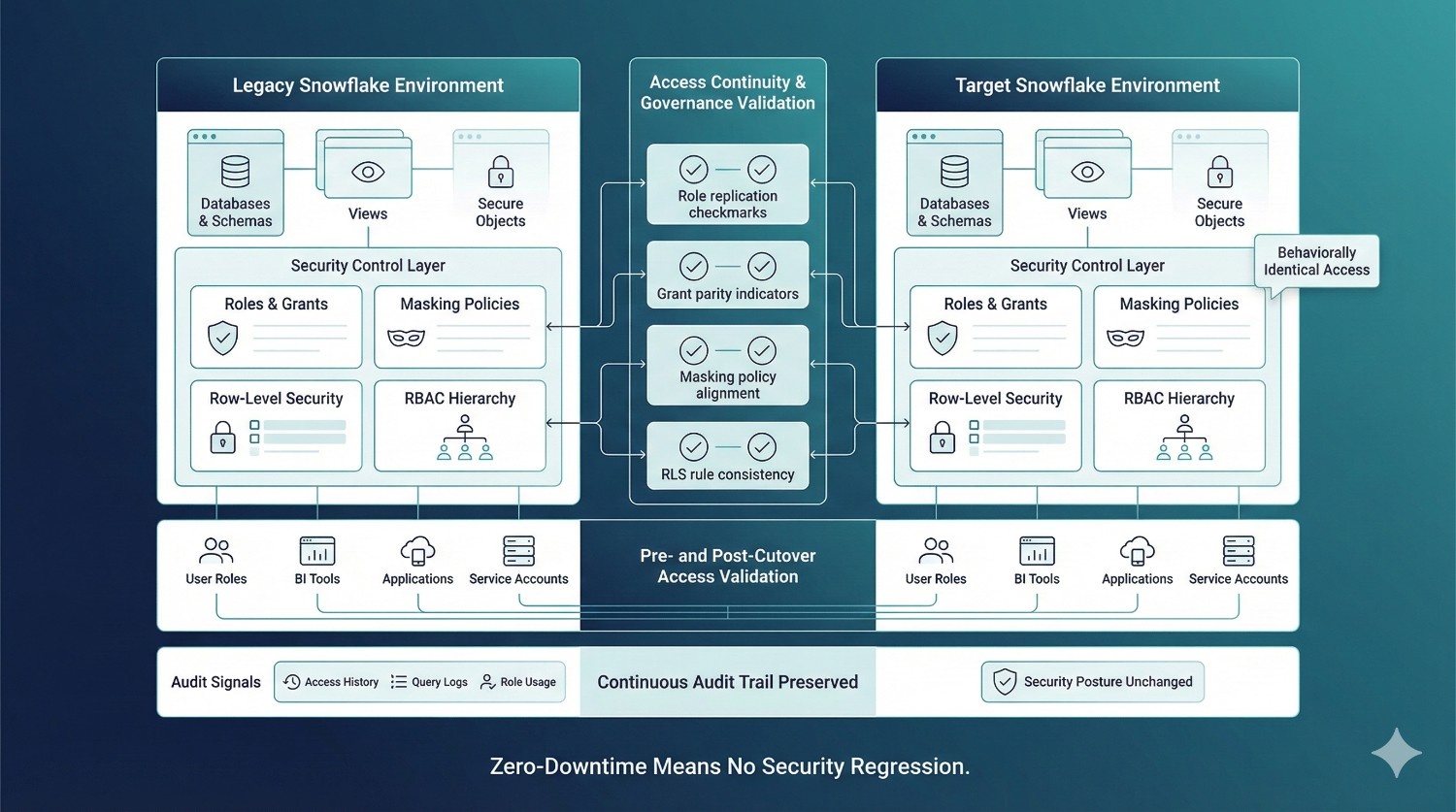
Governance, Security & Access Continuity
Role and Grant Preservation
The first principle of secure migration is behavioral consistency.
All roles, grants, and privilege hierarchies present in production must be faithfully replicated in the parallel environment. Users and service accounts should experience identical access patterns before and after cutover.
When roles are rebuilt manually or partially, subtle gaps appear—often unnoticed until a dashboard fails or a service account loses access in production.
Masking Policies and Row-Level Security
Security controls do not stop at table-level access.
Zero-downtime migrations must preserve:
- Column-level masking policies
- Row-level security rules
- Dynamic data access conditions
These controls are frequently embedded deep within Snowflake metadata and are easy to overlook during schema recreation. Any inconsistency here can expose sensitive data or silently restrict legitimate access.
Preventing Permission Regressions
Permission regressions are one of the most common post-migration issues.
They occur when:
- New schemas are created without full grant replication
- Temporary migration roles are left behind
- Access is assumed rather than verified
Preventing regressions requires explicit comparison of permissions between legacy and target environments—not just visual inspection.
Access Validation Before and After Cutover
Access must be tested, not trusted.
Pre- and post-cutover validation ensures that:
- Every user role can access expected datasets
- BI tools authenticate and query successfully
- Applications and pipelines retain required privileges
This validation confirms that migration has not altered security posture or disrupted operational workflows.
Auditability via Access History and Query Logs
Snowflake provides rich audit signals that must be actively used during migration.
Access history and query logs allow teams to:
- Verify who accessed which data and when
- Detect unusual patterns during migration
- Support internal reviews and external audits
Maintaining audit continuity reassures stakeholders that governance standards were upheld throughout the transition.
Compliance Confidence During Migration
- Preserves security controls end-to-end
- Produces verifiable audit evidence
- Demonstrates continuous compliance, even during change
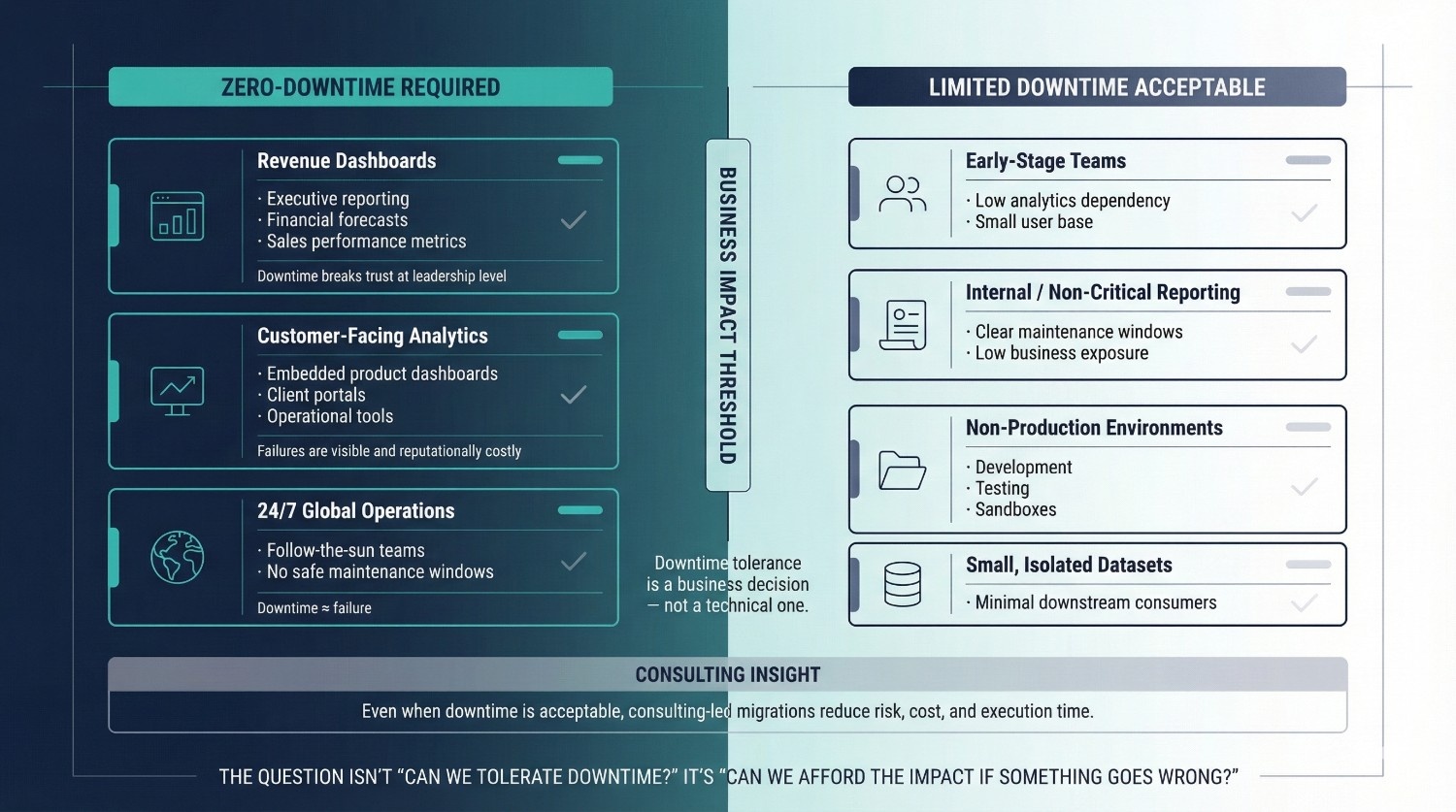
When You Should — And Shouldn’t — Attempt Zero-Downtime
Zero-downtime Snowflake migration is not a universal requirement—but for many organizations, it is a necessity. The decision should be driven by business impact, not technical preference. Understanding when zero-downtime is essential—and when limited downtime may be acceptable—helps teams apply the right level of rigor without unnecessary overhead.
When Zero-Downtime Is Essential
Zero-downtime is critical when analytics directly influence revenue, customer experience, or real-time decision-making.
Revenue dashboards
Executive reporting, sales performance metrics, and financial forecasts rely on continuous data availability. Any disruption undermines confidence and delays decisions at the highest levels.
Customer-facing analytics
Dashboards embedded in products, customer portals, or operational tools cannot afford outages or inconsistent data. Downtime here is immediately visible and reputationally costly.
24/7 global operations
Organizations operating across time zones often lack meaningful maintenance windows. When teams depend on analytics around the clock, planned downtime becomes indistinguishable from failure.
In these scenarios, zero-downtime is not an optimization—it is a requirement.
When Limited Downtime May Be Acceptable
Not all environments require zero-downtime execution.
Limited downtime may be reasonable for:
- Early-stage teams with low operational dependency on analytics
- Internal reporting with clear, low-impact maintenance windows
- Development or non-production environments
- Small datasets with minimal downstream consumers
In these cases, the cost and complexity of a full zero-downtime approach may outweigh the business risk.
Why Consulting-Led Migrations Still Outperform DIY
Even when downtime is technically acceptable, consulting-led migrations consistently produce better outcomes.
Internal teams often:
- Juggle migrations alongside core delivery work
- Lack migration-specific playbooks
- Discover risks late in the process
Experienced Data Migration Consulting introduces structure, proven patterns, and risk discipline—often enabling zero-downtime outcomes where teams initially assumed they were impractical.
Zero-Downtime as a Business Decision
The choice to pursue zero-downtime should be framed as a business decision, not a technical one.
The real question is not:
“Can we tolerate downtime?”
It is:
“Can we afford the impact if something goes wrong?”
When analytics are critical to trust, revenue, or operations, zero-downtime migration becomes a strategic safeguard—not an engineering luxury.
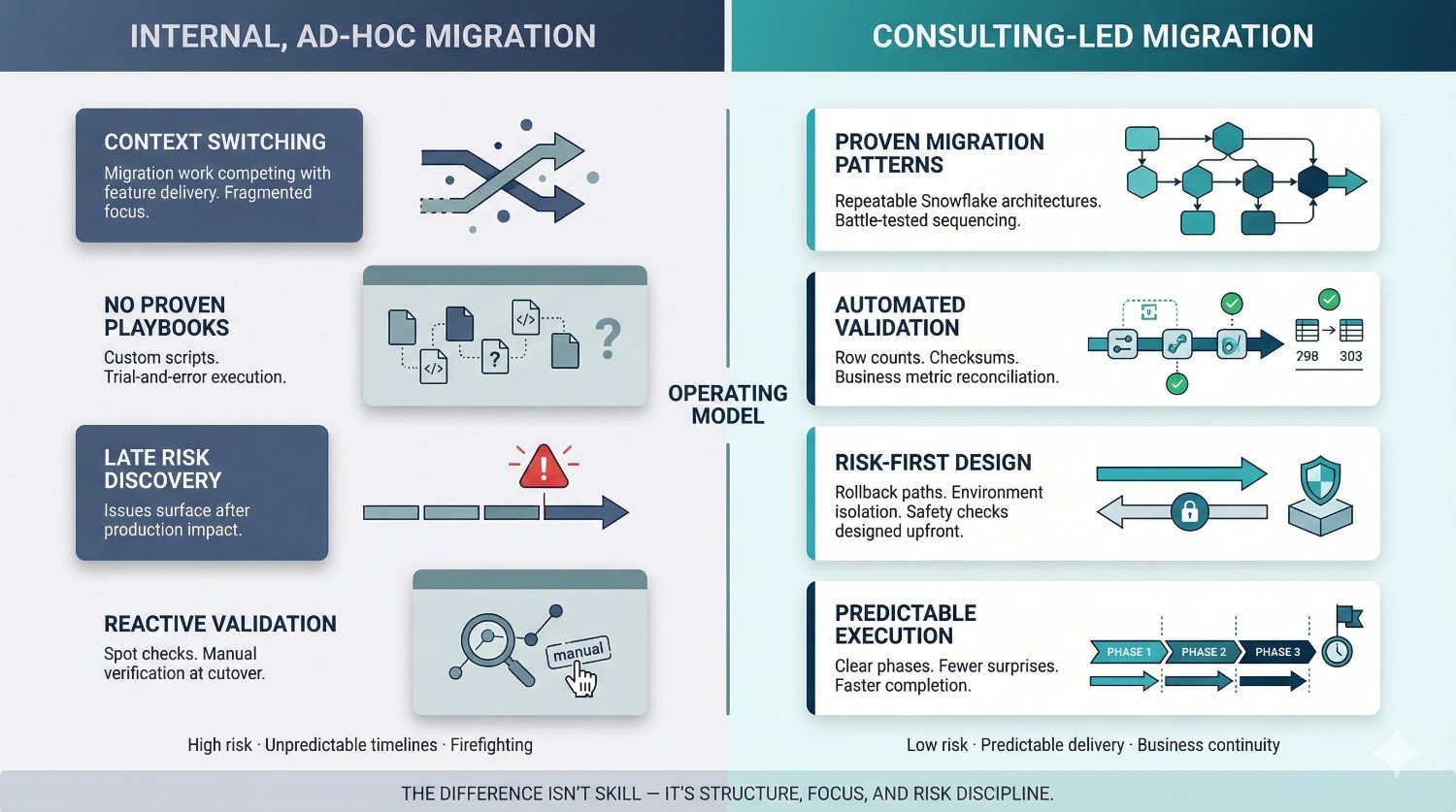
How Data Migration Consulting Changes the Outcome
Snowflake migrations rarely fail because teams lack technical ability. They fail because migrations are temporary, high-risk initiatives that demand a different operating model than day-to-day data engineering. This is where Data Migration Consulting fundamentally changes the outcome.
Why Internal Teams Struggle
Internal data teams are optimized for building and maintaining systems—not for one-time, high-stakes transitions.
Common challenges include:
- Context switching between migration work and ongoing feature delivery
- No proven playbooks for zero-downtime execution
- Migration risks discovered only after production impact
- Pressure to move fast without sufficient validation
Even highly skilled teams struggle when migration becomes just another task competing for attention.
What Experienced Consultants Bring
Effective Data Migration Consulting introduces focus, structure, and repeatability.
Proven migration patterns
Consultants apply architectures refined across multiple enterprise Snowflake environments, reducing experimentation and uncertainty.
Automated validation frameworks
Data correctness is continuously proven using row counts, checksums, and business metrics—rather than assumed at cutover.
Risk-first design
Rollback paths, isolation strategies, and safety checks are designed before execution begins, not added reactively.
Faster execution
With clear sequencing and fewer surprises, migrations progress predictably—often completing faster than ad-hoc internal efforts.
DataPrism’s Approach to Snowflake Migrations
At DataPrism, Data Migration Consulting is built around three non-negotiable principles:
- Zero-downtime by design
Parallel environments, dual-run pipelines, and abstraction layers ensure business continuity throughout migration. - Cost-aware execution
Isolated warehouses, query tagging, and backfill throttling keep Snowflake spend predictable and controlled. - Governance-first Snowflake architecture
Roles, masking policies, auditability, and compliance are preserved end-to-end—not patched in after cutover.
The result is not just a successful migration, but a Snowflake environment that is more reliable, more efficient, and ready to scale long after the migration is complete.
Conclusion
Downtime during Snowflake migrations is not inevitable. In most cases, it is the result of shortcuts, assumptions, and under-engineered execution—not platform limitations. Snowflake provides the architectural primitives needed to migrate safely, but those primitives only deliver value when applied through a deliberate, risk-aware blueprint.
Zero-downtime is achieved through planning, parallelism, and relentless validation. Parallel environments isolate risk. Dual-run pipelines prove correctness over time. Abstraction layers protect consumers. Continuous monitoring and rollback safety ensure that progress is always reversible. When these elements work together, migrations become controlled engineering programs rather than disruptive events.
This is where structured Data Migration Consulting makes the difference. By treating migration as a design problem—rather than a data copy task—organizations replace uncertainty with predictability and protect business continuity throughout change.
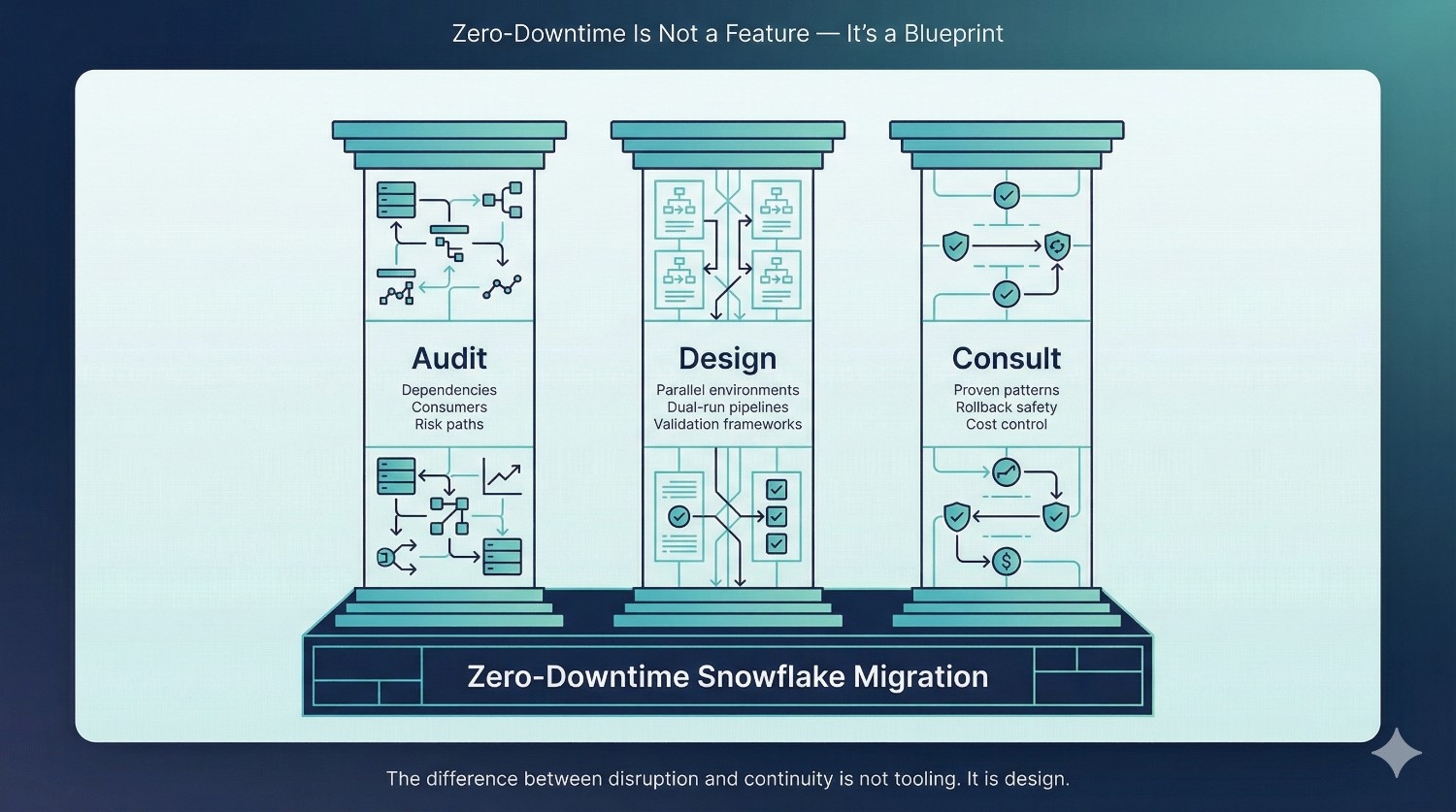
Before your next Snowflake migration, anchor decisions around three principles:
- Audit before you migrate
Understand every dependency, consumer, and risk path before moving data. - Design before you copy
Build parallel environments, synchronization strategies, and validation frameworks first. - Consult before you cut over
Apply proven migration patterns to reduce risk, control cost, and avoid irreversible mistakes.
The difference between disruption and continuity is not tooling. It is design—and design is a choice.
Frequently Asked Questions (FAQ)
Zero-downtime means business users experience no interruptions while the migration is in progress. Dashboards continue to load, data pipelines keep running, and applications remain operational as data is migrated in parallel behind the scenes. The migration is effectively invisible to end users.
Yes. Using dual-run strategies with Snowflake Streams and Tasks, or upstream CDC where available, ongoing writes are continuously synchronized to the new environment. Production systems remain live while correctness is proven over time rather than assumed at cutover.
Not inherently. While migrations introduce additional short-term compute usage, uncontrolled execution is what drives cost overruns. With isolated warehouses, auto-suspend settings, backfill throttling, and query tagging, zero-downtime migrations can remain cost-predictable—and often cost less than failed cutovers and emergency remediation.
Timelines depend on data volume, pipeline complexity, and the number of downstream consumers. Most enterprise migrations complete in weeks rather than months, with production systems remaining live throughout the process.
No. When views or semantic layers are used as abstraction layers, underlying data sources can be switched without modifying dashboards, reports, or application queries. This is a core principle of zero-downtime execution.
Rollback is built into the design. Snowflake Time Travel, view repointing, and schema-level fallbacks allow teams to revert quickly without data loss or extended downtime. Rollback is treated as a safety mechanism, not a failure.
Ideally before migration begins. Early involvement allows risks to be identified, parallel environments to be designed correctly, and costly rework to be avoided. Data Migration Consulting is most effective when it shapes the migration strategy—not when it is called in to fix issues after they reach production.