TL;DR – Snowflake vs Redshift at a glance
What is Snowflake?
Snowflake is a cloud data warehouse. It separates storage and compute, so you can scale each one as needed and pay only for what you use. It works with AWS, Azure, and Google Cloud.
Key Features of Snowflake
- Separate compute, storage, and services for a flexible cloud-native architecture
- Handle structured and semi-structured data like JSON, Avro, and Parquet
- Auto scale with virtual warehouses, plus built-in concurrency handling, tuning, and optimization
- Support Time Travel, Fail safe recovery, and secure data sharing across accounts and cloud platforms
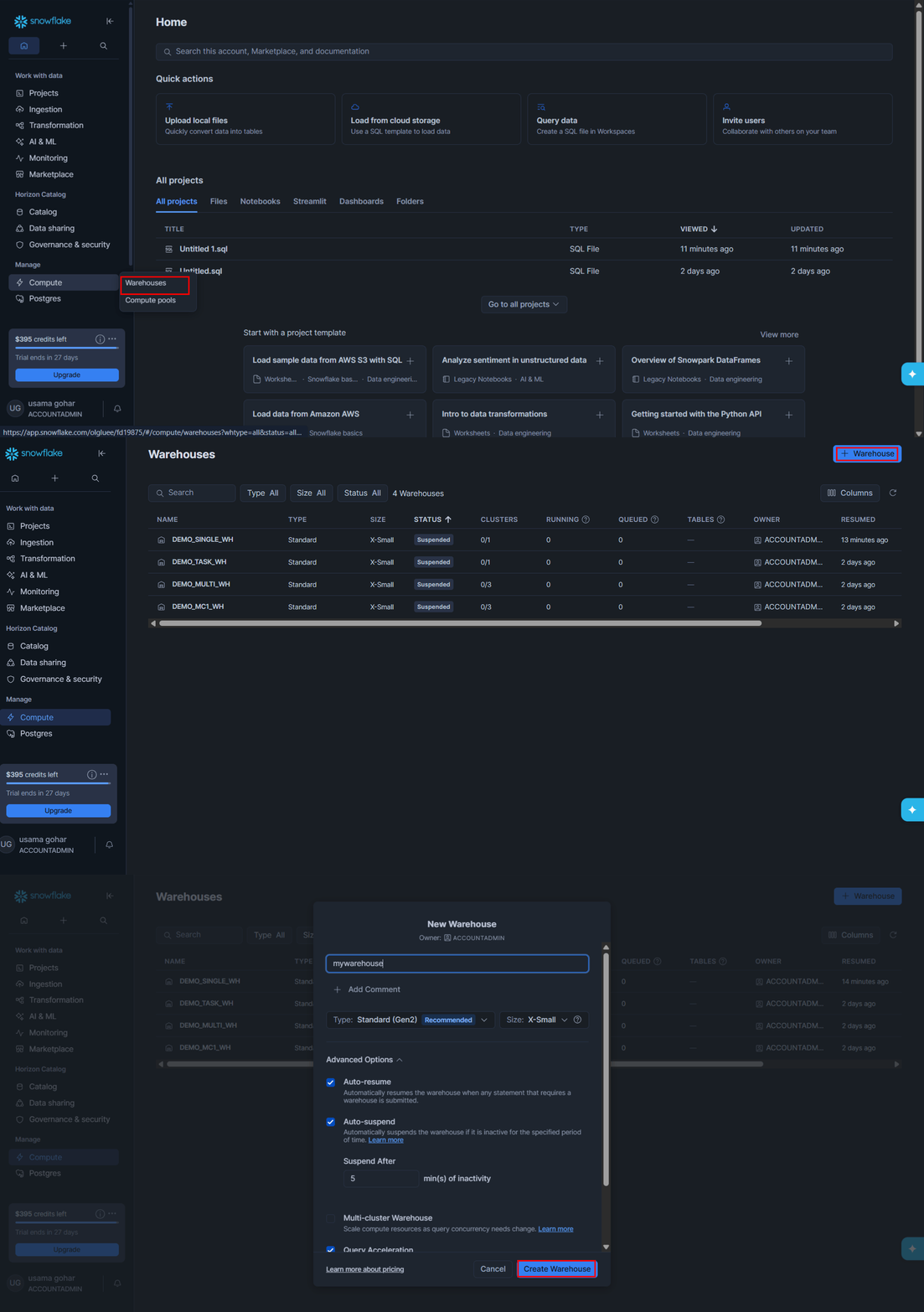
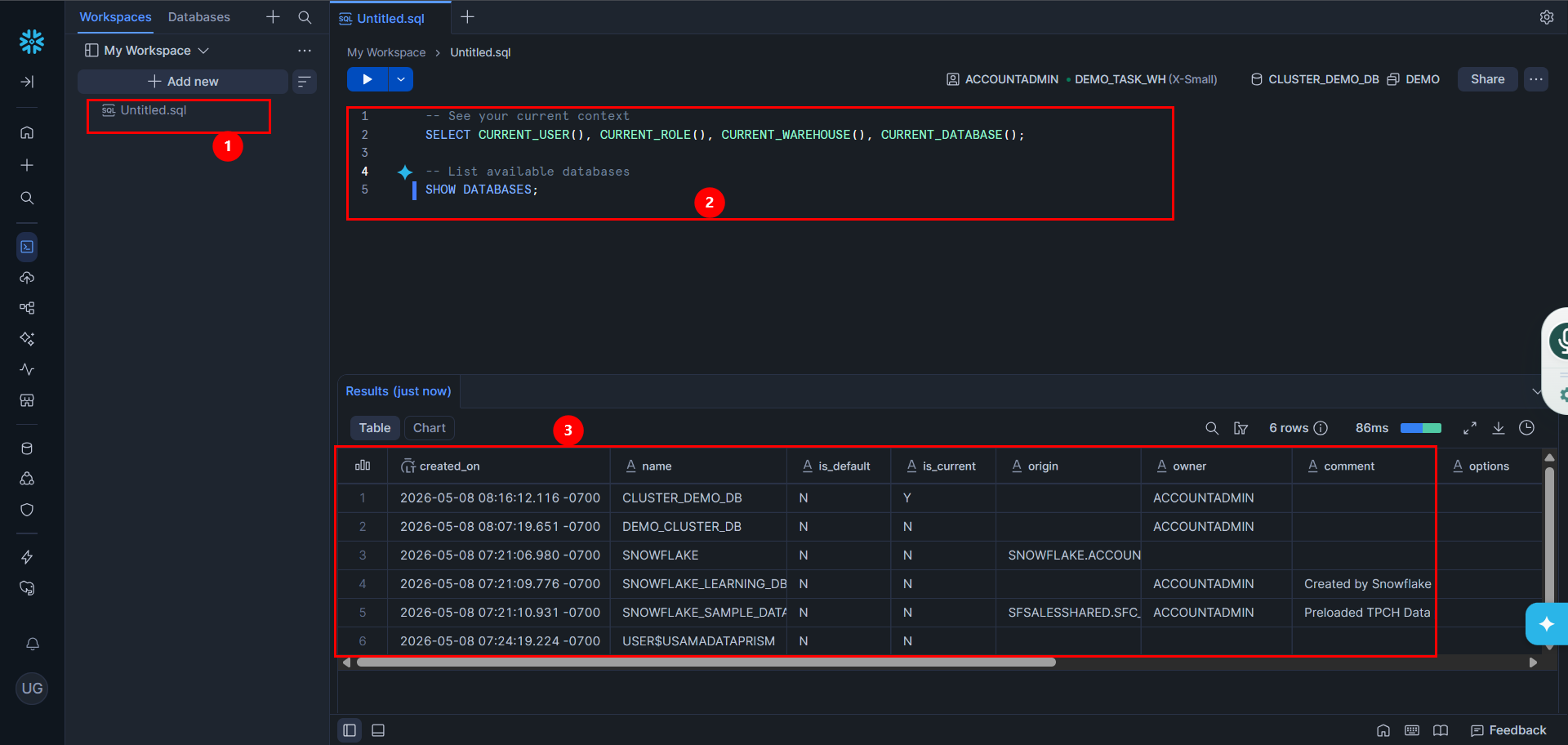
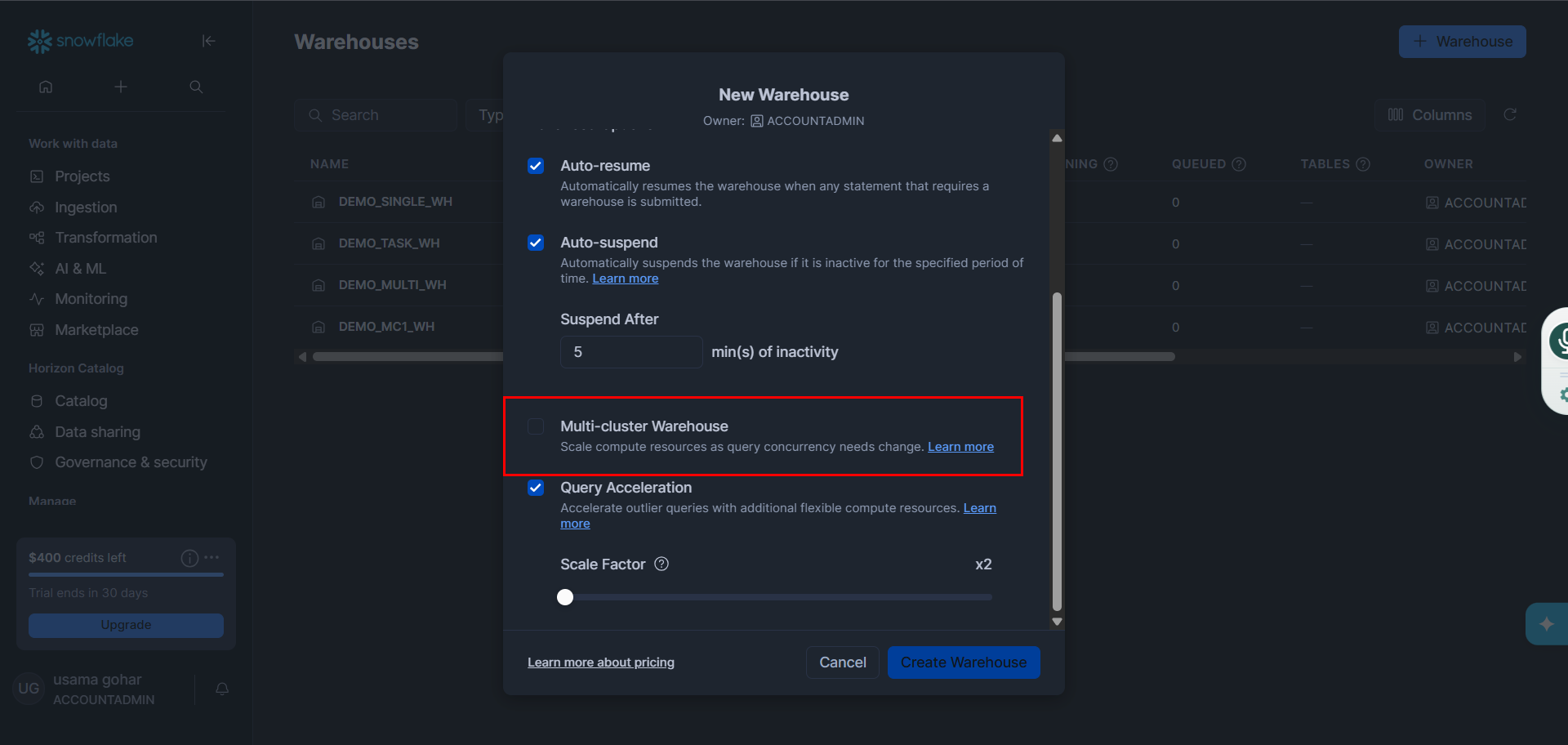
- With a simple setup flow, creating a warehouse takes just a few easy steps.
What is Redshift?
Amazon Redshift is a fully managed cloud data warehouse from Amazon. While historically known as a rigid system that required manual tuning, Redshift has evolved to compete directly with Snowflake's ease of use. The biggest shift is Redshift Serverless. Instead of buying fixed servers (nodes) and hoping you guessed your capacity correctly, Serverless handles the setup and scaling dynamically. You can start querying data right away with Redshift Query Editor or your BI tools.
Key Features of Redshift
● Concurrency scaling to handle unpredictable workloads
● We can query S3 data in-place via Redshift without ETL/ingestion
● Deep integration with many AWS services
Now that we have identified some basic knowledge about Snowflake and Amazon Redshift, let’s dive into the key differences to identify which one of them is more suitable for your needs.
Snowflake vs Redshift – Architecture & Scalability
The architecture of a data warehouse determines how it handles performance, scaling, and concurrency.
Snowflake is built with a modern cloud architecture where compute and storage are fully separate. This means:
- True Workload Isolation: You can spin up a dedicated compute cluster for your marketing team’s BI dashboards, and a completely separate one for your heavy engineering ETL pipelines. They both query the exact same data in centralized storage, but they never fight for the same CPU cycles.
- Instant Multi-Cluster Scaling: It automatically spins up identical clones of your warehouse to handle the concurrency, then shuts them down the second the rush is over.
- The Trade-off: Snowflake gives you instant, frictionless scaling with zero manual tuning. However, that lack of friction is how costs spiral, if a poorly written dbt model causes your warehouse to auto scale out to maximum capacity every hour, Snowflake will happily execute the task and bill you for the privilege.
Redshift used to require rigid capacity planning, where scaling meant manually adding nodes to a cluster. While you can still provision clusters this way, Redshift has evolved to handle unpredictable workloads:
- Concurrency Scaling: In a provisioned setup, Redshift now automatically handles traffic jams. When the main cluster gets too busy, AWS spins up transient, background capacity to absorb the overflow queries, minimizing wait times.
- Redshift Serverless: With Serverless, there are no nodes or clusters to manage. AWS dynamically adds or removes Redshift Processing Units (RPUs) second-by-second based on demand.
- The Trade-off: Redshift still offers the "knobs and dials" that traditional database administrators love. It rewards teams that want strict governance and predictable baselines, but it can require more architectural foresight than Snowflake's "just add another warehouse" approach.
Snowflake vs Redshift – Performance & Ease of Use
Snowflake is designed to deliver fast query performance with minimal tuning. It automatically handles most optimization work, so users don’t need to manually manage performance settings.
How Snowflake improves performance
- Automatic query optimization and workload management reduce manual tuning and keep performance efficient.
- Separation of compute and storage with virtual warehouses lets you scale compute instantly without affecting data.
- Multi cluster scaling handles high concurrency by adding clusters when many users run queries at once.
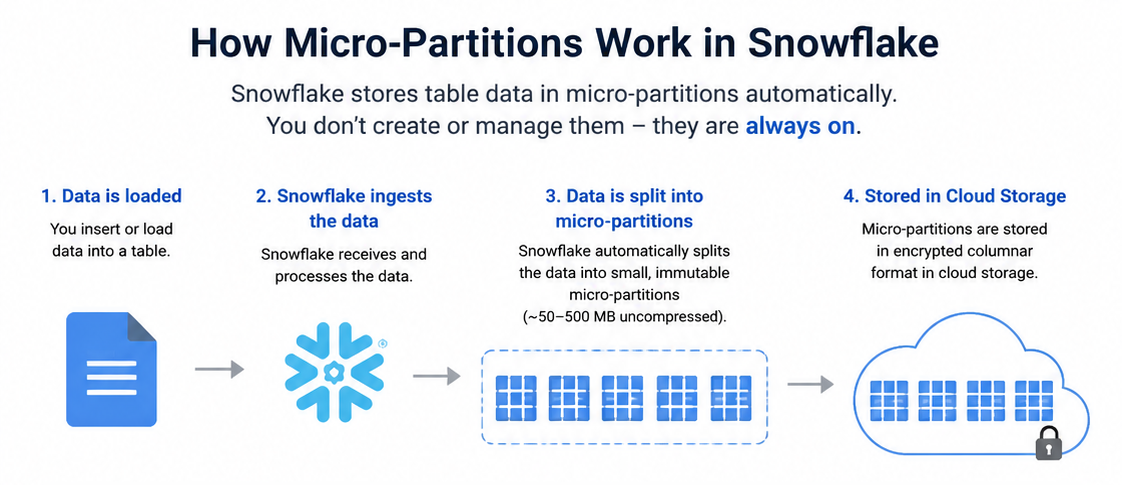
- Micro partitioning and caching speed up queries by reading less data and reusing results or cached data. However, this ease of use is exactly why costs can spiral.
Ease of Use & Maintenance: Who Does the Chores?
Snowflake removes most manual tuning work. Users don’t need to manage indexing, distribution keys, or cluster configuration. Performance improvements are mostly automatic and system-managed.
Amazon Redshift is designed to run analytics queries fast, especially on large datasets. It achieves this using several built-in performance features, which also help reduce manual tuning and make it easier to use.
How Redshift improves performance
- AWS has aggressively closed the "ease of use" gap by introducing Redshift Autonomics (Automatic Table Optimization). Redshift now uses machine learning to constantly observe query patterns. It automatically applies the optimal Sort and Distribution keys, runs Auto-Vacuuming in the background, and dynamically manages memory allocation (Auto-WLM) without human intervention.
- Redshift is dramatically easier to use today than it was five years ago. It gives you the "hands-off" experience for standard workloads, it still allows data engineers to pop the hood. If a specific, massive enterprise query needs strict optimization, your engineers can still manually override the ML and tune the system at a granular level.
Ease of use
These features reduce the need for manual optimization. Redshift handles much of the tuning internally, but performance still depends on proper setup.
Performance and cost are roughly comparable, with Snowflake having a slight edge in some scenarios.
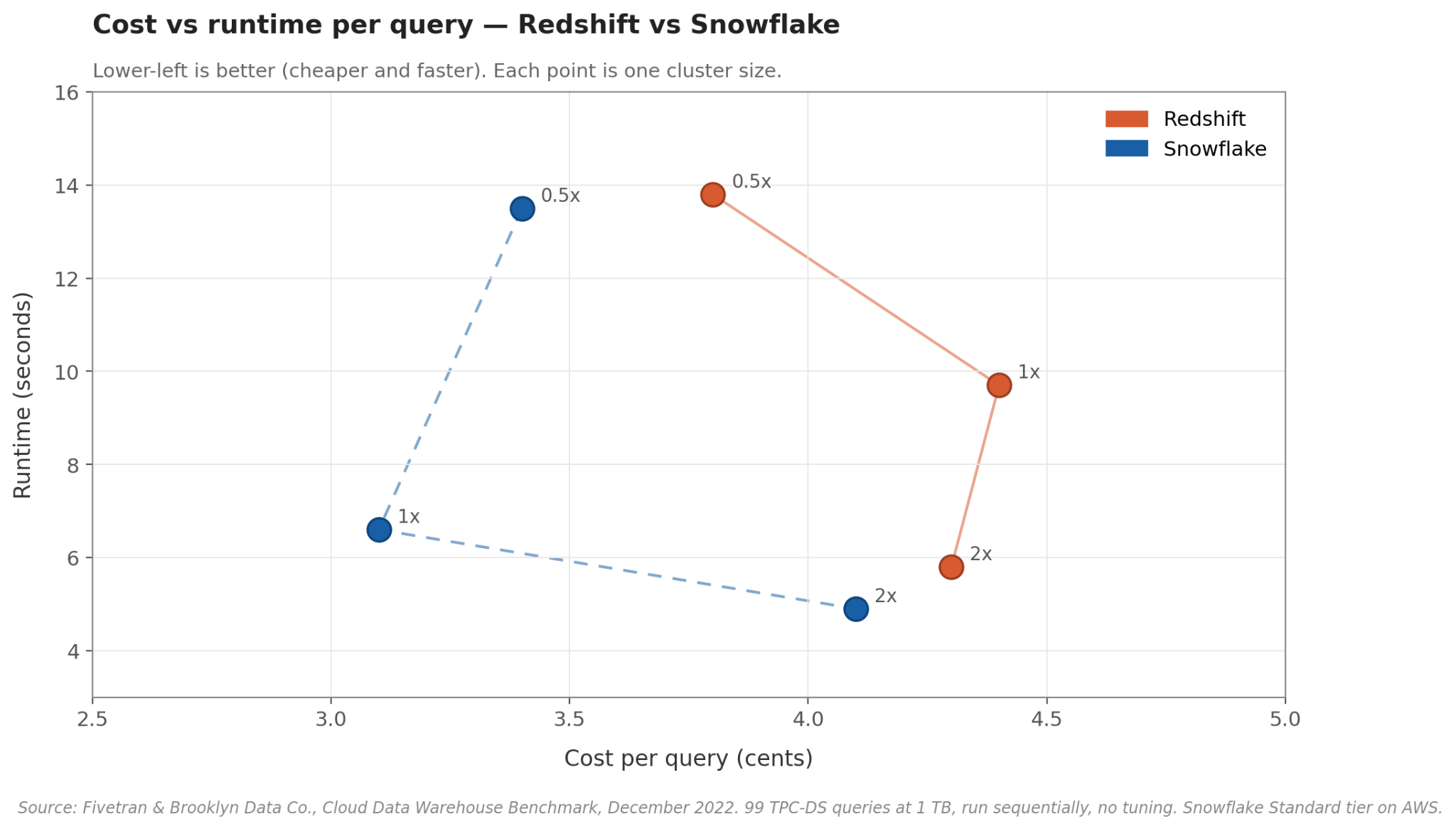
The clearest independent comparison of these two is the Fivetran 2022 benchmark, which ran 99 standard TPC-DS queries against a 1 TB dataset on both warehouses at three cluster sizes. (Worth noting: Fivetran is a Snowflake partner, but their full methodology and code are public on GitHub.)
The short version: the two are very close. At a typical mid-size cluster, Snowflake finished a query in about 6.6 seconds for 3.1 cents, and Redshift in about 9.7 seconds for 4.4 cents. Push to a bigger cluster and Snowflake stays slightly faster, but the cost gap closes. Drop to a smaller cluster and they're nearly the same.
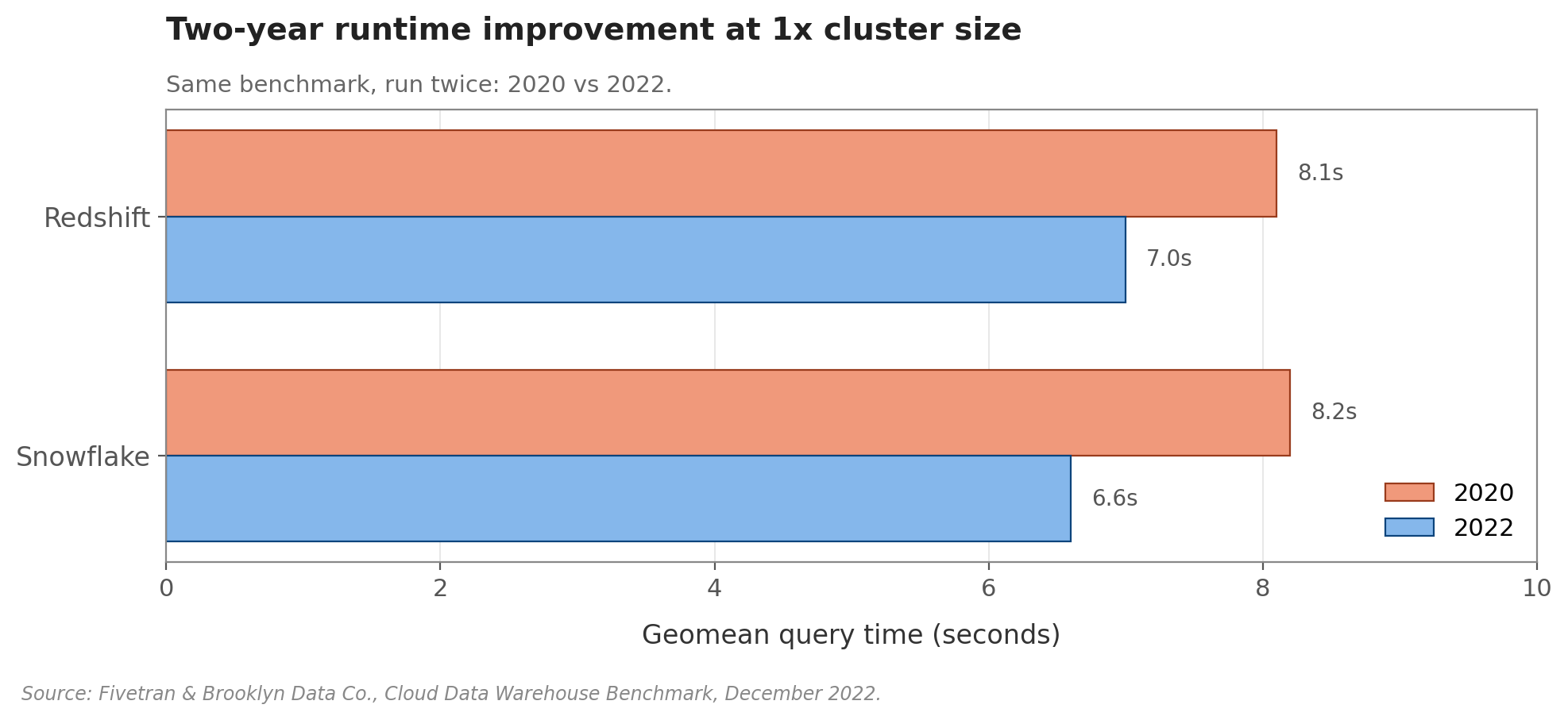
Both got faster between 2020 and 2022, too. On the same benchmark, Redshift dropped from 8.1 to 7.0 seconds and Snowflake from 8.2 to 6.6 seconds, small gains, but a reminder that both products keep improving.
- Snowflake was cheaper to run for both small and heavy clusters, even when runtime was the same as compared to Redshift.
- The biggest advantage showed up with the medium cluster as snowflake was both faster and more cost-effective than Redshift.
A few things to keep in mind. These prices use Snowflake's cheapest tier; Enterprise and Business Critical cost 1.5x and 2x more per credit. The benchmark also runs queries one at a time, so it doesn't capture how either platform handles a busy team hitting it at once.
Snowflake vs Redshift – Pricing
Snowflake uses a consumption-based model. Compute and storage are billed separately, and warehouse compute is billed per second with a 60-second minimum. Snowflake only charges while the warehouse is running which makes Snowflake a better fit for workloads that rise and fall during the day.
Redshift is more node-based for provisioned clusters. You pay for the cluster nodes, and the cost depends on the region, node type, and number of nodes. Reserved nodes can lower the hourly price if you commit for longer periods, which makes Redshift a stronger fit for steady, predictable workloads.
Snowflake vs Redshift – Data Format & Integrations
Snowflake natively supports semi-structured data (JSON, Avro, Parquet, XML, ORC) via the VARIANT type — no pre-defined schema needed. It auto-optimizes to columnar format, supports Apache Iceberg for open-format external storage, and integrates broadly with ETL tools (Fivetran, dbt), BI platforms (Tableau, Looker, Power BI), and ML environments. Runs across AWS, Azure, and GCP.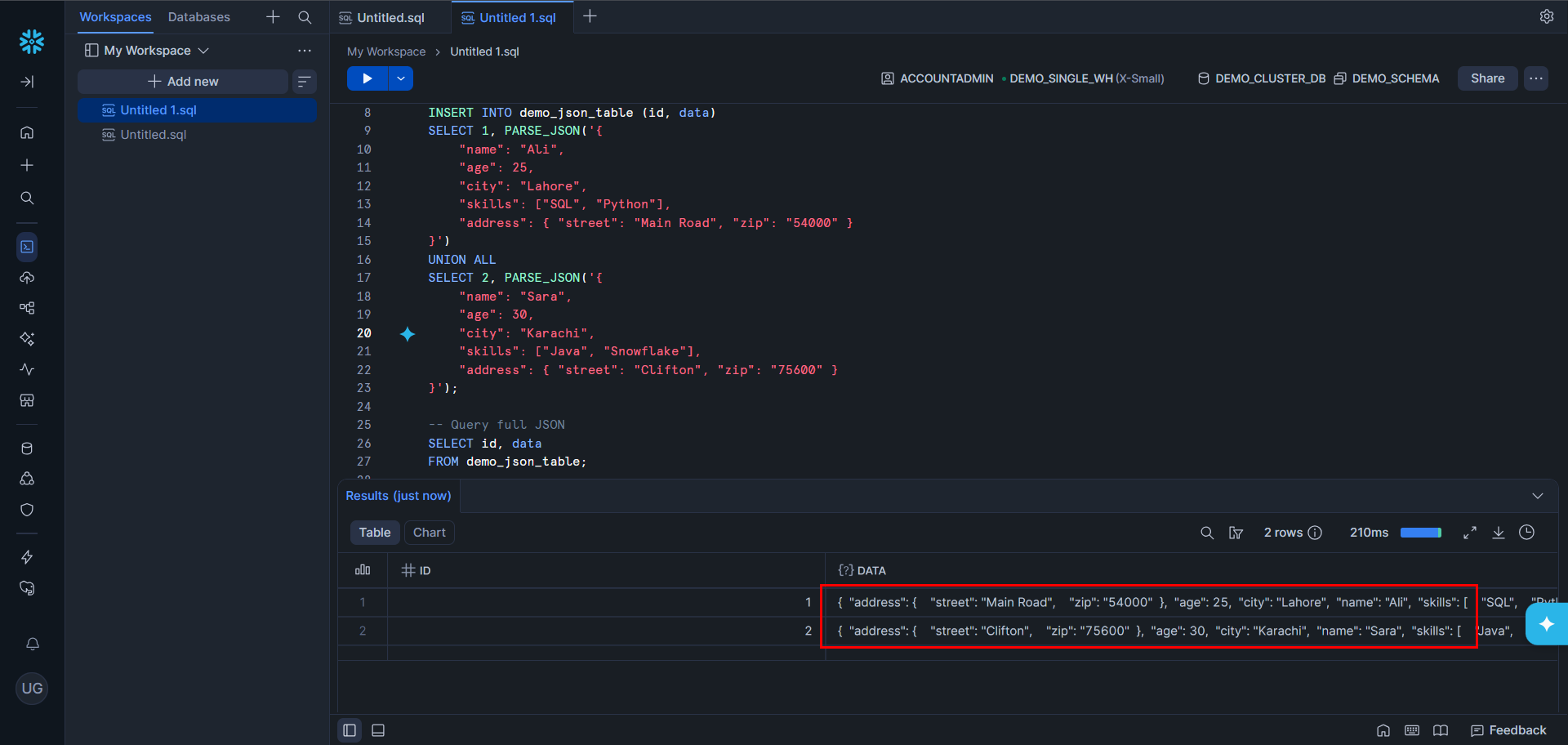
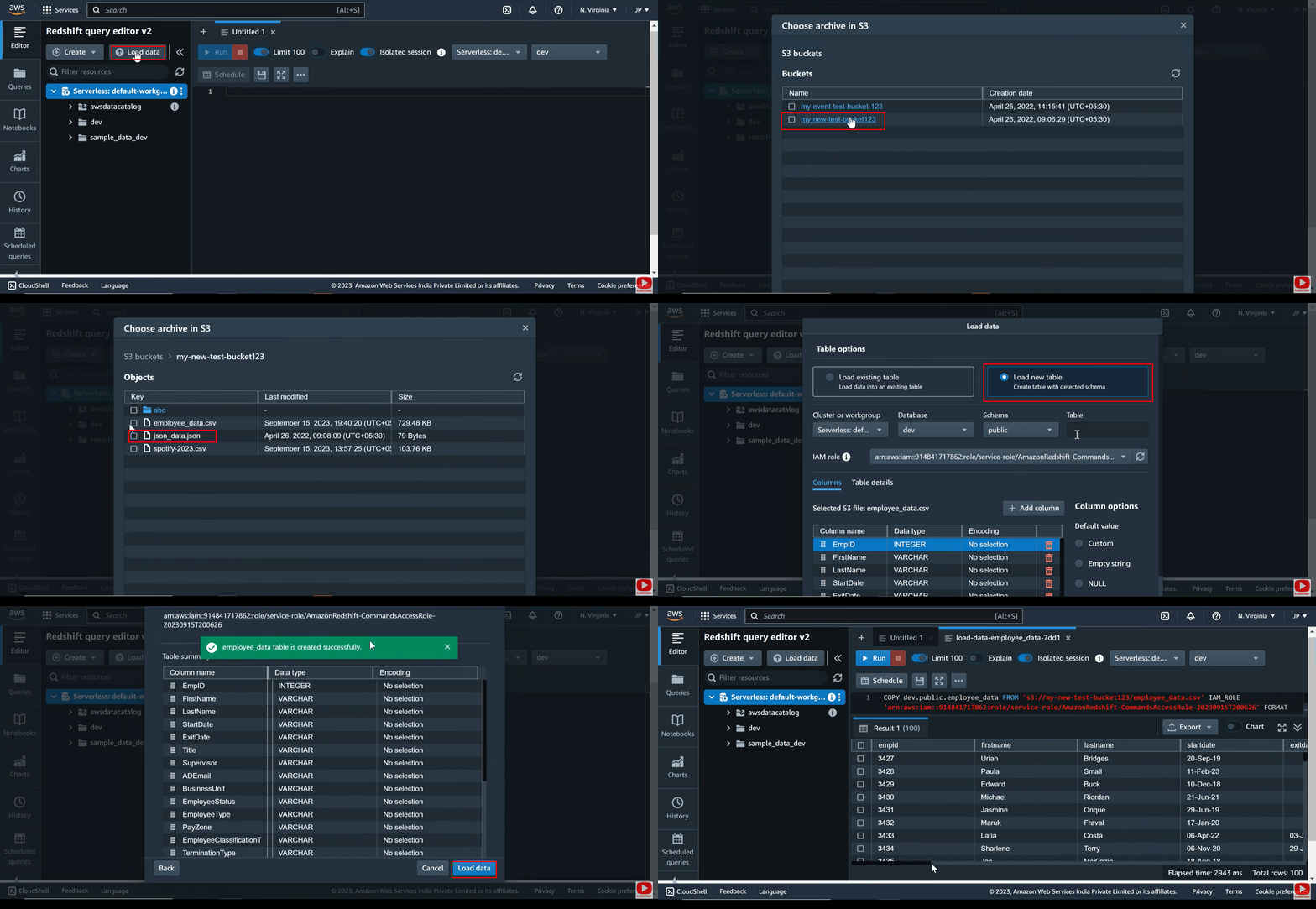
Redshift was structured-data-first but has evolved, Spectrum enables S3 querying and SUPER types handle semi-structured data in native tables. Nested data querying is less intuitive than Snowflake's VARIANT. Redshift is best suited for AWS-native stacks (S3, Glue, Lambda, SageMaker).
Snowflake vs Redshift – Security, Compliance & Availability
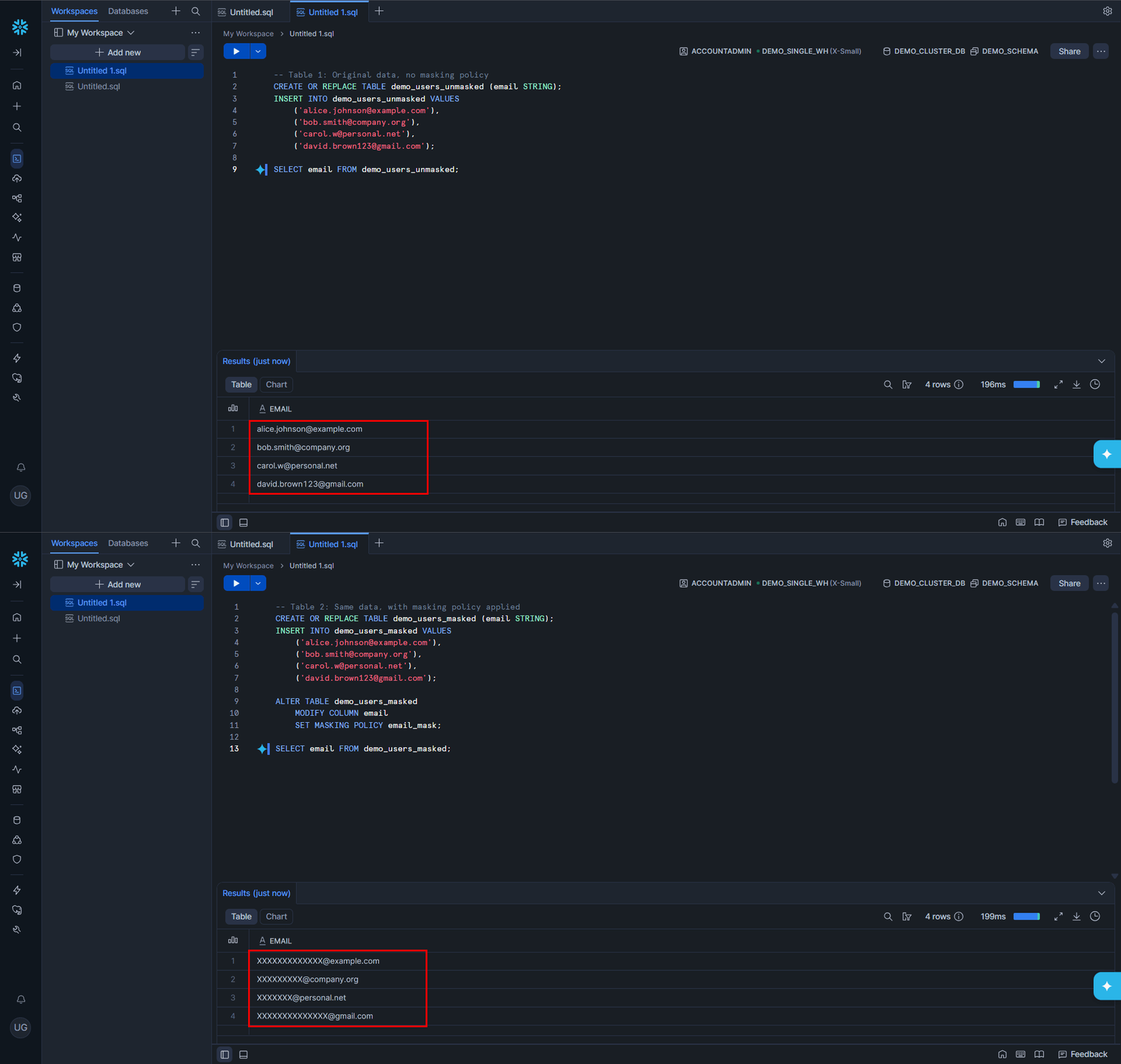
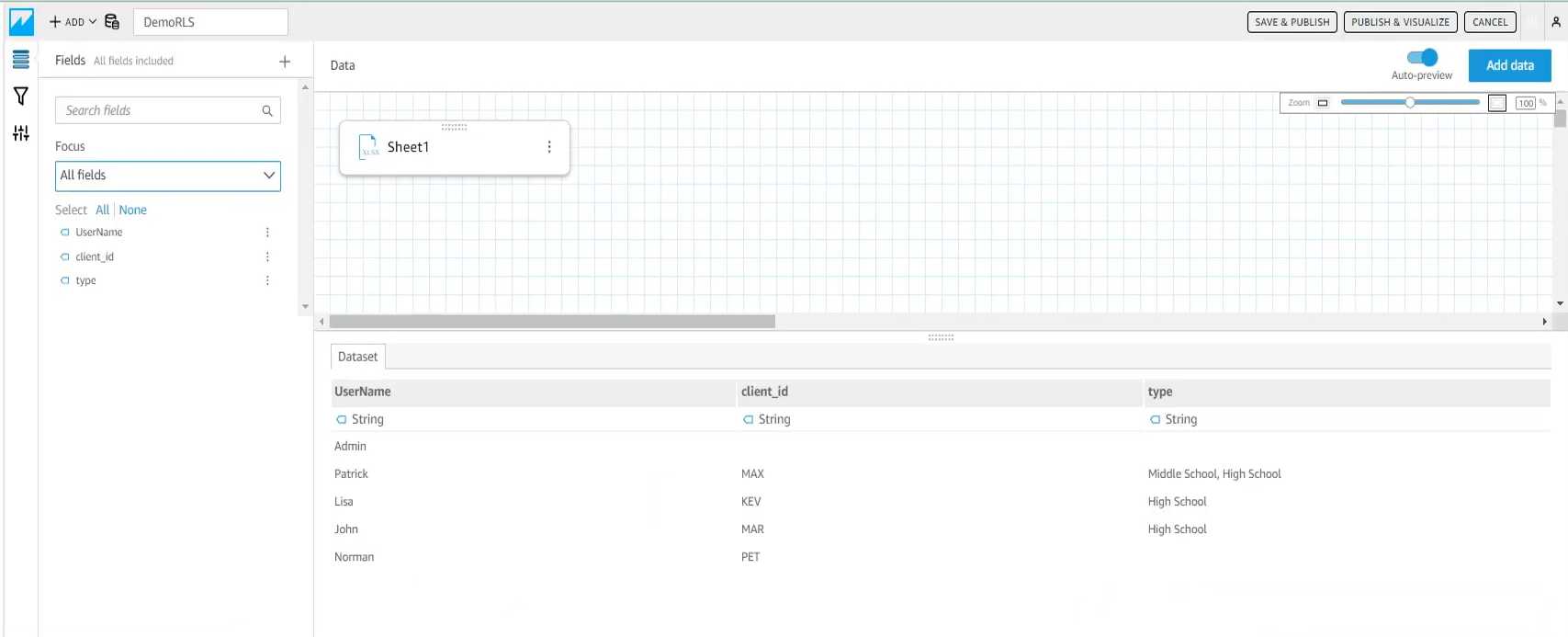
Snowflake delivers security out of the box — end-to-end encryption, MFA, RBAC, row-level security, dynamic data masking, and access history auditing. Compliant with HIPAA, SOC 1/2/3, PCI DSS, and ISO/IEC 27001. Automatic replication and failover handle high availability across regions with no manual intervention. A complete list of Regulatory Compliance can be found here.
Redshift secures data via IAM, KMS encryption, VPC isolation, and column-level access control. Compliant with FedRAMP, HIPAA, and GDPR. Automated snapshots, cross-region replication, and multi-AZ deployment ensure availability — though most require explicit configuration and ongoing operational management. A complete list of Regulatory Compliance can be found here.
Snowflake vs Redshift – Data Sharing
Modern platforms must not only analyze data but also enable collaboration so that the information can be shared across regions and organizations.
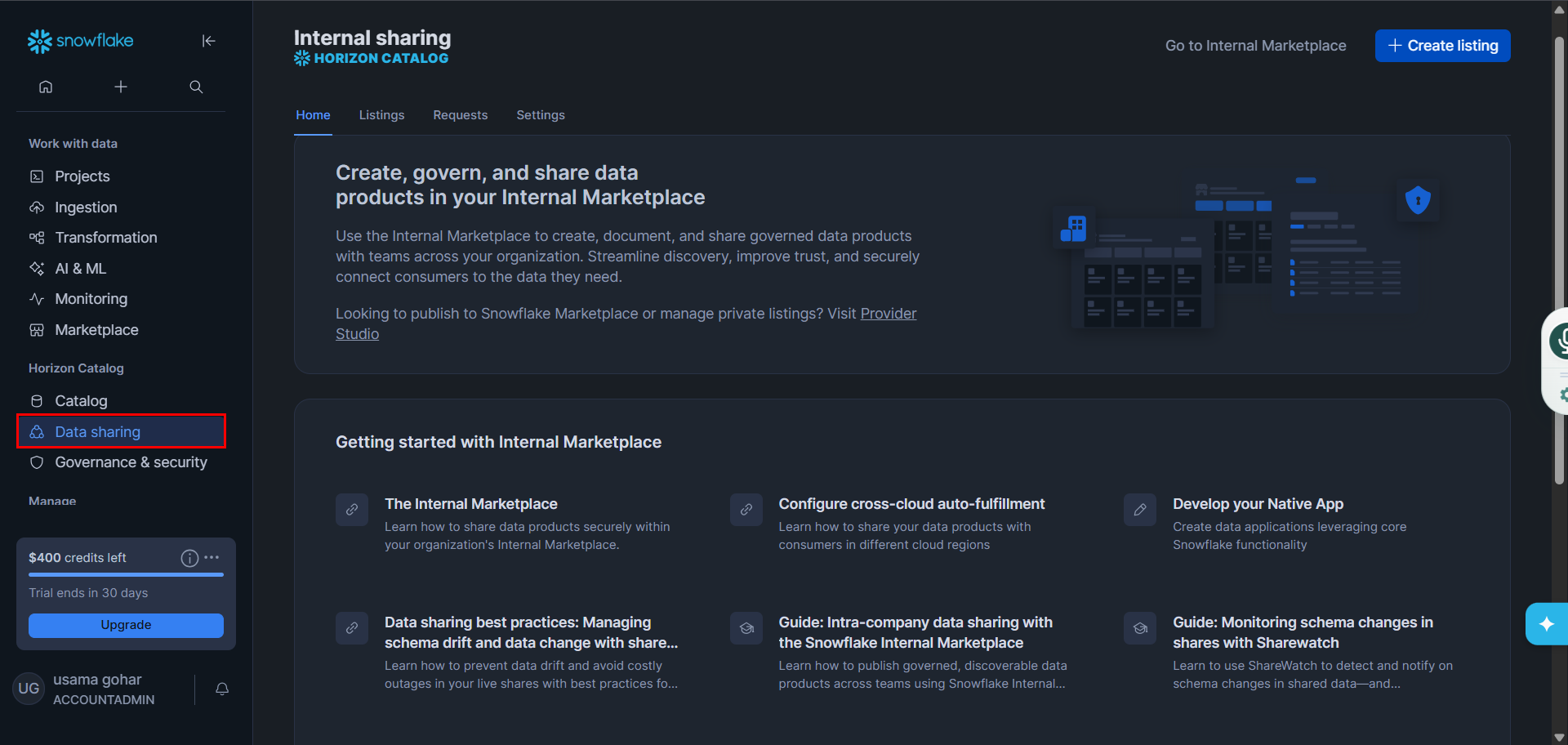
Data sharing is what makes Snowflake so much more valuable than other data warehouses. It allows real-time, live data sharing across Snowflake accounts even if they are across different cloud providers. The fact that this data sharing happens without any duplication of data acts as a cherry on top. This is a massive advantage for companies collaborating with partners, clients, or subsidiaries.
Redshift supports data sharing, but in many setups, it is limited by company policies to accounts within the same AWS Organization. It does support cross-account sharing, but it usually needs extra approval and setup.
Quick comparison table
Snowflake vs Redshift – Pros & Cons
Which to choose: Snowflake or Redshift
Book a Free 30-Minute Meeting
Discover how our services can support your goals — no strings attached. Schedule your free 30-minute consultation today and let's explore the possibilities.
Book a Free Call